
 Home
Home  Apps
Apps  Games
Games  About Us
  Cookies & Privacy Policy
  Terms of Service
Sony | Imaging Edge Mobile
Version: 7.8.4
Developer: Sony Corporation
 Verified App
 Advertisement
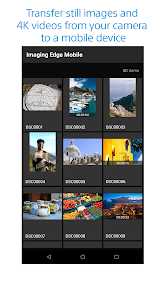
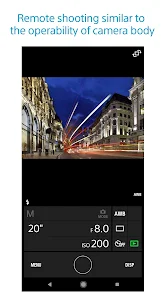
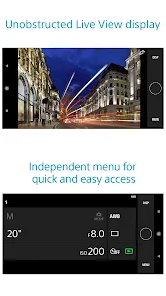
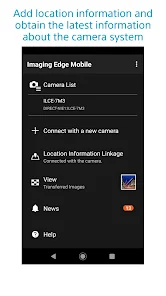
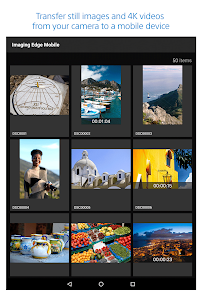
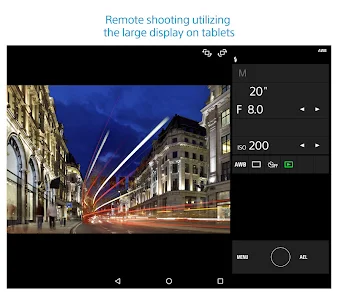
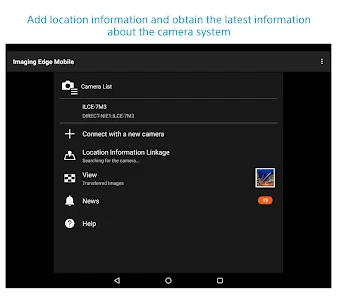
The Sony | Imaging Edge Mobile app enhances your photography experience by allowing seamless transfer of images and videos from your Sony camera to your mobile device. With features like remote shooting, easy sharing, and camera control, it empowers photographers to manage their content effortlessly. The app also supports geotagging and provides access to additional camera settings, making it an essential tool for both amateur and professional photographers looking to elevate their creative workflow.
Advertisement
Features of "Sony | Imaging Edge Mobile"
"Sony | Imaging Edge Mobile" is a versatile application designed to enhance the experience of Sony camera users. One of its standout features is the ability to remotely control your camera, allowing you to take photos and videos from a distance. This is particularly useful for capturing group shots or wildlife photography without disturbing the subject. The app also supports live view, enabling you to see what the camera sees directly on your smartphone screen.
Another significant feature is the seamless transfer of images and videos from your camera to your mobile device. This allows for quick sharing on social media or easy editing on your phone. The app also offers a variety of editing tools, enabling users to enhance their photos before sharing. Additionally, it provides access to camera settings, allowing for adjustments on the go. Overall, "Sony | Imaging Edge Mobile" is designed to streamline the photography process, making it more convenient and efficient for users.
How to Use "Sony | Imaging Edge Mobile"
To get started with "Sony | Imaging Edge Mobile," first, download the app from the App Store or Google Play Store. Once installed, ensure that your Sony camera is compatible with the app. Next, enable the Wi-Fi function on your camera and connect your smartphone to the camera's Wi-Fi network. Open the app, and it should automatically detect your camera.
After establishing a connection, you can explore various features. Use the remote control function to take photos or videos by tapping the shutter button on your smartphone. For transferring images, select the desired photos in the app and initiate the transfer process. You can also access camera settings through the app, allowing for adjustments without needing to touch the camera. Familiarize yourself with the app's interface to maximize its potential and enhance your photography experience.
Pros & Cons of the App
The "Sony | Imaging Edge Mobile" app offers several advantages that enhance the user experience. One of the primary benefits is its user-friendly interface, which makes it easy for both beginners and experienced photographers to navigate. The remote shooting feature is particularly useful for capturing images from unique angles or in challenging situations. Additionally, the ability to transfer images quickly to your mobile device allows for instant sharing and editing, which is a significant time-saver.
However, the app does have some drawbacks. Users have reported occasional connectivity issues, which can be frustrating, especially during critical shooting moments. The app's performance may also vary depending on the smartphone model and operating system, leading to inconsistent experiences. Furthermore, while the editing tools are helpful, they may not be as comprehensive as dedicated photo editing applications. Overall, while "Sony | Imaging Edge Mobile" has its limitations, its benefits often outweigh the drawbacks for many users.
 Google Play
  App Store
 Top Apps





Similar Apps

Lightroom Photo & Video Editor
Photography

4.6

Cartoon Photo PRO
Photography
4.7
FaceApp: Perfect Face Editor
Photography
4.3

Filmic Pro: Mobile Cine Camera
Photography
2.4

GIF Maker, GIF Editor Pro
Photography
4.7
Litchi for DJI Drones
Photography
4.5
Manual Camera: DSLR Camera Pro
Photography
4.0

PhotoPills
Photography
4.7
PhotoSync Bundle Add-On
Photography
4.6
ProCam X ( HD Camera Pro )
Photography
4.2
Solocator - GPS Field Camera
Photography
3.8

Stop Motion Studio Pro
Photography
4.3
Advertisement
Laden…