
 Home
Home  Apps
Apps  Games
Games  About Us
  Cookies & Privacy Policy
  Terms of Service
Manual Camera: DSLR Camera Pro
Version: 1.13
Developer: Lenses Inc.
 Verified App
 Advertisement
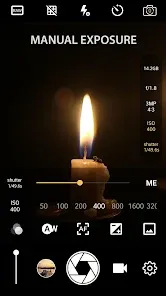
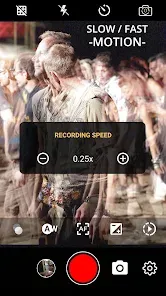
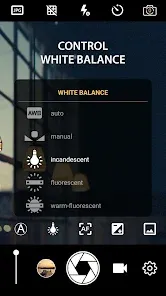
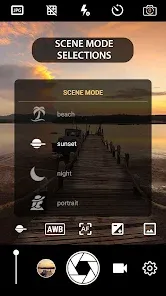
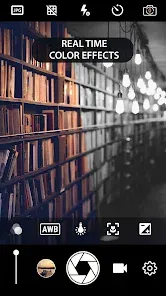
"Manual Camera: DSLR Camera Pro" is a powerful photography app designed for enthusiasts and professionals alike. It offers full manual control over camera settings, including ISO, shutter speed, and focus, allowing users to capture stunning images with precision. With an intuitive interface and advanced features, this app transforms your smartphone into a DSLR-like experience, enabling you to unleash your creativity and take your photography skills to the next level. Explore the art of photography like never before!
Advertisement
Features of "Manual Camera: DSLR Camera Pro"
"Manual Camera: DSLR Camera Pro" is a powerful photography application designed to give users full control over their camera settings, mimicking the experience of using a professional DSLR. One of its standout features is the manual focus capability, allowing users to adjust focus precisely, which is essential for achieving sharp images. The app also offers adjustable exposure settings, enabling photographers to manipulate shutter speed, ISO, and aperture to create the desired lighting effects in their photos.
Additionally, the app supports RAW image capture, providing high-quality images that retain more detail and allow for extensive post-processing. Users can also take advantage of various shooting modes, including HDR, burst mode, and time-lapse, catering to different photography styles and scenarios. The intuitive user interface makes it easy to navigate through settings, while the live histogram helps users monitor exposure levels in real-time. Overall, "Manual Camera: DSLR Camera Pro" is an excellent tool for both amateur and professional photographers looking to enhance their mobile photography experience.
How to Use "Manual Camera: DSLR Camera Pro"
Using "Manual Camera: DSLR Camera Pro" is straightforward, even for those new to photography. After downloading and installing the app, open it to access the main interface, where you will find various controls for adjusting settings. Start by selecting the shooting mode that best suits your needs, whether it’s manual, HDR, or burst mode. To adjust focus, simply slide the focus bar until your subject appears sharp and clear.
Next, you can modify exposure settings by adjusting the shutter speed, ISO, and aperture sliders. This allows you to control how much light enters the camera, which is crucial for capturing well-exposed images. If you want to shoot in RAW format, make sure to enable this option in the settings menu. Once you have configured your settings, frame your shot and press the shutter button to capture your image. Experiment with different settings and modes to discover the full potential of the app and improve your photography skills over time.
Pros & Cons of the App
Like any application, "Manual Camera: DSLR Camera Pro" has its advantages and disadvantages. One of the primary pros is its extensive manual control, which allows users to fine-tune their photography settings, similar to a DSLR camera. The ability to shoot in RAW format is another significant benefit, as it provides greater flexibility in post-processing. The app's user-friendly interface makes it accessible for beginners while still offering advanced features for seasoned photographers.
However, there are some cons to consider. The app may require a learning curve for those unfamiliar with manual photography settings, which could be daunting for casual users. Additionally, while the app is designed to enhance mobile photography, it may not fully replicate the quality of images produced by high-end DSLR cameras. Some users have also reported occasional performance issues, such as lag or crashes, particularly on older devices. Overall, while "Manual Camera: DSLR Camera Pro" is a robust tool for photography enthusiasts, it may not be suitable for everyone.
Check All Versions  Google Play
  App Store
Google Play App Store Top Apps





Similar Apps
Lightroom Photo & Video Editor
Photography

4.6
Cartoon Photo PRO
Photography
4.7
FaceApp: Perfect Face Editor
Photography
4.3
Filmic Pro: Mobile Cine Camera
Photography
2.4
GIF Maker, GIF Editor Pro
Photography
4.7
Litchi for DJI Drones
Photography
4.5

PhotoPills
Photography
4.7
PhotoSync Bundle Add-On
Photography
4.6
ProCam X ( HD Camera Pro )
Photography
4.2
Solocator - GPS Field Camera
Photography
3.8
Stop Motion Studio Pro
Photography
4.3

TIME WARP SCAN: Face Scanner
Photography
4.6
Advertisement
Laden…