
 Home
Home  Apps
Apps  Games
Games  About Us
  Cookies & Privacy Policy
  Terms of Service
Lightroom Photo & Video Editor
Version: 10.4.0
Developer: Adobe
 Verified App
 Advertisement


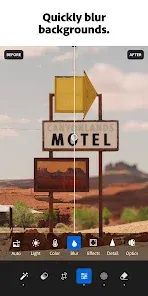


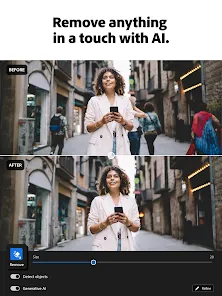
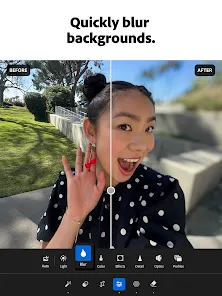
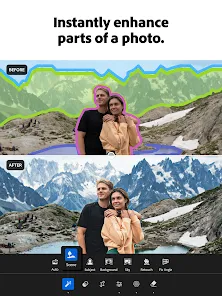

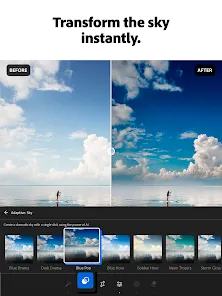

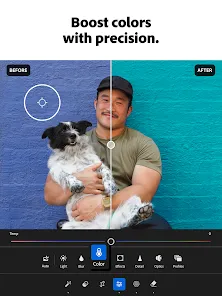
Lightroom Photo & Video Editor is a powerful mobile app designed for photographers and videographers. It offers a comprehensive suite of editing tools, allowing users to enhance their images and videos with precision. With features like advanced color grading, filters, and intuitive adjustments, you can transform your visuals effortlessly. Whether you're a professional or an enthusiast, Lightroom empowers you to create stunning content on the go, making it an essential tool for anyone passionate about photography and videography.
Advertisement
Features of "Lightroom Photo & Video Editor"
"Lightroom Photo & Video Editor" is a powerful tool designed for both amateur and professional photographers. One of its standout features is the advanced editing capabilities, which include a wide range of presets and filters that allow users to enhance their images effortlessly. The app supports RAW photo editing, enabling photographers to work with high-quality files and retain maximum detail during the editing process.
Another notable feature is the intuitive user interface, which makes navigation simple and efficient. Users can easily access tools for cropping, adjusting exposure, and fine-tuning colors. The app also offers cloud storage, allowing users to sync their edits across multiple devices seamlessly. Additionally, the integration of AI-driven features, such as automatic tagging and smart suggestions, helps streamline the editing workflow.
For video editing, Lightroom provides basic tools to trim clips, adjust colors, and apply filters, making it a versatile choice for content creators. The ability to create and share albums directly from the app enhances collaboration and sharing among users. Overall, Lightroom combines robust editing features with user-friendly design, making it a top choice for anyone looking to elevate their photography and videography skills.
How to Use "Lightroom Photo & Video Editor"
Using "Lightroom Photo & Video Editor" is straightforward, even for those new to photo editing. First, download the app from your device's app store and create an Adobe account if you don't already have one. Once installed, open the app and import your photos or videos by tapping the "+" icon. You can select multiple files at once, making it easy to start your editing project.
After importing, you can begin editing by selecting a photo or video from your library. The editing interface provides various tools, including sliders for adjusting exposure, contrast, and saturation. You can also apply presets to quickly enhance your images or create custom edits using the manual adjustment options. For video editing, simply select the clip and use the trimming and color adjustment tools to refine your footage.
Once you're satisfied with your edits, you can save your work or share it directly to social media platforms. The app also allows you to create albums, making it easy to organize your projects. Regularly exploring the app's features and updates will help you maximize your editing potential and keep your skills sharp.
Pros & Cons of the App
"Lightroom Photo & Video Editor" comes with several advantages that make it a popular choice among users. One of the primary pros is its powerful editing capabilities, which cater to both beginners and advanced users. The app's cloud storage feature allows for easy access to your work across devices, ensuring that you can edit on the go. Additionally, the user-friendly interface simplifies the editing process, making it accessible for those who may not have extensive experience with photo editing software.
However, there are some drawbacks to consider. One notable con is that while the app is free to download, many advanced features require a subscription to Adobe's Creative Cloud. This can be a barrier for users who are looking for a completely free editing solution. Furthermore, some users may find the learning curve steep when trying to master all the features available, especially if they are new to photo and video editing.
In summary, while "Lightroom Photo & Video Editor" offers robust features and a seamless editing experience, potential users should weigh the subscription costs and the learning curve against their editing needs and budget.
 Google Play
  App Store
 Top Apps





Similar Apps

Cartoon Photo PRO
Photography

4.7

FaceApp: Perfect Face Editor
Photography
4.3

Filmic Pro: Mobile Cine Camera
Photography
2.4

GIF Maker, GIF Editor Pro
Photography
4.7

Litchi for DJI Drones
Photography
4.5

Manual Camera: DSLR Camera Pro
Photography
4.0

PhotoPills
Photography
4.7

PhotoSync Bundle Add-On
Photography
4.6

ProCam X ( HD Camera Pro )
Photography
4.2
Solocator - GPS Field Camera
Photography
3.8

Stop Motion Studio Pro
Photography
4.3

TIME WARP SCAN: Face Scanner
Photography
4.6
Advertisement
Laden…