
 Home
Home  Apps
Apps  Games
Games  About Us
  Cookies & Privacy Policy
  Terms of Service
Solocator - GPS Field Camera
Version: 2.14.26
Developer: Civi Corp
 Verified App
 Advertisement
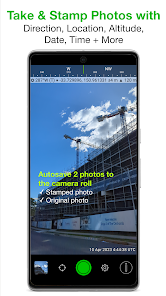
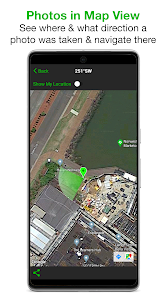
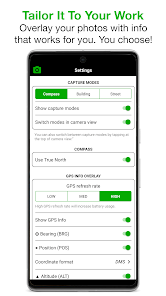
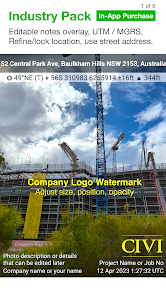
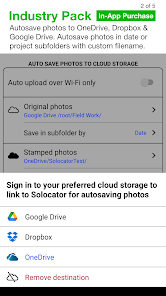
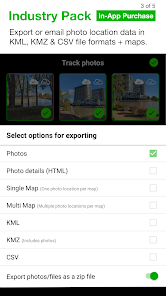
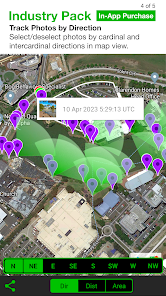
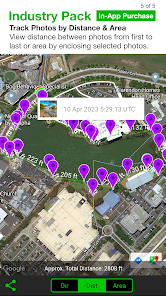
Solocator is a powerful GPS field camera app designed for professionals and outdoor enthusiasts alike. It seamlessly integrates high-quality photography with precise geolocation data, allowing users to capture images with embedded GPS coordinates, timestamps, and compass information. Ideal for surveying, construction, and environmental monitoring, Solocator enhances your documentation process, ensuring that every photo is not only visually stunning but also rich in context. Elevate your fieldwork with Solocator, where every shot tells a story grounded in location.
Advertisement
Features of "Solocator - GPS Field Camera"
Solocator - GPS Field Camera is a specialized application designed for professionals who require precise geolocation data in their photography. One of its standout features is the ability to embed GPS coordinates directly into images, ensuring that the location of each photo is accurately recorded. This is particularly useful for fields such as surveying, construction, and environmental monitoring.
Another notable feature is the customizable metadata options, allowing users to include additional information such as date, time, and even notes about the project. The app also supports various image formats, making it versatile for different user needs. Furthermore, Solocator offers a user-friendly interface that simplifies the process of capturing and managing images, even for those who may not be tech-savvy.
Additionally, the app provides options for offline use, which is essential for fieldwork in remote areas without internet access. Users can also share their images and data easily through various platforms, enhancing collaboration among team members. Overall, Solocator combines functionality with ease of use, making it an invaluable tool for professionals in need of reliable geotagging capabilities.
How to Use "Solocator - GPS Field Camera"
Using Solocator - GPS Field Camera is straightforward and intuitive, making it accessible for users of all skill levels. To get started, first download and install the app from your device's app store. Once installed, open the app and grant it permission to access your device's GPS and camera features. This is crucial for the app to function correctly and capture geotagged images.
After setting up, you can customize the settings according to your preferences. This includes selecting the metadata you want to include, such as project names or specific notes. When you're ready to take a photo, simply tap the camera icon. The app will automatically capture the image along with the GPS coordinates and any other selected metadata.
Once you've taken your photos, you can view them within the app, where they will be organized by date and location. You can also share your images directly from the app via email or social media, or export them for use in reports or presentations. With its user-friendly design, Solocator makes it easy to document and share your work effectively.
Pros & Cons of the App
Like any application, Solocator - GPS Field Camera has its advantages and disadvantages. One of the primary pros is its ability to accurately embed GPS data into images, which is invaluable for professionals in fields such as surveying, construction, and environmental studies. The app's user-friendly interface also makes it easy for users to navigate and utilize its features without extensive training.
Another significant advantage is the customizable metadata options, allowing users to tailor the information included with each photo. This feature enhances the app's utility for various projects and ensures that all necessary details are captured. Additionally, the offline functionality is a major plus for users working in remote areas where internet access is limited.
However, there are some cons to consider. Some users have reported occasional glitches or crashes, which can be frustrating during critical fieldwork. Additionally, while the app is generally easy to use, some advanced features may require a learning curve for new users. Lastly, the app may not be suitable for casual photographers who do not require geotagging, as its primary focus is on professional applications. Overall, Solocator is a powerful tool, but potential users should weigh these pros and cons based on their specific needs.
 Google Play
  App Store
 Top Apps





Similar Apps
Lightroom Photo & Video Editor
Photography

4.6

Cartoon Photo PRO
Photography
4.7
FaceApp: Perfect Face Editor
Photography
4.3

Filmic Pro: Mobile Cine Camera
Photography
2.4
GIF Maker, GIF Editor Pro
Photography
4.7
Litchi for DJI Drones
Photography
4.5
Manual Camera: DSLR Camera Pro
Photography
4.0

PhotoPills
Photography
4.7
PhotoSync Bundle Add-On
Photography
4.6
ProCam X ( HD Camera Pro )
Photography
4.2

Stop Motion Studio Pro
Photography
4.3

TIME WARP SCAN: Face Scanner
Photography
4.6
Advertisement
Laden…