
 Home
Home  Apps
Apps  Games
Games  About Us
  Cookies & Privacy Policy
  Terms of Service
SnapBridge
Version: 2.12.0
Developer: Nikon Corporation
 Verified App
 Advertisement
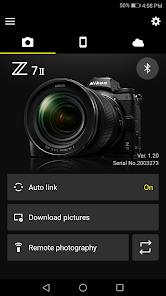
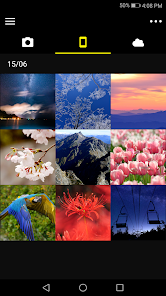
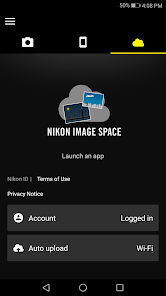
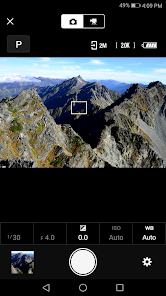
SnapBridge is a mobile application designed to enhance the photography experience for Nikon camera users. It allows seamless connectivity between compatible Nikon cameras and smartphones, enabling users to transfer images instantly, control camera settings remotely, and share photos on social media effortlessly. With its user-friendly interface, SnapBridge simplifies the process of managing and enjoying your photography, making it easier than ever to capture and share life's moments.
Advertisement
Features of SnapBridge
SnapBridge is a versatile application designed to enhance the connectivity between Nikon cameras and mobile devices. One of its standout features is the ability to automatically transfer images from the camera to a smartphone or tablet via Bluetooth, ensuring that users can share their photos instantly on social media platforms. This seamless transfer process allows for quick access to images without the need for cumbersome cables or manual uploads.
Another notable feature is the remote shooting capability, which enables users to control their camera settings and capture images directly from their mobile device. This is particularly useful for group shots or when the photographer wants to be part of the scene. Additionally, SnapBridge offers a user-friendly interface that simplifies the process of managing and organizing photos, making it easier to keep track of your photography projects.
Furthermore, the app provides firmware updates for compatible cameras, ensuring that users can take advantage of the latest features and improvements. SnapBridge also allows for geotagging, which adds location data to images, enhancing the storytelling aspect of photography. Overall, SnapBridge combines convenience and functionality, making it an essential tool for Nikon camera users.
How to Use SnapBridge
Using SnapBridge is a straightforward process that begins with downloading the app from the App Store or Google Play Store. Once installed, users need to pair their Nikon camera with their mobile device via Bluetooth. This involves turning on the camera's Bluetooth function and selecting the camera model within the SnapBridge app. After a successful connection, users can access various features directly from their mobile device.
To transfer images, simply select the photos you wish to download from the camera to your smartphone. The app allows for automatic transfers, so users can set it up to receive new images as they are taken. For remote shooting, navigate to the remote control feature within the app, where you can adjust settings such as shutter speed and aperture before capturing the shot. Additionally, users can utilize the app to edit and share their photos instantly, making it a comprehensive tool for photography enthusiasts.
Lastly, ensure that your camera's firmware is up to date by checking for updates within the app. This will help maintain optimal performance and access to new features. With these simple steps, SnapBridge can significantly enhance your photography experience, making it easier to connect, share, and manage your images.
Pros & Cons of SnapBridge
SnapBridge offers several advantages that make it a valuable tool for Nikon camera users. One of the primary benefits is its ability to facilitate quick and easy image transfers via Bluetooth, allowing photographers to share their work on social media almost instantly. The remote shooting feature is another significant advantage, providing flexibility and convenience for capturing images from various angles or settings. Additionally, the app's user-friendly interface simplifies photo management, making it easier to organize and edit images directly from a mobile device.
However, SnapBridge is not without its drawbacks. Some users have reported connectivity issues, particularly with older camera models, which can be frustrating during a shoot. The app's performance may also vary depending on the smartphone's operating system and version, leading to occasional glitches or slow response times. Furthermore, while the automatic transfer feature is convenient, it can consume battery life on both the camera and the mobile device, which may be a concern for long shooting sessions.
In summary, while SnapBridge provides numerous benefits that enhance the photography experience, potential users should be aware of its limitations. Weighing the pros and cons can help photographers determine if SnapBridge aligns with their needs and preferences, ultimately enhancing their creative process.
 Google Play
  App Store
 Top Apps





Similar Apps

Lightroom Photo & Video Editor
Photography

4.6

Cartoon Photo PRO
Photography
4.7

FaceApp: Perfect Face Editor
Photography
4.3

Filmic Pro: Mobile Cine Camera
Photography
2.4

GIF Maker, GIF Editor Pro
Photography
4.7

Litchi for DJI Drones
Photography
4.5

Manual Camera: DSLR Camera Pro
Photography
4.0

PhotoPills
Photography
4.7
PhotoSync Bundle Add-On
Photography
4.6

ProCam X ( HD Camera Pro )
Photography
4.2
Solocator - GPS Field Camera
Photography
3.8

Stop Motion Studio Pro
Photography
4.3
Advertisement
Laden…