
 Home
Home  Apps
Apps  Games
Games  About Us
  Cookies & Privacy Policy
  Terms of Service
Shutterfly: Prints Cards Gifts
Version: 12.21.0
Developer: Shutterfly, Inc
 Verified App
 Advertisement
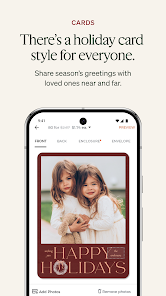
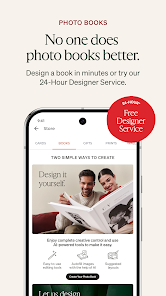
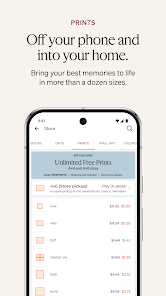
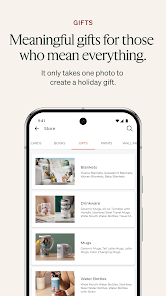
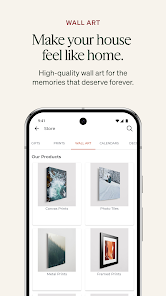
Shutterfly: Prints Cards Gifts is your go-to app for creating personalized photo products effortlessly. Transform your cherished memories into stunning prints, custom cards, and unique gifts with just a few taps. Enjoy a user-friendly interface that allows you to design and order high-quality items, perfect for any occasion. Whether it's a birthday, holiday, or just because, Shutterfly makes it easy to celebrate life's moments in style. Start crafting your memories today!
Advertisement
Features of "Shutterfly: Prints Cards Gifts"
"Shutterfly: Prints Cards Gifts" is a versatile app designed to help users create personalized photo products. One of its standout features is the ability to design custom photo books, cards, and gifts using your own images. The app offers a user-friendly interface that allows for easy navigation and customization, making it accessible for users of all skill levels. You can choose from a wide variety of templates and themes, ensuring that your creations are unique and tailored to your preferences.
Additionally, Shutterfly provides options for high-quality prints, ensuring that your photos look stunning in any format. The app also includes features for sharing your creations directly with friends and family, making it easy to send personalized cards or gifts for special occasions. Users can take advantage of seasonal promotions and discounts, which can make creating custom items more affordable. Overall, the app combines creativity with convenience, making it a popular choice for those looking to preserve memories in a tangible form.
How to Use "Shutterfly: Prints Cards Gifts"
Using the "Shutterfly: Prints Cards Gifts" app is a straightforward process that allows users to create personalized items with ease. First, download the app from your device's app store and create an account or log in if you already have one. Once you're in, you can start by selecting the type of product you want to create, such as a photo book, card, or gift item. The app will guide you through the selection process, offering various templates and design options to choose from.
After selecting a template, you can upload your photos directly from your device or social media accounts. The app allows you to edit and arrange your images, add text, and customize colors to match your style. Once you're satisfied with your design, simply follow the prompts to place your order. You can choose your preferred print quality and shipping options. Finally, review your order details and complete the purchase. The app also keeps track of your previous orders, making it easy to reorder items or create similar products in the future.
Pros & Cons of the App
The "Shutterfly: Prints Cards Gifts" app comes with several advantages that make it appealing to users. One of the main pros is its extensive range of customizable products, allowing users to create everything from photo books to personalized gifts. The app's user-friendly interface simplifies the design process, making it accessible for individuals with varying levels of tech-savviness. Additionally, Shutterfly often offers promotions and discounts, which can make creating custom items more budget-friendly. The high-quality prints and materials used in their products are also a significant plus, ensuring that your memories are preserved beautifully.
However, there are some drawbacks to consider. Some users have reported that the app can be slow at times, especially when uploading large photo files. Additionally, while the customization options are extensive, they can also be overwhelming for some users, leading to decision fatigue. Shipping times can vary, and some customers have experienced delays in receiving their orders. Lastly, while the app is free to download, the costs of products can add up quickly, especially if you are creating multiple items. Weighing these pros and cons can help you determine if the app meets your needs.
 Google Play
  App Store
 Top Apps





Similar Apps

Lightroom Photo & Video Editor
Photography

4.6

Cartoon Photo PRO
Photography
4.7

FaceApp: Perfect Face Editor
Photography
4.3

Filmic Pro: Mobile Cine Camera
Photography
2.4

GIF Maker, GIF Editor Pro
Photography
4.7
Litchi for DJI Drones
Photography
4.5

Manual Camera: DSLR Camera Pro
Photography
4.0

PhotoPills
Photography
4.7
PhotoSync Bundle Add-On
Photography
4.6

ProCam X ( HD Camera Pro )
Photography
4.2
Solocator - GPS Field Camera
Photography
3.8

Stop Motion Studio Pro
Photography
4.3
Advertisement
Laden…