Duo Mobile is a versatile authentication app designed to enhance security for your online accounts. By generating secure, time-sensitive passcodes and enabling push notifications, it simplifies the two-factor authentication process. With a user-friendly interface, Duo Mobile ensures that accessing your accounts remains both safe and convenient, protecting your sensitive information from unauthorized access. Whether for personal use or enterprise-level security, Duo Mobile is an essential tool for safeguarding your digital identity.
Features & Highlights
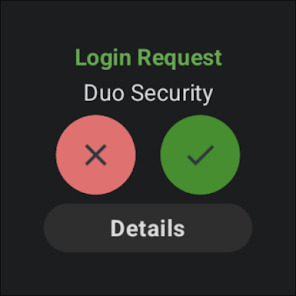
- Two-Factor Authentication: Duo Mobile provides robust two-factor authentication (2FA) to secure your accounts. Imagine logging into your workplace email—once you enter your password, a notification pops up on Duo Mobile, allowing you to approve or deny access. This extra layer of security ensures that even if someone has your password, they can’t easily access your sensitive information.
- Push Notifications: With Duo Mobile, you receive real-time push notifications for authentication requests. Picture yourself at a coffee shop, trying to connect to your company’s VPN. A quick tap on the notification on your phone allows you to authenticate seamlessly without the hassle of entering a one-time code.
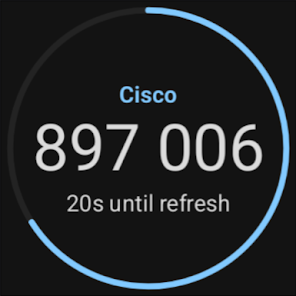
- Offline Access: One of the standout features of Duo Mobile is its ability to generate codes even when your phone is offline. This came in handy for me during a recent flight; having no internet connection, I was still able to log into my work applications using the time-based one-time password (TOTP) feature, ensuring I was productive even in the air.
- Easy Account Management: The app allows you to easily manage multiple accounts. For instance, whether it’s my personal email, work email, or bank account, all of them can be accessed in one place. This feature is particularly useful when juggling different accounts, as I can quickly toggle between them without any confusion.
- Backup & Recovery: Duo Mobile includes a secure backup and recovery option to ensure you don’t lose access to your accounts. After my phone was unexpectedly damaged, I was relieved to discover that I could easily restore my account access through the backup process, minimizing downtime and stress.
Real Experience Using Duo Mobile
Application Scenarios
Using Duo Mobile has become a part of my daily routine, especially as someone who works remotely. Every day, I log into various applications to access sensitive company data, whether it’s checking emails or joining virtual meetings. When I need to log into our project management tool, I utilize Duo Mobile for authentication. The app sends me a push notification, and with a simple tap, I’m logged in and ready to collaborate with my team. Additionally, I often find myself out and about, and when I need to access my bank account, the app’s offline capabilities mean that I can still generate the needed access codes without worrying about having an internet connection.
User Experience
The user interface of Duo Mobile is clean and intuitive, making it easy to navigate through its various features. The setup process was straightforward; adding accounts took just a few minutes, and the app guided me through each step seamlessly. I appreciate how quickly it processes authentication requests—there’s hardly any lag. The push notifications are timely and allow me to respond without unnecessary delays. Overall, my experience has been incredibly positive, and I feel confident knowing that my accounts are secure thanks to Duo Mobile’s reliable performance.
Pricing
Duo Mobile is free to download and use for personal accounts, which is a significant advantage. For businesses looking to implement Duo’s advanced security features, pricing varies based on the number of users and the level of service required. The tiered pricing model allows organizations to select a plan that best suits their needs, making it a flexible option for companies of all sizes.
Updates & Support
Duo Mobile receives regular updates that enhance its security features and improve user experience. The support team is responsive and helpful; I reached out once to clarify a query about account recovery, and they provided a prompt and informative response. The knowledge base available on their website is also a great resource for troubleshooting and learning more about app functionalities.
Security & Privacy Review
As an American user, security and privacy are paramount when choosing apps for sensitive tasks. Duo Mobile is available on both the App Store and Google Play, ensuring a safe download from reputable sources. When registering, the app requires minimal personal data, which is a relief in today’s digital age. You only need to provide an email address to set up your account, allowing for a quick setup without overwhelming personal information disclosure.
Importantly, Duo Mobile does not contain ads or engage in intrusive tracking behavior. This aspect is particularly reassuring, as I don’t have to worry about my information being sold or misused. With the growing concern over data privacy, Duo Mobile stands out as a trustworthy solution for anyone looking to enhance their account security while maintaining control over their personal data. In my experience, using Duo Mobile has not only simplified my authentication process but has also given me peace of mind regarding the safety of my online accounts.
-
 Duo Mobile enhances security
 - Easy two-factor authentication
- User-friendly and intuitive design
- Supports multiple platforms easily
- Real-time push notifications
-
 Limited offline access options
 - Complex setup for new users
- No support for all devices
- Inconsistent performance issues



 Verified App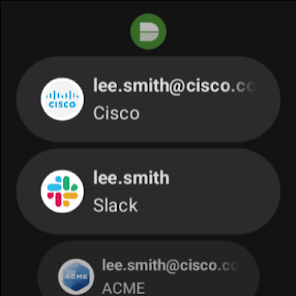



















 Google Play
  App Store