
 Home
Home  Apps
Apps  Games
Games  About Us
  Cookies & Privacy Policy
  Terms of Service
Zoom Workplace
Version: 6.6.6.34426
Developer: zoom.com
 Verified App
 Advertisement

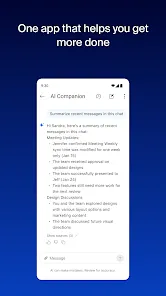








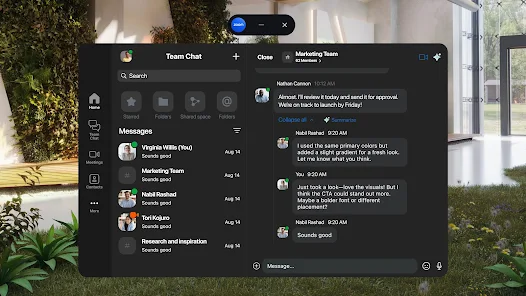
Zoom Workplace is an innovative app designed to enhance collaboration and productivity in hybrid work environments. By seamlessly integrating video conferencing, messaging, and project management tools, it empowers teams to connect and collaborate effortlessly, regardless of location. With user-friendly features and a focus on real-time communication, Zoom Workplace transforms the way organizations work together, fostering a more engaged and efficient workforce. Experience a new level of teamwork and connectivity with Zoom Workplace.
Advertisement
Features of Zoom Workplace
Zoom Workplace is designed to enhance collaboration and communication within organizations. One of its standout features is the integrated video conferencing capability, allowing teams to hold virtual meetings seamlessly. Users can schedule, host, and join meetings directly from the platform, ensuring that everyone stays connected regardless of their location.
Another key feature is the chat functionality, which enables real-time messaging among team members. This feature supports both one-on-one and group chats, making it easy to share ideas and updates quickly. Additionally, Zoom Workplace offers file sharing and collaboration tools, allowing users to upload and share documents, images, and other files directly within the platform.
Moreover, the platform includes task management tools that help teams organize their work effectively. Users can create, assign, and track tasks, ensuring that everyone is on the same page regarding project deadlines and responsibilities. Lastly, Zoom Workplace integrates with various third-party applications, enhancing its functionality and allowing users to customize their workspace according to their needs.
How to Use Zoom Workplace
Using Zoom Workplace is straightforward and user-friendly. To get started, users need to create an account on the platform. Once registered, they can log in and explore the dashboard, which provides access to all features. To schedule a meeting, users can click on the 'Schedule' button, fill in the necessary details such as date, time, and participants, and send out invites directly from the platform.
For instant communication, users can utilize the chat feature by selecting a contact or group and sending messages in real-time. File sharing is also simple; users can drag and drop files into the chat or use the upload button to share documents with their team. To manage tasks, users can create a task list, assign responsibilities, and set deadlines, ensuring that everyone is aware of their roles.
Additionally, users can integrate other applications to enhance their workflow. This can be done through the settings menu, where users can connect tools that they already use, such as project management software or cloud storage services. Overall, Zoom Workplace is designed to streamline communication and collaboration, making it an essential tool for modern teams.
Pros & Cons of Zoom Workplace
Zoom Workplace offers several advantages that make it appealing to organizations. One of the primary benefits is its comprehensive suite of tools that facilitate communication, including video conferencing, chat, and file sharing. This all-in-one approach helps reduce the need for multiple applications, streamlining workflows and enhancing productivity. Additionally, the platform is user-friendly, making it easy for team members to adopt and utilize its features effectively.
However, there are also some drawbacks to consider. One potential con is that, depending on the organization's size, the platform may become overwhelming with too many features, leading to confusion among users. Furthermore, while Zoom Workplace offers robust security measures, concerns about data privacy and security breaches can still arise, especially for organizations handling sensitive information. Lastly, the reliance on internet connectivity can be a limitation, as poor connections may disrupt meetings and collaboration efforts.
In summary, while Zoom Workplace provides a powerful set of tools for enhancing team collaboration, organizations should weigh the pros and cons to determine if it aligns with their specific needs and operational requirements.
 Google Play
  App Store
 Top Apps





Similar Apps

DoorDash - Dasher
Business

4.3

Duo Mobile
Business
4.5

Google Chat
Business
4.4

LinkedIn: Jobs & Business News
Business
4.2

Microsoft Authenticator
Business
4.6

Microsoft Teams
Business
4.7

Uber - Driver: Drive & Deliver
Business
4.6

TeamViewer Remote Control
Business
4.4

Slack
Business
4.7

Power Apps
Business
4.5

Workday
Business
4.3

AnyDesk Remote Desktop
Business
2.6
Advertisement
Laden…