
 Home
Home  Apps
Apps  Games
Games  About Us
  Cookies & Privacy Policy
  Terms of Service
Webex Meetings
Version: 39.4.0
Developer: Cisco Systems, Inc.
 Verified App
 Advertisement



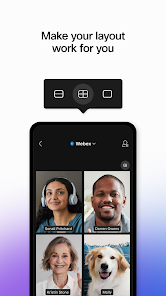
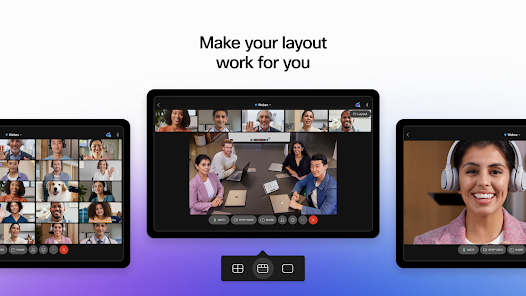
Webex Meetings is a powerful video conferencing app designed to facilitate seamless communication and collaboration. With features like high-definition video, screen sharing, and interactive tools, it enables users to connect effortlessly from anywhere in the world. Ideal for businesses and teams, Webex Meetings enhances productivity by allowing participants to engage in real-time discussions, share ideas, and manage projects effectively. Experience a reliable platform that transforms virtual meetings into dynamic and engaging experiences.
Advertisement
Features of Webex Meetings
Webex Meetings is a robust video conferencing platform designed to facilitate seamless communication and collaboration. One of its standout features is high-definition video and audio quality, ensuring that participants can engage in clear and uninterrupted discussions. The platform supports large meetings, accommodating up to 1,000 participants, making it ideal for webinars and large team gatherings.
Another notable feature is the screen sharing capability, which allows users to present documents, slides, and applications in real-time. This enhances collaboration by enabling participants to view and discuss content simultaneously. Additionally, Webex Meetings offers a range of interactive tools, such as polls, Q&A sessions, and breakout rooms, which foster engagement and participation among attendees.
Security is a top priority for Webex, with end-to-end encryption and various authentication options to protect sensitive information. The platform also integrates with other productivity tools, such as Microsoft Office and Google Workspace, streamlining workflows. Overall, Webex Meetings provides a comprehensive suite of features that cater to diverse meeting needs, making it a popular choice for businesses and organizations.
How to Use Webex Meetings
Using Webex Meetings is straightforward and user-friendly. To get started, users need to create an account on the Webex website or download the mobile app. Once registered, users can schedule a meeting by selecting the date and time, inviting participants via email, and generating a unique meeting link. This link can be shared with attendees, allowing them to join the meeting easily.
Before the meeting, it’s advisable to test the audio and video settings to ensure everything is functioning correctly. On the day of the meeting, participants can join by clicking the link provided in the invitation. During the meeting, users can utilize features such as screen sharing, chat, and interactive tools to enhance collaboration. After the meeting, users can access recordings and transcripts, which are helpful for those who could not attend.
Webex Meetings also offers a mobile app, allowing users to join meetings on the go. This flexibility ensures that team members can stay connected, regardless of their location. Overall, the platform is designed to facilitate effective communication and collaboration, making it an essential tool for remote work and virtual meetings.
Pros & Cons of Webex Meetings
Webex Meetings comes with several advantages that make it a preferred choice for many organizations. One of the primary pros is its high-quality video and audio capabilities, which enhance the overall meeting experience. The platform's ability to host large meetings with numerous participants is another significant benefit, making it suitable for webinars and large-scale events. Additionally, Webex offers robust security features, ensuring that sensitive information remains protected during virtual meetings.
However, there are some drawbacks to consider. One common criticism is that the user interface can be somewhat complex for new users, leading to a steeper learning curve. Some users have also reported occasional connectivity issues, particularly in areas with poor internet service. Furthermore, while Webex Meetings offers a free version, many of its advanced features are only available in paid plans, which may not be feasible for smaller organizations or individual users.
In summary, while Webex Meetings provides a comprehensive set of features and strong security measures, potential users should weigh these benefits against the learning curve and cost considerations. Overall, it remains a powerful tool for enhancing virtual collaboration and communication.
 Google Play
  App Store
 Top Apps





Similar Apps

DoorDash - Dasher
Business

4.3

Duo Mobile
Business
4.5

Google Chat
Business
4.4

LinkedIn: Jobs & Business News
Business
4.2

Microsoft Authenticator
Business
4.6

Microsoft Teams
Business
4.7

Uber - Driver: Drive & Deliver
Business
4.6

TeamViewer Remote Control
Business
4.4

Slack
Business
4.7

Power Apps
Business
4.5

Zoom Workplace
Business
4.1

Workday
Business
4.3
Advertisement
Laden…