
 Home
Home  Apps
Apps  Games
Games  About Us
  Cookies & Privacy Policy
  Terms of Service
Alight Motion
Version: 5.0.272.1028383
Developer: Alight Motion
 Verified App
 Advertisement
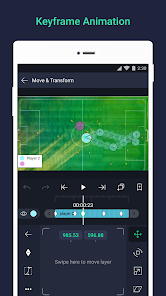
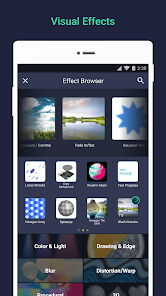
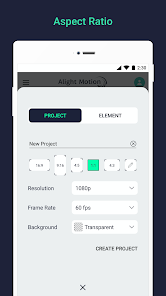
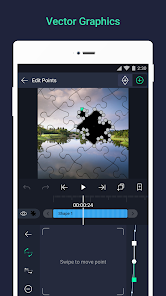
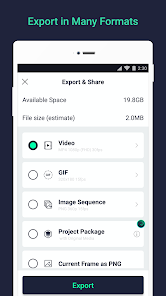
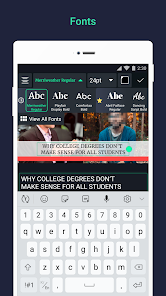
Alight Motion is a versatile mobile app designed for video editing and animation, offering users a powerful platform to create stunning visual content. With features like multi-layer editing, vector graphics, and motion graphics, it caters to both beginners and experienced creators. Users can add effects, animations, and audio to their projects, making it ideal for social media content, presentations, and more. Its intuitive interface and robust tools empower creativity on the go.
Advertisement
Features of Alight Motion
Alight Motion is a versatile mobile application designed for video editing and animation, offering a range of powerful features that cater to both beginners and experienced creators. One of its standout features is the ability to work with multiple layers for graphics and videos, allowing users to create complex compositions with ease. The app supports vector graphics, enabling users to create and edit scalable designs without losing quality.
Additionally, Alight Motion provides a variety of visual effects and color correction tools, which help enhance the overall look of videos. Users can also access a library of pre-made animations and transitions, making it easier to add dynamic elements to their projects. The app supports keyframe animation, giving users precise control over motion and timing. Furthermore, Alight Motion allows for audio editing, enabling users to sync soundtracks and sound effects seamlessly with their visuals.
With its user-friendly interface and extensive features, Alight Motion is an excellent choice for anyone looking to create professional-quality animations and videos directly from their mobile devices.
How to Use Alight Motion
Using Alight Motion is straightforward, making it accessible for users of all skill levels. To get started, download the app from your device's app store and create an account. Once you open the app, you can begin a new project by selecting the desired aspect ratio for your video. The interface is intuitive, with a timeline at the bottom where you can add layers for video, graphics, and audio.
To add elements to your project, tap the "+" icon, which allows you to import media from your device or use built-in assets. You can then manipulate these layers by adjusting their position, scale, and rotation. To create animations, utilize the keyframe feature, which lets you set specific points in time for your layers to change. You can also apply effects and transitions by selecting the desired layer and navigating to the effects menu. Once your project is complete, export it in your preferred format and share it on social media or save it for later use.
With practice, users can explore the app's advanced features, such as custom animations and audio synchronization, to elevate their video projects further.
Pros & Cons of Alight Motion
Alight Motion comes with several advantages that make it a popular choice among video editors and animators. One of the primary pros is its user-friendly interface, which simplifies the editing process for beginners while still offering advanced features for experienced users. The app's support for multiple layers allows for intricate designs and animations, making it versatile for various creative projects. Additionally, the availability of a wide range of effects, transitions, and audio editing tools enhances the overall editing experience.
However, Alight Motion is not without its drawbacks. One notable con is that some features are locked behind a subscription model, which may deter users who prefer free applications. Additionally, while the app is powerful, it may require a learning curve for those unfamiliar with video editing concepts. Performance can also vary depending on the device, with some users experiencing lag or crashes on older models. Despite these limitations, Alight Motion remains a strong contender in the mobile video editing space, appealing to a broad audience.
Overall, the app's strengths often outweigh its weaknesses, making it a valuable tool for anyone looking to create engaging video content.
 Google Play
  App Store
 Top Apps





Similar Apps

Kodi
Video Players & Editors

3.6
CapCut - Video Editor
Video Players & Editors
3.4
AirMirror: AirPlay Receiver
Video Players & Editors
3.6

Blue Iris
Video Players & Editors
2.5
IPTV Extreme Pro
Video Players & Editors
3.8

IPTV Pro
Video Players & Editors
4.7

MX Player Pro
Video Players & Editors
4.3

Screen Recorder - Vidma Record
Video Players & Editors
4.5

StbEmu (Pro)
Video Players & Editors
3.6

TV Cast Pro for Android TV
Video Players & Editors
4.4
TV Cast Pro for Fire TV
Video Players & Editors
4.5

TV Cast Pro for LG webOS
Video Players & Editors
4.0
Advertisement
Laden…