
Version: 1.2
Developer: FoxFi Software
 Verified App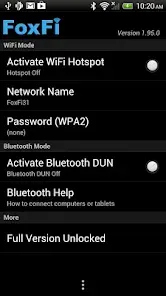
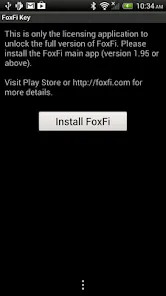
FoxFi Key is an application designed to enhance the functionality of PdaNet, allowing users to share their mobile data connection with other devices. One of its primary features is the ability to create a Wi-Fi hotspot without requiring root access, making it accessible for a wider range of users. This feature is particularly beneficial for those who want to share their internet connection with laptops or tablets without the hassle of complicated setups.
Another notable feature is the support for USB tethering, which allows users to connect their devices directly to a computer for a stable internet connection. Additionally, FoxFi Key offers a user-friendly interface that simplifies the process of enabling tethering options. The app also includes options for customizing the hotspot name and password, ensuring a secure connection. Furthermore, it provides real-time data usage monitoring, allowing users to keep track of their data consumption while tethering.
Overall, FoxFi Key enhances the PdaNet experience by providing versatile tethering options, ease of use, and essential features that cater to the needs of mobile users looking to share their internet connection seamlessly.
Using FoxFi Key is a straightforward process that allows users to share their mobile data connection effortlessly. First, download and install the FoxFi Key app from the Google Play Store. Once installed, open the app and grant any necessary permissions it requests. The app will guide you through the setup process, which typically involves selecting your preferred tethering method, such as Wi-Fi hotspot or USB tethering.
To enable the Wi-Fi hotspot, simply tap on the corresponding option within the app. You can customize the hotspot name and password to ensure a secure connection. After setting it up, other devices can connect to your hotspot using the credentials you provided. If you prefer USB tethering, connect your device to a computer using a USB cable and select the USB tethering option in the app. Ensure that PdaNet is also installed on your computer to facilitate the connection.
Once everything is set up, you can start using the internet on your connected devices. Monitor your data usage through the app to avoid exceeding your mobile data limits. With these simple steps, FoxFi Key allows you to share your mobile data connection with ease.
Like any application, FoxFi Key has its advantages and disadvantages. One of the primary pros is its ability to create a Wi-Fi hotspot without requiring root access, making it accessible for a broader audience. Users appreciate the straightforward interface, which simplifies the tethering process. Additionally, the app supports both USB and Wi-Fi tethering, providing flexibility in how users choose to share their internet connection. The real-time data monitoring feature is another significant advantage, allowing users to keep track of their data usage effectively.
However, there are some cons to consider. Some users have reported occasional connectivity issues, particularly with certain devices or network configurations. Additionally, while the app is free to download, some features may require a paid upgrade, which could deter users looking for a completely free solution. Furthermore, the app's performance may vary depending on the mobile carrier, as some providers may restrict tethering capabilities. Overall, while FoxFi Key offers valuable features for tethering, potential users should weigh these pros and cons before deciding to use the app.
 Google Play
  App Store
 Spotify Wrapped is an annual feature that summarizes your listening habits, including your most-played songs and artists of the year.
To create a playlist, click "Your Library," then "Playlists," and select "Create Playlist." Add songs by searching or browsing.
Yes, with a Spotify Premium subscription, you can download songs and playlists for offline listening.
Spotify offers a free tier with ads, as well as a Premium subscription that removes ads and adds features.
Click the three dots next to the song, select "Share," and choose your preferred sharing method, like social media or a link.