
Category: Business
Developer: SAP SE
 Verified App



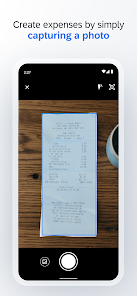
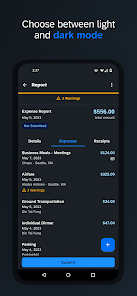


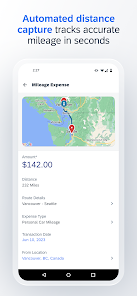
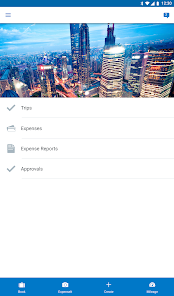
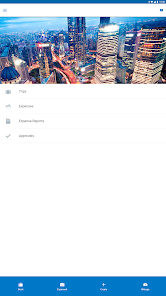
SAP Concur is a comprehensive travel and expense management solution designed to streamline the process of managing business travel and expenses. One of its key features is automated expense reporting, which allows users to capture receipts and expenses through mobile devices, reducing manual entry and errors. The platform also integrates with various travel booking tools, enabling users to book flights, hotels, and rental cars seamlessly within the same interface.
Another notable feature is real-time expense tracking, which provides businesses with insights into spending patterns and helps in budget management. SAP Concur also offers customizable approval workflows, ensuring that expense reports are reviewed and approved according to company policies. Additionally, the platform provides analytics and reporting tools that help organizations monitor travel expenses and identify cost-saving opportunities.
Furthermore, SAP Concur supports compliance with travel policies and regulations, helping organizations maintain control over their travel expenditures. The mobile app enhances user experience by allowing employees to manage their travel and expenses on the go, making it easier to stay organized and compliant.
Using SAP Concur is designed to be user-friendly, making it accessible for employees at all levels. To get started, users need to create an account, which can typically be done through their organization’s portal. Once logged in, users can navigate the dashboard to access various features such as travel booking, expense reporting, and receipt management.
For travel booking, users can search for flights, hotels, and car rentals directly within the platform. After selecting their travel options, they can proceed to book and receive confirmation details. For expense reporting, users can upload receipts by taking photos with their mobile devices or by manually entering expenses. The system automatically categorizes expenses, making it easier to compile reports.
Once expenses are entered, users can submit their reports for approval. The customizable workflows ensure that reports are routed to the appropriate approvers. Finally, users can track the status of their reports and receive notifications when approvals are completed. Overall, SAP Concur simplifies the travel and expense management process, making it efficient and straightforward.
SAP Concur offers several advantages that make it a popular choice for businesses. One of the primary pros is its comprehensive integration capabilities, allowing seamless connections with various travel and financial systems. This integration helps streamline processes and reduces the need for manual data entry. Additionally, the mobile app enhances user convenience, enabling employees to manage their travel and expenses on the go.
Another significant advantage is the robust reporting and analytics features, which provide organizations with valuable insights into spending patterns and compliance with travel policies. This data can help businesses identify areas for cost savings and improve budget management. Furthermore, the automated expense reporting feature minimizes errors and saves time for employees.
However, there are some cons to consider. The platform can be complex for new users, requiring a learning curve to navigate its various features effectively. Additionally, some users have reported that the pricing can be on the higher side, especially for smaller businesses. Lastly, while the integration capabilities are extensive, they may not cover all third-party applications, which could limit functionality for some organizations.

 Streamlines expense management for effortless reporting and tracking. Enhances compliance with automated policy enforcement and audit trails. Integrates seamlessly with existing ERP systems for smooth data flow. Mobile app allows for on-the-go expense submissions and approvals. Provides real-time insights to optimize travel and expense budgets.
 High costs can strain budgets, especially for small businesses. User interface may be overwhelming for new users. Limited customization options can hinder specific organizational needs.

The auto-edge detect is terrible for scanning receipts. Needs manual cropping. Take a look at the Tiny scanner app, and see how it should done. Seriously, Sap should be able to do better than this. Scanning receipts is the only reason I use the app. Edit: It's better now and I increased by one star, you need to add copy and paste into the app. I suggest that if we have multiple per diem, allow to select a range of dates, an making multiple days easier. If you do that I'll give 5 stars.
Incredibly frustrating. So many clicks. Upload a receipt and then it's unclassified. Pick a category and you'll get a pop-up that your changes will be lost. The admin design must lack guardrails because you end up with illogical requirements like having to select that a receipt is attached right after you attached a receipt. Most reports cannot be completed on the mobile app at all. Receipt scanning is inconsistent, and good luck with currency exchange inaccuracies.
this is the shittiest app ever!! it cannot read text from a printed receipt and accurately load information in. I submit expense reports it they have no errors. they show up to the approver they have errors. what the f***. The app takes forever to load and make adjustments to expenses and if the phone times out and goes to black screen it's an error. there's nothing to stare at and nothing to work on. the app is slow as hell. I have asked my employer for a different way to submit expenses.
App never remembers my sign in or honors my setting to sign in with biometrics. In fact, when I sign in, it changes my biometric setting automatically back to OFF. It makes me go through the entire 2-step Authentication process every time I open it. This is an easy fix, please fix it. It's so annoying to do this every single day.
Still only one star and the developers have not improved anything this app 3 years later. So SLOW! It never picks up the right information for my receipts. it just took me 5 minutes to upload one receipt. I have no idea why/how German software is such trash when they ACQUIRE working technology on the open market. This app gets slower and more complicated with every update, just like the owner's native software, SAP. That's it! They changed the backbone to SAP, and now it sucks. Done and done.
Review Source: Google Play store public user reviews.
Yes, users can submit suggestions or feedback to SAP Concur through the app or the official website, where they often provide a dedicated feedback channel.
Yes, SAP Concur collects personal data necessary for processing travel and expenses, but it is committed to safeguarding user privacy and complying with data protection regulations.
Yes, SAP Concur allows users to capture receipts and manage expenses offline, with data syncing automatically when an internet connection is reestablished.
To cancel your SAP Concur subscription, you should contact your SAP Concur account manager or customer support for assistance with the cancellation process.
The cost of a subscription to SAP Concur varies based on the features selected and the size of the organization, so it is best to contact SAP Concur for specific pricing information.
Customer numbers are generally fixed, but for specific requests, please contact customer service to discuss your options.
You can reach customer service by visiting the support section on the SAP Concur website or calling the designated support number.
After activation, log in to your account and navigate to the settings section to update your information. For further assistance, contact customer service.
To activate your account, check your email for an activation link. Click it and follow the instructions to complete the activation process.
Use the "Forgot Password" link on the login page to receive a reset email, or contact customer service if you encounter issues.
BUG FIXES• Various fixes and performance improvements
















 Google Play
  App Store