
 Home
Home  Apps
Apps  Games
Games  About Us
  Cookies & Privacy Policy
  Terms of Service
Fake GPS Joystick & Routes Go
Version: 1.7.1
Developer: JIB Software UG (haftungsbeschränkt)
 Verified App
 Advertisement
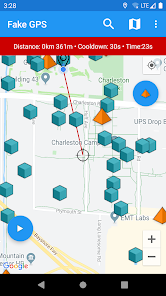
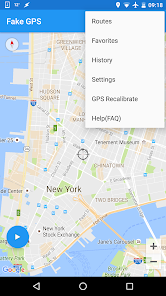
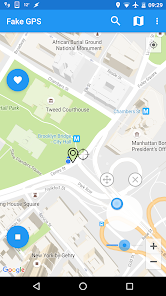
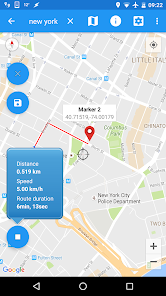
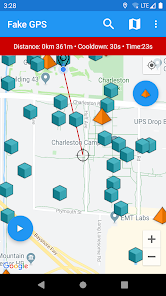
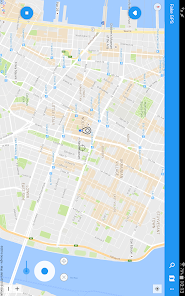
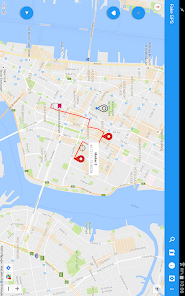

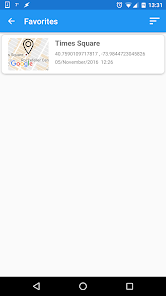
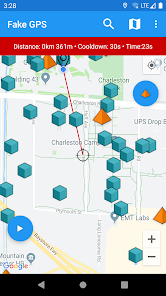

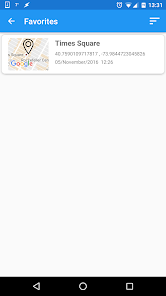
"Fake GPS Joystick & Routes Go" is a powerful app designed for users who want to simulate GPS locations effortlessly. With its intuitive joystick feature, you can easily navigate anywhere in the world without moving an inch. Whether for gaming, testing, or privacy purposes, this app allows you to create custom routes and set your desired location with just a few taps. Experience the freedom of virtual travel and enhance your location-based applications today!
Advertisement
Features of "Fake GPS Joystick & Routes Go"
"Fake GPS Joystick & Routes Go" is a versatile application designed for users who want to simulate their GPS location. One of its standout features is the joystick control, which allows users to move their location in real-time, making it easy to navigate through different areas without physically being there. This feature is particularly useful for gamers who want to spoof their location in augmented reality games.
Another notable feature is the ability to create and save routes. Users can plan a specific path and simulate movement along that route, which is beneficial for testing location-based apps or for privacy reasons. The app also supports various map views, including satellite and terrain, providing a comprehensive visual experience. Additionally, it offers a user-friendly interface, making it accessible for both novice and experienced users. The app is compatible with most Android devices, ensuring a wide range of usability.
Furthermore, "Fake GPS Joystick & Routes Go" allows users to set a fixed location, which can be useful for accessing location-restricted content. The app also includes a history feature, enabling users to revisit previously set locations. Overall, this app combines functionality with ease of use, making it a popular choice for those looking to manipulate their GPS settings.
How to Use "Fake GPS Joystick & Routes Go"
Using "Fake GPS Joystick & Routes Go" is straightforward, making it accessible for users of all skill levels. First, download and install the app from the Google Play Store. Once installed, you will need to enable developer options on your Android device. This can typically be done by going to Settings, then About Phone, and tapping on the Build Number several times until developer mode is activated.
Next, navigate to the Developer Options in your settings and select "Mock Location App." Choose "Fake GPS Joystick & Routes Go" from the list. After this setup, open the app, and you will see a map interface. You can use the joystick to move your location or tap on the map to set a specific point. To create a route, select the route option and plot your desired path. Once you are satisfied with your location or route, simply press the start button to activate the fake GPS.
Remember to disable the mock location feature when you are done to return to your actual GPS settings. This app is particularly useful for testing location-based applications or for privacy purposes, allowing you to control your digital footprint effectively.
Pros & Cons of the App
Like any application, "Fake GPS Joystick & Routes Go" has its advantages and disadvantages. One of the primary pros is its user-friendly interface, which makes it easy for anyone to navigate and utilize its features. The joystick control is a significant benefit, allowing for real-time location manipulation, which is especially useful for gamers and testers of location-based apps. Additionally, the ability to create and save routes enhances its functionality, making it a versatile tool for various purposes.
However, there are some cons to consider. The app may not work seamlessly with all applications, particularly those with strict location verification measures. Some users have reported occasional glitches or crashes, which can be frustrating. Furthermore, using a fake GPS can violate the terms of service of certain apps, leading to potential bans or restrictions. Lastly, while the app is free, some features may require in-app purchases, which could deter users looking for a completely free solution.
In summary, while "Fake GPS Joystick & Routes Go" offers valuable features for location manipulation, users should weigh the pros and cons carefully to determine if it meets their needs.
Check All Versions  Google Play
  App Store
Google Play App Store Top Apps





Similar Apps

ARC Launcher® Pro Themes DIY
Personalization

4.7

Auric Icon Pack
Personalization
4.6
Beauty Sporty Fit Watch Face
Personalization
3.3

Black Pie - Icon Pack
Personalization
4.7

Blaze Backless Icon Pack
Personalization
4.6

Blaze Dark Icon Pack
Personalization
4.5

Borealis - Icon Pack
Personalization
4.6
Chester inform LCD
Personalization
3.7

Crayon Icon Pack
Personalization
4.4
Digital Mod Black watchface
Personalization
3.8
Digital Red watch face
Personalization
4.0

Facemoji AI Emoji Keyboard
Personalization
4.7
Advertisement
Laden…