
 Home
Home  Apps
Apps  Games
Games  About Us
  Cookies & Privacy Policy
  Terms of Service
ARC Launcher® Pro Themes DIY
Version: 41.3
Developer: AppTech Launcher Studios Inc
 Verified App
 Advertisement
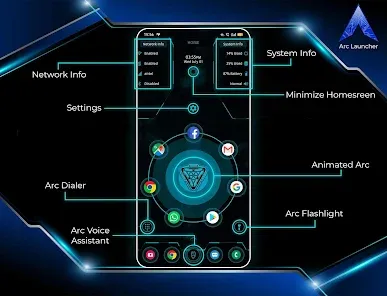
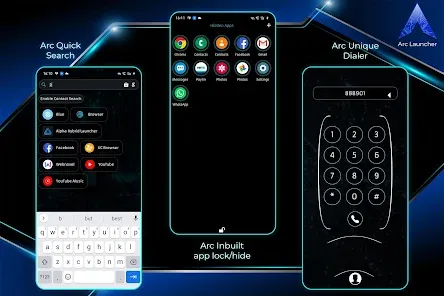
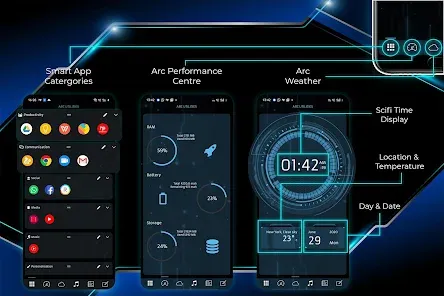
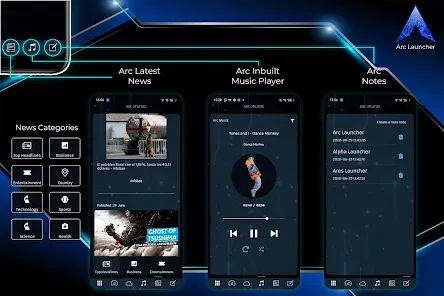
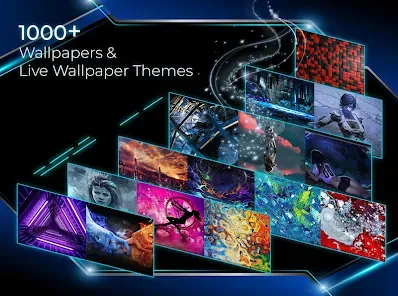
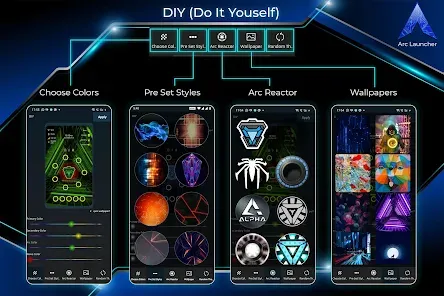
Introducing ARC Launcher® Pro Themes DIY, the ultimate customization tool for your Android device! Transform your home screen with stunning themes, personalized icons, and unique layouts. Enjoy a seamless user experience with enhanced performance and intuitive navigation. Whether you want a sleek, modern look or a vibrant, playful design, ARC Launcher® empowers you to create a truly one-of-a-kind interface. Elevate your device's aesthetic and functionality today!
Advertisement
Features of "ARC Launcher® Pro Themes DIY"
"ARC Launcher® Pro Themes DIY" offers a plethora of features designed to enhance user experience and customization. One of its standout features is the ability to create personalized themes, allowing users to modify icons, wallpapers, and layouts according to their preferences. This level of customization ensures that each user can have a unique interface that reflects their style.
Additionally, the app includes a variety of pre-designed themes that users can choose from, making it easy to switch up the look of their device without extensive effort. The launcher also supports gesture controls, enabling users to navigate their devices more intuitively. Furthermore, it provides a range of widgets that can be added to the home screen, offering quick access to essential apps and information.
Another notable feature is the app's performance optimization, which helps in speeding up device operations and improving battery life. Users can also enjoy a clean and organized app drawer, making it easier to find and manage applications. Overall, "ARC Launcher® Pro Themes DIY" combines aesthetic appeal with functional enhancements, making it a popular choice among Android users seeking a personalized experience.
How to Use "ARC Launcher® Pro Themes DIY"
Using "ARC Launcher® Pro Themes DIY" is a straightforward process that allows users to customize their Android devices effortlessly. After downloading and installing the app from the Google Play Store, users need to set it as their default launcher. This can typically be done through the device's settings under the 'Home' or 'Launcher' options.
Once set up, users can explore the app's interface, which is user-friendly and intuitive. To create a personalized theme, navigate to the customization options where you can change icons, wallpapers, and layouts. The app provides a variety of pre-installed themes that can be applied with a single tap, or users can opt to design their own from scratch.
Additionally, users can access gesture settings to enable quick actions, such as swiping to open specific apps or features. Widgets can be added to the home screen by long-pressing on the screen and selecting the desired widget from the menu. Overall, the app is designed to be accessible for users of all skill levels, making customization a fun and engaging experience.
Pros & Cons of the App
Like any application, "ARC Launcher® Pro Themes DIY" comes with its own set of advantages and disadvantages. One of the primary pros is its extensive customization options, allowing users to tailor their device's appearance to their liking. The app's performance optimization features also enhance the overall speed and efficiency of the device, which is a significant benefit for users looking to improve their experience.
Another advantage is the availability of pre-designed themes, which makes it easy for users who may not want to spend time creating their own. The gesture controls and widget support further enhance usability, providing quick access to frequently used apps and features.
On the downside, some users may find that the app can be resource-intensive, potentially affecting battery life on older devices. Additionally, while the customization options are extensive, they may overwhelm users who prefer a more straightforward interface. Lastly, occasional bugs or glitches can occur, which may detract from the overall user experience. Balancing these pros and cons is essential for users considering whether to adopt this launcher for their Android devices.
Check All Versions  Google Play
  App Store
Google Play App Store Top Apps





Similar Apps
Auric Icon Pack
Personalization

4.6
Beauty Sporty Fit Watch Face
Personalization
3.3
Black Pie - Icon Pack
Personalization
4.7

Blaze Backless Icon Pack
Personalization
4.6

Blaze Dark Icon Pack
Personalization
4.5

Borealis - Icon Pack
Personalization
4.6
Chester inform LCD
Personalization
3.7

Crayon Icon Pack
Personalization
4.4
Digital Mod Black watchface
Personalization
3.8
Digital Red watch face
Personalization
4.0

Facemoji AI Emoji Keyboard
Personalization
4.7
Fake GPS Joystick & Routes Go
Personalization
3.7
Advertisement
Laden…