Version: 25.9.0
Developer: PowerSchool Group LLC
 Verified App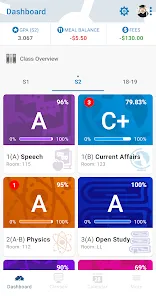
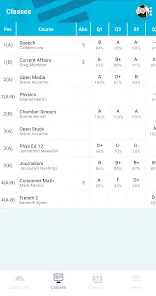
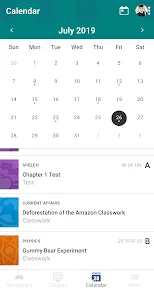
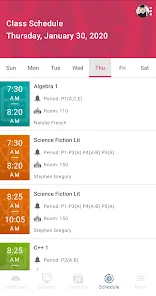
PowerSchool Mobile is a comprehensive app designed to enhance communication between students, parents, and educators. One of its standout features is real-time access to student grades and attendance, allowing parents to monitor their child's academic performance closely. The app also provides notifications for important updates, such as upcoming assignments, test dates, and school events, ensuring that users stay informed.
Another key feature is the ability to view detailed course information, including syllabi and teacher contact details, which facilitates better engagement between parents and teachers. Additionally, PowerSchool Mobile supports multiple languages, making it accessible to a diverse user base. The app also includes a calendar feature that helps users keep track of important dates and deadlines, promoting better time management for students.
Furthermore, the app allows for easy communication with teachers through messaging, fostering a collaborative environment for student success. Overall, PowerSchool Mobile is designed to streamline the educational experience, making it easier for families to stay connected with their child's schooling.
Using PowerSchool Mobile is straightforward and user-friendly. First, download the app from the App Store or Google Play, depending on your device. Once installed, open the app and select your school district from the list provided. You will then need to log in using your PowerSchool credentials, which typically include a username and password provided by your school.
After logging in, you will have access to a dashboard that displays your child's grades, attendance records, and other important information. You can navigate through different sections of the app to view detailed reports on assignments, test scores, and class schedules. To receive notifications, ensure that you enable push notifications in your device settings, allowing you to stay updated on any changes or announcements.
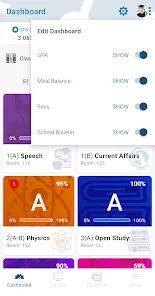
Additionally, you can customize your settings to receive alerts for specific subjects or events. The messaging feature allows you to communicate directly with teachers, making it easy to ask questions or discuss concerns. Overall, PowerSchool Mobile is designed to be intuitive, making it accessible for users of all ages.
PowerSchool Mobile offers several advantages that enhance the educational experience for students and parents alike. One of the primary benefits is the convenience of accessing real-time information about grades and attendance, which helps parents stay informed about their child's academic progress. The app's user-friendly interface makes navigation easy, even for those who may not be tech-savvy. Additionally, the ability to communicate directly with teachers fosters a collaborative environment, encouraging parental involvement in education.
However, there are some drawbacks to consider. Some users have reported occasional glitches or slow loading times, which can be frustrating when trying to access important information quickly. Additionally, the app's reliance on internet connectivity means that users may face challenges in areas with poor service. Furthermore, while the app supports multiple languages, some features may not be fully translated, potentially limiting accessibility for non-English speakers.
In summary, while PowerSchool Mobile provides valuable tools for enhancing communication and engagement in education, users should be aware of its limitations and potential technical issues. Balancing these pros and cons can help users make the most of the app's features.
Spotify Wrapped is an annual feature that summarizes your listening habits, including your most-played songs and artists of the year.
To create a playlist, click "Your Library," then "Playlists," and select "Create Playlist." Add songs by searching or browsing.
Yes, with a Spotify Premium subscription, you can download songs and playlists for offline listening.
Spotify offers a free tier with ads, as well as a Premium subscription that removes ads and adds features.
Click the three dots next to the song, select "Share," and choose your preferred sharing method, like social media or a link.













 Google Play
  App Store