
 Home
Home  Apps
Apps  Games
Games  About Us
  Cookies & Privacy Policy
  Terms of Service
Google Classroom
Version: 3.47.836427600
Developer: Google LLC
 Verified App
 Advertisement
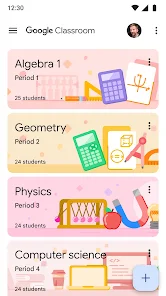
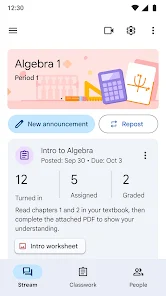
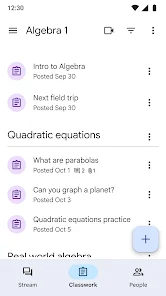
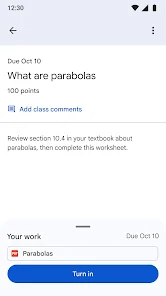
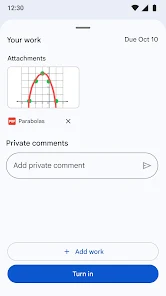
Google Classroom is a free web-based platform designed to streamline the educational process for teachers and students. It facilitates the creation, distribution, and grading of assignments, enhancing communication and collaboration in a digital learning environment. With features like real-time feedback, integration with Google Workspace tools, and a user-friendly interface, Google Classroom empowers educators to manage their classrooms efficiently while fostering student engagement and organization.
Advertisement
```html
Features of Google Classroom
Google Classroom is a versatile platform designed to streamline the educational experience for both teachers and students. One of its primary features is the ability to create and manage classes, allowing educators to organize their coursework efficiently. Teachers can post assignments, share resources, and provide feedback all in one place, enhancing communication and collaboration.
Another notable feature is the integration with other Google Workspace tools, such as Google Docs, Sheets, and Slides. This integration allows for seamless sharing and collaboration on documents, making it easier for students to work together on projects. Additionally, Google Classroom supports various file types, enabling teachers to upload videos, PDFs, and links to external resources.
Furthermore, the platform offers a grading system that simplifies the assessment process. Teachers can easily track student progress, provide grades, and return assignments with comments. The user-friendly interface ensures that both students and educators can navigate the platform with ease, making it an effective tool for modern education.
How to Use Google Classroom
Using Google Classroom is straightforward and user-friendly. To get started, educators need to create a Google account if they don’t already have one. Once logged in, they can access Google Classroom through the app or website. Teachers can create a new class by clicking on the "+" icon and selecting "Create class." They will then fill in the class details, such as the name, section, and subject.
After setting up the class, teachers can invite students by sharing a unique class code or sending email invitations. Once students join, educators can post announcements, assignments, and resources directly to the class stream. Assignments can be customized with due dates and instructions, and teachers can attach relevant materials from Google Drive.
Students can submit their work through the platform, and teachers can provide feedback and grades directly on the submitted assignments. The platform also allows for ongoing communication between teachers and students, fostering a collaborative learning environment. Overall, Google Classroom is designed to enhance the educational experience by making it more organized and accessible.
Pros & Cons of Google Classroom
Google Classroom offers several advantages that make it a popular choice among educators. One of the main pros is its integration with Google Workspace, which allows for easy collaboration on documents and projects. The platform is also user-friendly, making it accessible for both teachers and students. Additionally, the ability to track student progress and provide timely feedback enhances the learning experience.
However, there are some drawbacks to consider. One con is that Google Classroom requires a stable internet connection, which may pose challenges for students in areas with limited access. Furthermore, while the platform is intuitive, some users may find the initial setup process a bit overwhelming, especially if they are not familiar with technology. Lastly, the reliance on Google services means that users must be comfortable with the privacy policies and data management practices of the company.
In summary, while Google Classroom provides a robust platform for educational engagement, it is essential to weigh its pros and cons to determine if it meets the specific needs of your classroom environment.
``` Google Play
  App Store
 Top Apps





Similar Apps

ClassDojo
Education

4.8

Blackboard
Education
3.4

Mathway: Scan & Solve Problems
Education
4.4
Duolingo: Language Lessons
Education
4.6
Schoology
Education
1.9
Photomath
Education
4.3

Lingokids - Play and Learn
Education
4.3

Babbel - Learn Languages
Education
4.6

CE5 Contact
Education
4.0

Cancel Tyranny
Education
4.4

Civilization Revolution 2
Education
3.6
Elevate - Brain Training Games
Education
4.6
Advertisement
Laden…