
 Home
Home  Apps
Apps  Games
Games  About Us
  Cookies & Privacy Policy
  Terms of Service
Pixel Studio: pixel art editor
Version: 5.35
Developer: Hippo Games AM
 Verified App
 Advertisement
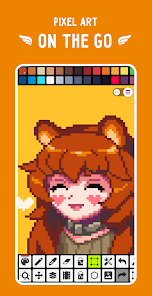
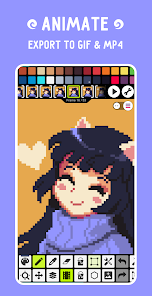
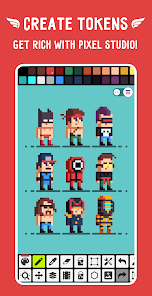
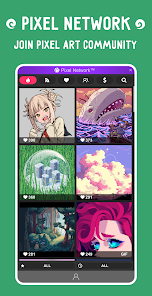
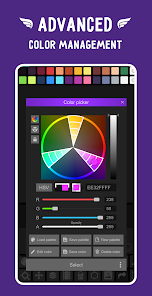
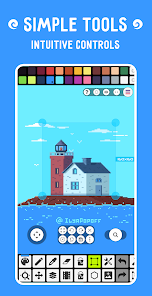
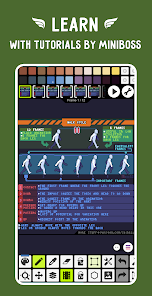
"Pixel Studio: Pixel Art Editor" is a versatile app designed for artists and enthusiasts to create stunning pixel art with ease. Featuring a user-friendly interface, a variety of tools, and customizable palettes, it empowers users to bring their creative visions to life. Whether you're a beginner or a seasoned pro, Pixel Studio offers everything you need to craft detailed sprites, animations, and more, all from the convenience of your device. Unleash your creativity and dive into the world of pixel art!
Advertisement
Features of "Pixel Studio: Pixel Art Editor"
"Pixel Studio: Pixel Art Editor" is a versatile tool designed for both beginners and experienced artists who want to create pixel art. One of its standout features is the user-friendly interface, which allows for easy navigation and quick access to various tools. The app supports multiple layers, enabling artists to work on complex designs without losing track of their progress. Additionally, it offers a wide range of brushes and customizable tools, allowing for unique artistic expression.
Another notable feature is the color palette management, which lets users create and save custom palettes for their projects. The app also supports animation, allowing users to create animated pixel art with frame-by-frame editing. Furthermore, it includes a grid overlay and snap-to-grid functionality, making it easier to align elements precisely. The ability to export artwork in various formats, including PNG and GIF, ensures that artists can share their creations easily across different platforms.
Overall, "Pixel Studio" combines essential features with an intuitive design, making it a go-to choice for anyone interested in pixel art creation.
How to Use "Pixel Studio: Pixel Art Editor"
Using "Pixel Studio: Pixel Art Editor" is straightforward, making it accessible for users of all skill levels. To get started, download and install the app on your device. Once opened, you can create a new project by selecting the canvas size that suits your needs. The interface displays various tools on the side, including brushes, erasers, and color selectors, which you can easily access.
Begin by choosing a brush and selecting a color from the palette. You can start drawing directly on the canvas, utilizing the grid overlay to maintain precision. If you wish to add depth to your artwork, take advantage of the layering feature, which allows you to work on different elements separately. For animation, create multiple frames and adjust the timing to bring your pixel art to life. Once satisfied with your creation, export it in your desired format for sharing or further use.
With practice, you’ll discover more advanced techniques and features, enhancing your pixel art skills over time.
Pros & Cons of the App
"Pixel Studio: Pixel Art Editor" comes with several advantages that make it appealing to users. One of the primary pros is its intuitive interface, which simplifies the learning curve for beginners. The app's extensive toolset, including customizable brushes and layers, allows for a high degree of creativity and flexibility. Additionally, the support for animation and various export formats enhances its functionality, making it suitable for both casual users and professional artists.
However, there are some drawbacks to consider. Some users may find that the app lacks advanced features found in more professional-grade software, which could limit its appeal for seasoned artists. Additionally, while the app is generally stable, occasional bugs may disrupt the user experience. Lastly, the mobile version may not offer the same level of precision as desktop alternatives, which could be a concern for detailed work.
In summary, while "Pixel Studio" has its limitations, its strengths make it a valuable tool for anyone interested in pixel art creation.
 Google Play
  App Store
 Top Apps





Similar Apps

FlipaClip: Create 2D Animation
Art & Design

4.4
AR Art Projector: Da Vinci Eye
Art & Design
4.1

GIMP
Art & Design
2.8

Rainbow Brainskull Oracle Deck
Art & Design
4.8
Sketchbook
Art & Design
4.0

Adobe Capture: Illustrator,Ps
Art & Design
4.6
Floor Plan Creator
Art & Design
4.0

Infinite Painter
Art & Design
4.5
Pixelcut AI Photo Editor
Art & Design
4.3
Dawn AI - Avatar Generator
Art & Design
2.0
Poseit
Art & Design
3.8
starryai - AI Art Generator
Art & Design
4.2
Advertisement
Laden…