
 Home
Home  Apps
Apps  Games
Games  About Us
  Cookies & Privacy Policy
  Terms of Service
Microsoft Family Safety
Version: 2.0.3.1064
Developer: Microsoft Corporation
 Verified App
 Advertisement
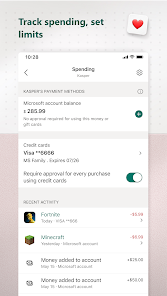
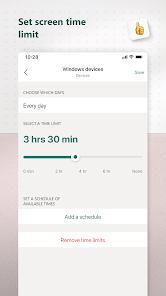
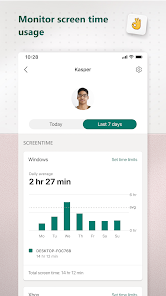
The Microsoft Family Safety app helps families stay connected and secure by providing tools for location sharing, driving safety, and activity monitoring. With features like location alerts, driving reports, and screen time management, it empowers families to make informed decisions about their safety and well-being. The app fosters communication and collaboration among family members, ensuring everyone is informed and protected in today’s digital world.
Advertisement
Features of Microsoft Family Safety
Microsoft Family Safety is designed to help families stay connected and ensure the safety of their loved ones. One of its key features is location sharing, which allows family members to share their real-time locations with each other. This feature is particularly useful for parents who want to keep track of their children's whereabouts.
Another important feature is activity reporting, which provides insights into how family members are using their devices. Parents can monitor screen time, app usage, and even set limits to promote healthier digital habits. Additionally, the app includes driving safety features that offer driving reports, helping users understand their driving behavior and encouraging safer practices.
Microsoft Family Safety also offers a shared family calendar, making it easier to coordinate schedules and plan family activities. Furthermore, the app integrates with Microsoft 365, allowing families to access shared documents and resources seamlessly. Overall, these features work together to create a safer and more connected family environment.
How to Use Microsoft Family Safety
Using Microsoft Family Safety is straightforward and user-friendly. To get started, download the app from the Microsoft Store or your device's app store. Once installed, create a family group by inviting family members via their Microsoft accounts. This step is essential for enabling features like location sharing and activity reporting.
After setting up your family group, you can customize settings for each member. For instance, parents can set screen time limits, monitor app usage, and receive activity reports. To enable location sharing, ensure that location services are turned on for the app on all devices. This allows family members to see each other's locations in real-time.
Additionally, you can access driving safety features by linking the app to your vehicle. This will provide insights into driving habits and safety scores. Regularly check the app for updates and new features, as Microsoft frequently enhances its offerings. By actively engaging with the app, families can foster a safer and more connected environment.
Pros & Cons of the App
Microsoft Family Safety comes with several advantages that make it appealing for families. One of the primary pros is its comprehensive suite of features that promote safety and connectivity. The ability to track locations, monitor screen time, and receive driving reports provides parents with valuable insights into their children's activities. Additionally, the integration with Microsoft 365 allows for seamless sharing of documents and calendars, enhancing family organization.
However, there are some drawbacks to consider. One con is that the app requires all family members to have Microsoft accounts, which may not be ideal for everyone. Furthermore, while the app offers robust features, some users may find the interface a bit overwhelming, especially if they are not tech-savvy. Privacy concerns may also arise, as location sharing can be sensitive information.
In summary, while Microsoft Family Safety offers a range of beneficial features for family management and safety, potential users should weigh these pros and cons to determine if it aligns with their needs and preferences.
 Google Play
  App Store
 Top Apps





Similar Apps

Cocomelon
Parenting

4.5

Speech Blubs: Language Therapy
Parenting
4.5

OurFamilyWizard Co-Parent App
Parenting
4.5

AirDroid Parental Control
Parenting
4.5

Eyezy: Phone Tracker By Number
Parenting
2.7

Bark - Parental Controls
Parenting
4.2
Parental Control App- FamiSafe
Parenting
3.3

Solid Starts: Baby Food App
Parenting
4.9

Sitly - The babysitter app
Parenting
1.5

Baby Connect: Newborn Tracker
Parenting
4.5

BabySparks - Development Activ
Parenting
4.1

Huckleberry: Baby & Child
Parenting
4.9
Advertisement
Laden…