
 Home
Home  Apps
Apps  Games
Games  About Us
  Cookies & Privacy Policy
  Terms of Service
Bark - Parental Controls
Version: 5.6.16
Developer: Bark Technologies, Inc.
 Verified App
 Advertisement


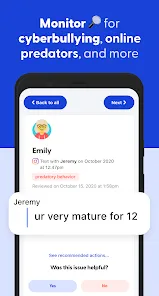
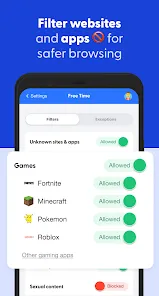
Bark is a comprehensive parental control app designed to help families navigate the digital world safely. By monitoring texts, social media, and online activities, Bark alerts parents to potential risks such as cyberbullying, online predators, and inappropriate content. With its user-friendly interface and customizable settings, Bark empowers parents to foster open communication with their children while ensuring a secure online experience. Protect your family and promote healthy digital habits with Bark's innovative tools and insights.
Advertisement
Features of "Bark - Parental Controls"
Bark - Parental Controls offers a comprehensive suite of features designed to help parents monitor and protect their children's online activities. One of its standout features is the ability to monitor text messages, social media platforms, and emails for potential risks, including cyberbullying, suicidal ideation, and explicit content. This proactive approach allows parents to intervene before issues escalate.
Another key feature is the screen time management tool, which enables parents to set limits on device usage and schedule downtime. This helps promote a healthy balance between online and offline activities. Additionally, Bark provides location tracking, allowing parents to keep tabs on their child's whereabouts in real-time.
The app also offers customizable alerts, so parents can receive notifications based on specific keywords or phrases that may indicate concerning behavior. Furthermore, Bark's user-friendly interface makes it easy for parents to navigate and utilize its various features effectively.
Overall, Bark - Parental Controls combines monitoring, management, and safety features to create a robust tool for parents aiming to safeguard their children's digital experiences.
How to Use "Bark - Parental Controls"
Using Bark - Parental Controls is a straightforward process that begins with downloading the app from the App Store or Google Play. After installation, parents need to create an account and set up their family profile. This involves adding the child's devices and linking their social media accounts, which allows Bark to monitor their online interactions.
Once the setup is complete, parents can customize the monitoring settings according to their preferences. This includes selecting which platforms to monitor and setting up alerts for specific keywords or phrases. Bark will then begin analyzing the child's online activity and send notifications if any concerning behavior is detected.
Parents can access the Bark dashboard to review reports and alerts, providing insights into their child's digital life. The app also allows for screen time management, where parents can set limits and schedules for device usage. Regularly checking the dashboard and engaging in open conversations with children about online safety can enhance the effectiveness of Bark's monitoring capabilities.
By following these steps, parents can effectively utilize Bark - Parental Controls to ensure a safer online environment for their children.
Pros & Cons of the App
Bark - Parental Controls comes with several advantages that make it a popular choice among parents. One of the primary pros is its comprehensive monitoring capabilities, which cover a wide range of platforms, including social media, texts, and emails. This extensive coverage helps parents stay informed about their child's online interactions and potential risks.
Another significant advantage is the app's proactive alert system, which notifies parents of concerning behavior, allowing for timely intervention. Additionally, Bark's user-friendly interface makes it accessible for parents who may not be tech-savvy. The screen time management feature also promotes healthy device usage, encouraging children to engage in offline activities.
In summary, while Bark - Parental Controls offers valuable features for safeguarding children online, parents should weigh the pros and cons to determine if it aligns with their family's needs and values.
 Google Play
  App Store
 Top Apps





Similar Apps

Cocomelon
Parenting

4.5

Microsoft Family Safety
Parenting
3.9

Speech Blubs: Language Therapy
Parenting
4.5

OurFamilyWizard Co-Parent App
Parenting
4.5

AirDroid Parental Control
Parenting
4.5

Eyezy: Phone Tracker By Number
Parenting
2.7

Parental Control App- FamiSafe
Parenting
3.3

Solid Starts: Baby Food App
Parenting
4.9

Sitly - The babysitter app
Parenting
1.5

Baby Connect: Newborn Tracker
Parenting
4.5

BabySparks - Development Activ
Parenting
4.1

Huckleberry: Baby & Child
Parenting
4.9
Advertisement
Laden…