
Category: Finance
Developer: Esurance
 Verified App


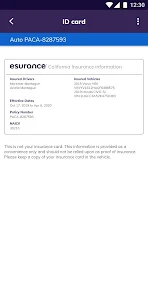
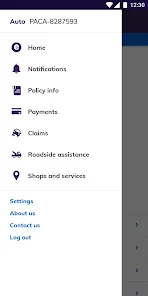
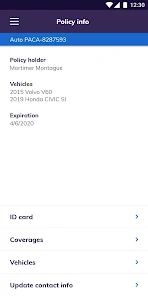
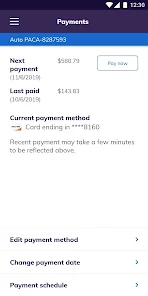
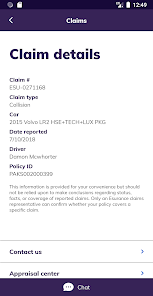
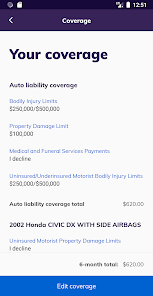
Esurance Mobile offers a variety of features designed to enhance the user experience for policyholders. One of the standout features is the ability to manage your insurance policy directly from your smartphone. Users can view their coverage details, make payments, and access their insurance cards with just a few taps. The app also provides a user-friendly interface that simplifies navigation, making it easy to find the information you need.
Another key feature is the claims filing process, which can be initiated through the app. Users can submit claims, upload photos, and track the status of their claims in real-time. Additionally, the app includes a roadside assistance feature, allowing users to request help in case of a breakdown or accident. Notifications and alerts keep users informed about important updates, such as payment reminders or policy changes, ensuring they stay on top of their insurance needs.
Lastly, Esurance Mobile offers a convenient way to connect with customer support. Users can access FAQs, chat with representatives, or find contact information for further assistance. Overall, the app is designed to provide a comprehensive and efficient insurance management experience.
Using the Esurance Mobile app is straightforward and user-friendly. First, download the app from the Apple App Store or Google Play Store, depending on your device. Once installed, you will need to create an account or log in using your existing Esurance credentials. After logging in, you will have access to your policy information and various features.
To manage your policy, navigate to the dashboard where you can view your coverage details, make payments, and access your insurance cards. If you need to file a claim, simply select the claims option, follow the prompts to provide necessary information, and upload any relevant photos. For roadside assistance, tap the corresponding feature, and the app will guide you through the process of requesting help.
Additionally, you can customize your notification settings to receive alerts about important updates. If you have questions or need assistance, the app provides easy access to customer support options. Overall, the Esurance Mobile app is designed to make managing your insurance as convenient as possible.
The Esurance Mobile app comes with several advantages that enhance the user experience. One of the primary pros is its convenience; users can manage their insurance policies anytime and anywhere, making it easy to access important information on the go. The app's intuitive design allows for quick navigation, which is particularly beneficial for those who may not be tech-savvy. Additionally, the ability to file claims and request roadside assistance directly through the app streamlines processes that would otherwise require phone calls or in-person visits.
However, there are some drawbacks to consider. Some users have reported occasional technical glitches, such as slow loading times or crashes, which can be frustrating. Additionally, while the app covers many essential features, it may lack some advanced functionalities that users expect from a comprehensive insurance management tool. Lastly, customer support through the app may not always provide immediate solutions, leading to longer wait times for assistance.
In summary, while the Esurance Mobile app offers significant benefits in terms of convenience and ease of use, potential users should be aware of its limitations and occasional technical issues.

 Manage your policy anytime, anywhere with ease. Get quick access to your ID card digitally. File claims instantly with simple step-by-step guidance. Receive instant notifications for important policy updates. Enjoy user-friendly navigation for a seamless experience.
 Limited customer service options can lead to frustrating experiences. Mobile app features may lack in-depth functionality compared to desktop. Claims processing can be slower than competitors, causing delays in resolution.

settings menu never opens. I can't set up the fingerprint. it's been this way for months if not years. I click to enable fingerprint and use my password to log in, which it does, but it never enables. I click settings and it just spins forever and locks up the app so you have to close it and log back in. If you don't care about fingerprint or the settings, it's okay.
Terrible experience with e-insurance roadside assistance. Last night my car wouldn’t start and the app kept giving me an error when I tried to request help. The app told me to call a number, but when I called, the automated system told me to go back and use the app. I was stuck in a loop with no way to actually get help. What’s the point of paying for roadside assistance if it doesn’t work when you need it most? After this experience, I will definitely be switching insurance companies.
I'm currently a single mother w/2 boys trying to juggle a full time job, school, & kids. My life is constantly "on the go" which makes it impossible for me to do simple things like... going to the Ins.Office & pay a bill. This App is accurate, fast, easy to use, convenient, & my best friend! Also, when I used it to seach for Cust. Support, I found plenty of info. If I left a msg. they reached back out to me quickly! They are proffesional, knowledgable, & very helpful! I give it thumbs up! 👍👍👍
Very buggy app at times. Keeps logging out when trying to change autopay payment account. Sends new ID cards every single time upon logging in and subsequently sends another message notification to print a new ID card every single freeking time. So totally frustrating that probably will be looking elsewhere just to get away from the app. Pity to lose a long standing client for such a simple issue.
Great and useful app! You can do everything with your policy on this app that you can do over the phone with Esurance customer service. The app is well laid out, easy to use, allows you to access your current insurance card, and has many other endless features. If you have Esurance, this app iss absolutely essential. If you don't have Esurance, get it! They have been the best insurance company I've ever dealt with.
Review Source: Google Play store public user reviews.
Yes, users can submit suggestions or feedback through the app or by contacting Esurance customer support, ensuring that their input is considered for future updates.
Yes, Esurance Mobile collects personal data as part of its functionality to provide services, manage policies, and improve the user experience; users can review the privacy policy for more details.
While some features of Esurance Mobile may be accessible offline, full functionality typically requires an internet connection for tasks like filing claims or accessing policy details.
To cancel your Esurance Mobile subscription, you will need to contact Esurance customer service directly to discuss the cancellation of your insurance policy.
There is no subscription cost for using Esurance Mobile; it is included as part of the insurance services provided to policyholders.
Yes, you can activate your account by following the prompts in the app after downloading it. Just enter your details as requested.
Yes, if you signed up using a social media account, you can log in with that same account through the Esurance Mobile app.
You can reach customer service through the app or by calling their support number listed on the website.
Your customer number can be found in your policy documents or by logging into your account on the website.
Open the app and enter your email and password associated with your account. If you’re having trouble, use the “Forgot Password” option.
The team knocked off some bugs and made some experience improvements, helping to make your (insurance) lives easier.Because we value your feedback, please continue to let us know what you think at [email protected]














 Google Play
  App Store