
Category: Finance
Developer: Ent Credit Union
 Verified App


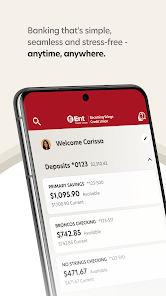
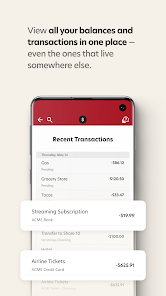
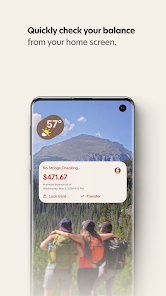
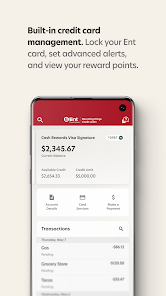
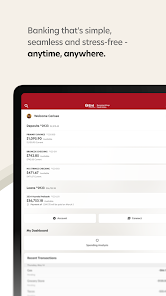
Ent Mobile Banking offers a variety of features designed to enhance the banking experience for its users. One of the primary features is the ability to check account balances in real-time, allowing customers to stay updated on their financial status at any moment. Users can also view transaction history, which provides a detailed overview of their spending and helps in budgeting effectively.
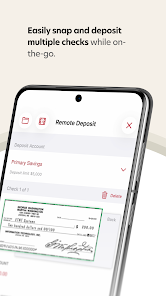
Another significant feature is the capability to transfer funds between accounts or to other individuals, making it convenient for users to manage their finances. The app also supports mobile check deposits, enabling users to deposit checks by simply taking a photo, thus eliminating the need to visit a physical branch. Additionally, Ent Mobile Banking includes robust security measures, such as biometric login options and two-factor authentication, ensuring that users' financial information remains safe.
Lastly, the app provides access to various financial tools and resources, including budgeting calculators and financial education materials, empowering users to make informed financial decisions.
Using Ent Mobile Banking is straightforward and user-friendly. First, users need to download the app from their device's app store, whether it be iOS or Android. After installation, they must create an account or log in using their existing Ent credentials. Once logged in, users can navigate through the app's intuitive interface to access various features.
To check account balances, users simply select the account they wish to view. For transactions, they can easily scroll through their transaction history or use the search function to find specific entries. To transfer funds, users need to select the 'Transfer' option, choose the accounts involved, and enter the amount. For mobile check deposits, users can select the deposit feature, take a photo of the check, and follow the prompts to complete the deposit.
Overall, the app is designed to provide a seamless banking experience, making it easy for users to manage their finances on the go.
Ent Mobile Banking comes with several advantages that enhance the user experience. One of the main pros is its convenience; users can manage their finances anytime and anywhere, eliminating the need for physical branch visits. The app's user-friendly interface makes navigation simple, even for those who may not be tech-savvy. Additionally, the robust security features, including biometric login and two-factor authentication, provide peace of mind regarding the safety of personal information.
However, there are some cons to consider. Some users have reported occasional technical glitches, such as slow loading times or app crashes, which can be frustrating. Additionally, while the app offers many features, it may lack some advanced functionalities that are available through traditional banking methods. Lastly, users who prefer face-to-face interactions may find the app less appealing, as it does not replace the personal touch of in-branch services.
In summary, while Ent Mobile Banking offers a range of useful features and conveniences, potential users should weigh these pros and cons based on their individual banking needs.
```
 Enjoy 24/7 access to your accounts anytime, anywhere. Easily transfer funds between accounts with a few taps. Securely manage your finances with advanced encryption technology. Receive real-time notifications for transactions and account activity. Effortlessly pay bills directly from your mobile device.
 Limited customer support options can lead to unresolved issues. Security concerns may deter users from online transactions. Mobile app glitches can disrupt banking activities and frustrate users.

Everything about ENTs App and website was great until they updated. I can no longer log in with one hand on my phone. Give us back pin entry. Unless I give out my pin or password, there should be no reason to change it to maintain security. Other than that the app was easy to use and set up nicely to control your account. I don't know if it is due to ENT is becoming WINGS but they rearranged the app again.
This app does not work as well as it use to. It is slow to open and I have sat wondering if transfers went through because the screen won't change or the information isn't showing up Update- They released the app update 5 days after I rated the first time. It's seems to have gotten even worse. They removed the security feature on the login screen intended to make it more difficult to be scammed. Transfers and purchase use to be seamless
Several times does not work. Takes forever to work. To make mobile deposits is horrible! Takes forever to align for the picture. Have a day. App often doesn't even work. Nothing about this new digital is easy and quick. Not easy to navigate at all. Can't give one positive remark about this new system. At 75 don't have much patience for apps that don't work and are not user friendly. Never understood why companies have to change a perfectly good system.
Since the update (and integration with Wings Credit Union), a few negative things have happened. Every time I log into the app, I have to re-register my device. I no longer get notifications about transactions on my accounts. It doesn't integrate well with my budgeting app any more. The app looks fine, but honestly I would take function features over how the app looks and currently several of the security features don't function anymore. Disappointed and considering changing credit unions.
The app is not stable. It often will not start and the wheel spin for up to 4 minutes. Other times it reports that it is not available. it frequently messes up transfers. Sometimes, edits to scheduled transactions do not 'stick', and I end up with double payments or transfers. This can cause serious problem if you're budget is tight. vomit is a very clunky app. If the Wings merger doesn't fix this, we will move our accts and HELOC.
Review Source: Google Play store public user reviews.
Yes, users can submit suggestions or feedback through the app’s feedback feature or by reaching out to customer support directly.
Yes, the app collects personal data to provide services, enhance user experience, and ensure security. However, it adheres to strict privacy policies to protect user information.
No, Ent Mobile Banking requires an active internet connection to access its features and services.
If you have a subscription or service linked to Ent Mobile Banking that you wish to cancel, you can do so through your account settings within the app or by contacting customer support.
There is no subscription fee for using the Ent Mobile Banking app; it is available at no cost to users.
Yes, you can activate your account directly in the app by following the on-screen instructions after downloading it.
Yes, customer service is available to help you resolve any login issues you may encounter. Don't hesitate to reach out.
You can reach our customer service by calling the number listed on our website or using the in-app chat feature for immediate assistance.
Your customer number can typically be found on your account statement or by logging into your online banking account.
To log in, open the app, enter your username and password, then tap "Log In." Make sure your internet connection is stable.
Big update. Like, really big.Our new digital banking is here — featuring a redesigned app experience, enhanced security, Quick Balance access, integrated credit card management, customizable dashboards, multi-check deposit, external account views, and simpler member-to-member transfers.














 Google Play
  App Store