
Category: Finance
Developer: Australia and New Zealand Banking Group Limited
 Verified App


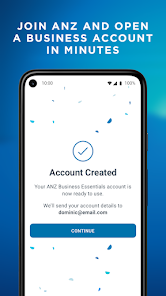
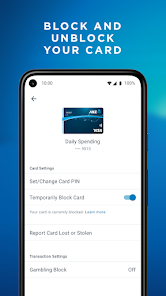
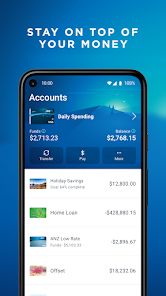
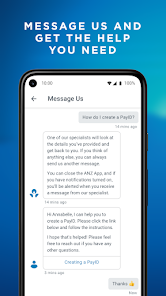
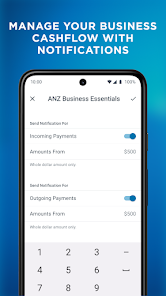
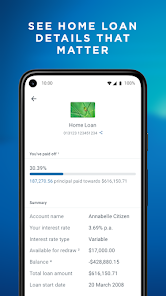
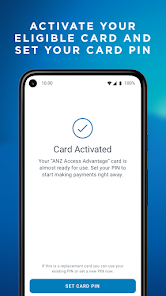
ANZ Australia offers a comprehensive range of banking services tailored to meet the needs of its customers. One of the standout features is its user-friendly mobile banking app, which allows customers to manage their accounts, transfer funds, and pay bills with ease. The app also includes features like biometric login for enhanced security and real-time transaction notifications, ensuring users stay informed about their finances.
Another notable feature is the extensive network of branches and ATMs across Australia, providing customers with convenient access to banking services. ANZ also offers various account types, including savings, transaction, and investment accounts, catering to different financial needs. Additionally, the bank provides personalized financial advice and tools to help customers plan for their future, whether it’s saving for a home or retirement.
Furthermore, ANZ Australia is committed to sustainability and social responsibility, offering green banking options and supporting community initiatives. With competitive interest rates and a focus on customer service, ANZ Australia strives to create a positive banking experience for all its clients.
Using ANZ Australia is straightforward, thanks to its intuitive digital platforms. To get started, customers need to open an account, which can be done online or at a local branch. Once the account is set up, users can download the ANZ mobile banking app from their device's app store. After installation, they will need to log in using their account credentials or set up biometric authentication for added convenience.
Once logged in, customers can easily navigate through various features, such as checking account balances, viewing transaction history, and making payments. The app also allows users to transfer money between accounts or to other banks, set up direct debits, and manage their savings goals. For those seeking financial advice, ANZ provides resources and tools within the app to help users make informed decisions.
Additionally, customers can access customer support through the app or by visiting a branch if they have any questions or need assistance. Overall, ANZ Australia’s digital services are designed to make banking accessible and efficient for all users.
The ANZ app comes with several advantages that enhance the banking experience for its users. One of the primary pros is its user-friendly interface, which makes navigation simple for both tech-savvy individuals and those less familiar with digital banking. The app also offers a wide range of features, including bill payments, fund transfers, and account management, all in one place. Additionally, the app's security measures, such as biometric login and real-time alerts, provide peace of mind for users concerned about their financial safety.
However, there are some drawbacks to consider. Some users have reported occasional technical glitches, which can hinder the banking experience. Additionally, while the app is generally reliable, there may be times when it experiences downtime during maintenance or updates. Furthermore, certain features may not be available in all regions, limiting functionality for some users. Overall, while the ANZ app offers a robust banking solution, potential users should weigh these pros and cons to determine if it meets their specific needs.
In conclusion, the ANZ app is a powerful tool for managing finances, but like any digital service, it has its limitations. Users should stay informed about updates and changes to ensure they are getting the most out of their banking experience.

 ANZ offers competitive interest rates for savings and loans. The bank provides a wide range of financial products. Customers benefit from user-friendly online banking services. ANZ has a strong commitment to sustainability initiatives. Excellent customer service ensures quick problem resolution.
 High fees can erode your savings over time Limited branch access in rural areas can be inconvenient Customer service experiences may vary, leading to frustration

Very basic app and lacks many of the features other banking apps offer. For a bank that makes millions in profit every year, you’d expect a much more modern app that’s on par with other banking apps. What’s really frustrating is that the app no longer saves recipients. Every time you want to transfer money to the same person, you have to re-enter all their details again. Previously, recipients could be saved automatically during transfers, which was more convenient. Don't know what changed.
Review left years ago no longer relevant. ANZ didn't give me loan 300k for a block of land I had 100k I could access for payments or pay off the principal and take 200k loan. but refused finance. that block sold for 700k a year later. So they cost me 400k in a year. Using app for a few months now and I have no trouble using it transfer money to different accounts easily. Still need to speak with tellers about loans and to access cash. Face to face banking is still a pleasant experience for me
I'm bank surfing at the moment and thought I'd try ANZ again. This app sucks. There's no running total in your bank account and no actual account balance on the home screen, you have to press into the account to see what the actual available funds are. Clearly whoever designed this app banks with someone else. It's been this way for years and ANZ don't look like they'll change it any time soon.
Generally great with an easy to use interface. Unfortunately when activating a new card the process was confusing. I wasn't really sure what I was meant to be scanning? I assume it was the card number? Also when I tried to scan the scanning didn't work.
How is it that a company that makes 6 billion profit annually can't get simple functions on their app to work? can't edit my profile "something went wrong" to add my email. can't contact support chat with infinite loading, yet my internet is fine. Regretting setting up an account with anz
Review Source: Google Play store public user reviews.
Yes, users can submit suggestions or feedback through the app itself or by contacting ANZ customer support for assistance.
Yes, ANZ Australia collects personal data to provide and improve its services, but it adheres to strict privacy policies to protect user information.
Some features of the ANZ Australia app may be accessible offline, but most functionalities, such as transactions and account updates, require an internet connection.
Since there is no subscription fee for the app, there is no need to cancel; however, you can delete the app from your device at any time.
There is no subscription fee for using the ANZ Australia app; it is free for all customers with ANZ accounts.
Yes, you can access customer service through the ANZ app via the help section or by using the contact options provided in the app.
Yes, you can activate your account online by following the activation link sent to your email after account creation.
You can reach ANZ customer service by calling 13 13 14 or using the online chat feature on our website.
Click on the "Forgot password?" link on the login page, follow the instructions, and you'll receive an email to reset your password.
To log in, visit the ANZ website, click on the 'Log in' button, and enter your customer number and password.
ANZ App version 4.92. This version includes routine updates that help keep the app stable and consistent. We’ve made a range of minor improvements to enhance everyday use and accessibility. Please update to the latest version for the most current experience.














 Google Play
  App Store