Category: Communication
Developer: Verizon Consumer Group
 Verified App


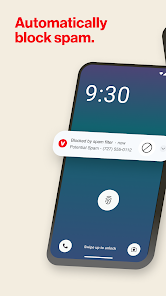
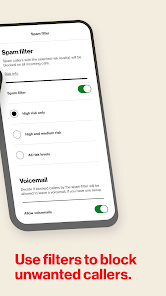
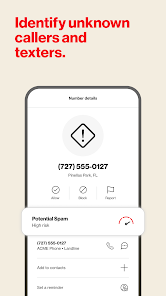
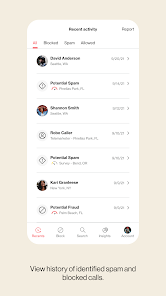
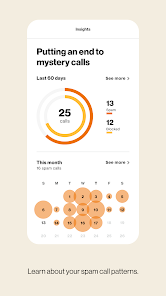
If you're someone who receives a flood of unwanted calls daily, Verizon Call Filter is a game-changer. This app is designed to help you regain control over your phone calls and manage unwanted interruptions effectively. Here are some of the standout features that truly enhance its functionality:
As someone who juggles a busy work schedule and personal commitments, I find my phone ringing at all hours, often with numbers I don’t recognize. Before using Verizon Call Filter, I would answer calls only to be met with the robotic voice of a telemarketer or, worse, a scammer trying to steal my information. Now, I rely on the app daily. For instance, during a crucial work project, I received a call that the app flagged as "Potential Spam." Instead of answering and risking my concentration, I simply let it go to voicemail. Later, I checked the app, confirmed it was indeed spam, and felt a wave of relief knowing I didn’t waste my time.
The Verizon Call Filter app is intuitive and user-friendly. The interface is clean and straightforward, making it easy to navigate through the various features. Upon opening the app, I was greeted with a dashboard displaying my call statistics, including the number of spam calls blocked and the calls that were screened. The workflow is seamless; I can quickly access the spam call list, manage my block list, and view caller ID information without any hassle. Performance-wise, the app has been reliable. I haven’t experienced any major bugs or slowdowns, which is crucial when you're relying on it to manage important calls. Overall, my experience with Verizon Call Filter has been overwhelmingly positive. It has truly enhanced my calling experience and provided me with peace of mind.
Verizon Call Filter is available for free for all Verizon customers, which is an absolute steal considering the level of protection and functionality it offers. There are also premium features available for a small monthly fee, but the basic version covers the essential needs of most users. Given how much time and frustration it saves, I believe even the premium features are worth the investment for frequent users.
Verizon regularly updates the Call Filter app, ensuring that it stays ahead of new spam tactics and enhances user experience. The updates are seamless, and I’ve noticed improvements in spam detection since I first started using the app. Additionally, Verizon provides excellent customer support. If I ever had questions or issues, I could easily reach out through their official support channels and receive prompt assistance. This level of support reinforces my confidence in using the app.
When it comes to security and privacy, Verizon Call Filter takes a proactive approach, which is vital for American users concerned about data safety. The app is available on both the App Store and Google Play, ensuring that it meets the necessary standards for mobile applications. Upon downloading the app, I had to register with my Verizon account, which required minimal personal information. This streamlined process made me feel secure without overwhelming me with unnecessary data requests.
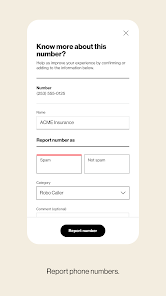
Regarding ads and tracking behavior, I appreciate that Verizon Call Filter does not bombard users with ads, which can be a significant turn-off for many. The app is primarily focused on enhancing user experience without compromising privacy. Additionally, the community reporting feature is an excellent way to contribute to the app's improvement while maintaining transparency about how data is used. Overall, I feel safe using Verizon Call Filter, knowing my information is handled responsibly and with respect to my privacy.

 Blocks unwanted spam calls effectively Identifies potential fraud calls instantly Customizable settings for personalized experience Voicemail transcription for easy access User-friendly interface for quick navigation
 Occasional false positives may block legitimate calls. Limited customization options for filtering preferences. Users may miss important calls without notification. Interface can be confusing for some users.

Even with the highest filter settings it still let's calls through that show up as "risky" multiple times a day. also, there is clearly a bug where it will correctly block a caller the first time they try, but then if they try to call immediately again, the call will go through. While it does block some calls, its just frustrating how many it allows to come through. Funny enough, it has blocked a call from someone in my actual contact list that I talk to regularly which makes no sense.
This app is a huge disappointment. Paying extra for a service that only allows 10 permitted calls is already bad, but it gets worse when it starts blocking my own saved contacts, even favorites, as spam. At that point, it is not protecting me, it is disrupting basic communication. For a paid Verizon product, this is unacceptable and feels like overpriced, unreliable junk.
awful app. yeah it'll block calls but the app does not work. at first I could open it and see the list of calls. I tried to mark a number as safe to come through that it blocked. it would load and load and never let me. now when I open the app it will say "get started" and then immediately change to a page that says I'm not part of the Verizon network which is incorrect. I can't even change my spam filter settings.
this is not easy to find out who's calling and to block the calls from coming, you still have a notification. There should be more of an identifier with the phone numbers. I get calls, block then, they change 1 number, call again. can't find out who they are coming from. i still can't answer my phone. It's ridiculous. I pay for a phone. It can't even answer it.
Best app found to easily block spam text and calls. However, there are no settings to allow you to back off on what it blocks, nor does it warn you the call may be spam and allow you to answer it. So, it's a little aggressive. It just marks it as spam and blocks it outright. Sitting here waiting on a call with a physician and the app blocked it. Not what I expected to happen. However, the recommendations it gives for updating filters makes zero sense as the directions to not apply.
Review Source: Google Play store public user reviews.
Verizon Call Filter does collect some data to provide its services, but Verizon has privacy policies in place to protect your information.
Verizon Call Filter offers a free version with basic features, while also providing a subscription option for additional premium features.
Yes, Verizon Call Filter requires an internet connection to access its features, including call identification and spam reporting.
You can contact Verizon support for Call Filter via the app, through the Verizon website, or by calling their customer service for assistance and feedback.
You can manage or cancel your Verizon Call Filter subscription through the app settings or by visiting your Verizon account online.
Yes, you can use the app on multiple devices as long as they are linked to the same Verizon account.
Yes, you can customize settings for spam detection and call blocking to suit your preferences.
Open the app, navigate to the settings, and follow the prompts to activate Call Filter on your line.
Download the app from the App Store or Google Play, then log in using your Verizon account credentials.
In the app, select the spam number and choose the option to report it directly from the call log.
Bug Fixes











 Google Play
  App Store