Category: Communication
Developer: Samsung Electronics Co., Ltd.
 Verified App


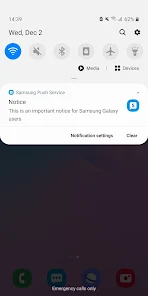
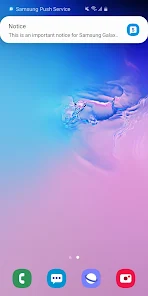
Samsung Push Service is a vital component of the Samsung ecosystem, designed to enhance user experience by delivering timely notifications and updates. One of its primary features is the ability to send real-time alerts for various applications, ensuring users stay informed about important events, messages, and promotions. This service supports a wide range of Samsung apps, including Samsung Health, Samsung Pay, and more, allowing seamless communication between the apps and the user.
Another notable feature is its efficient data management, which minimizes battery consumption while ensuring that notifications are delivered promptly. The service also allows users to customize their notification preferences, enabling them to choose which apps can send alerts and how frequently they receive them. Additionally, Samsung Push Service is designed to work in the background, ensuring that users receive updates without needing to actively open the apps. Overall, this service enhances the functionality of Samsung devices, making them more user-friendly and responsive to individual needs.
Using Samsung Push Service is straightforward and requires minimal setup. First, ensure that your Samsung device is connected to the internet, either through Wi-Fi or mobile data. The service is typically pre-installed on Samsung devices, so you won’t need to download it separately. To manage your notification settings, navigate to the device's Settings menu, then select 'Apps' or 'Application Manager.' From there, locate 'Samsung Push Service' and tap on it to access the settings.
Within the settings, you can enable or disable notifications for specific apps, allowing you to tailor your experience according to your preferences. If you wish to receive notifications, ensure that the service is enabled and that the apps you want to receive alerts from are also allowed to send notifications. Additionally, you can adjust the notification sound and vibration settings to suit your liking. By following these steps, you can effectively utilize Samsung Push Service to stay updated with the latest information from your favorite apps.
Samsung Push Service offers several advantages that enhance the user experience on Samsung devices. One of the primary benefits is the real-time delivery of notifications, which keeps users informed about important updates and events. This feature is particularly useful for apps like Samsung Health and Samsung Pay, where timely alerts can significantly impact user engagement. Additionally, the service is designed to be energy-efficient, minimizing battery drain while still providing essential notifications.
However, there are some drawbacks to consider. One potential con is that users may find the volume of notifications overwhelming, especially if multiple apps are allowed to send alerts. This can lead to notification fatigue, where important messages may be overlooked. Furthermore, some users may have concerns about privacy and data usage, as the service requires an internet connection to function effectively. Overall, while Samsung Push Service enhances the functionality of Samsung devices, users should carefully manage their notification settings to strike a balance between staying informed and avoiding excessive alerts.

 Instant notifications keep you updated on important events and messages. Seamless integration enhances your overall Samsung device experience. Customizable alerts allow you to prioritize what matters most. Low data usage ensures efficient performance without draining your resources. Reliable delivery guarantees you never miss critical information or updates.
 Limited customization options restrict user control over notifications. Frequent updates may consume data and battery life. Not all apps support the push service, leading to missed alerts.
  Google Play
  App Store

samsung puts apps on your phone that you can't take off. I had one of what I found out too late was one of their worst phones. I made space on my phone only to find out it had upgraded the OS during the night. Since then, the stock keyboard is fat finger everything. Icons changed the look. Some things don't need to change to work. But things like that are changed because someone got money to do it.
One of many Samsung apps you can't take off and it constantly bugs you to update it. They also installed games without permission that I constantly have to uninstall. Unless Samsung fixes these issues I'm never getting one of their phones again, there are many better options that let you do what you want with your phone.
Ever notice that there is a constant stream of apps you "must have" and that are constantly being "updated" with permissions they need in order for your phone to work correctly or for you to have an "enhanced" experience. Bloatware at best! Every app should have a truthful "Essential" label and a delete button if it's not so it could be deleted for good at the user's discretion. Crapware!
This isn't really needed and doesn't do what Samsung claims it does. Truth about it is that it is spying on you in addition to helping to force cycle the on board memory and allow Samsung/Google to force install apps on your device. Every time they claim to be giving you some kind of supper special app/feature what is happening is that they were either paid to force install it or they are waiting to cycle the memory of your phone again so that they can make it fail faster so you buy again.
Just look at what everyone is saying. Its all true. I have at least 10 samsung apps on my phone that update themselves, after I turn off auto update. To me it is Fraud and they don't follow the developer rules. These apps have all my info and still want more. Try the "Discontinue Use" in samsung internet. Its gone less than 8 seconds. Then.......IT'S BACK..
Review Source: Google Play store public user reviews.
Yes, users can typically submit suggestions or feedback through Samsung's official support channels or forums, where they can communicate directly with the development team.
Samsung Push Service may collect certain usage data to improve its services, but it typically does not collect personally identifiable information without user consent.
No, Samsung Push Service requires an internet connection to receive and deliver notifications, as it relies on a cloud-based infrastructure.
Since there is no subscription for Samsung Push Service, users do not need to cancel anything; however, they can disable the service in their device settings if desired.
Samsung Push Service does not have a subscription model; it is offered for free as part of the Samsung ecosystem.
Yes, you can activate your account by following the link sent to your email after registration.
You can reach Samsung Customer Service via the official website or by calling the provided customer support number for assistance.
To update your Customer Number, log in to your account and navigate to the account settings, or contact Customer Service for further assistance.
To log in, visit the Samsung Push Service website and enter your credentials in the login section.
You can contact Customer Service through the support section on the Samsung website or by calling the customer service number.
Improved stability