Version: 3.0.2
Developer: Philips Respironics
 Verified App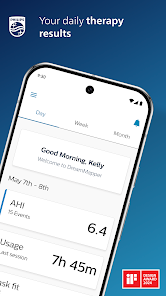
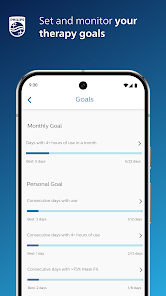
DreamMapper is a comprehensive mobile application designed to assist users in managing their sleep therapy, particularly for those using CPAP (Continuous Positive Airway Pressure) devices. One of its standout features is the ability to track therapy progress, allowing users to monitor their usage hours, mask fit, and overall adherence to prescribed therapy. This data is presented in an easy-to-understand format, enabling users to visualize their progress over time.
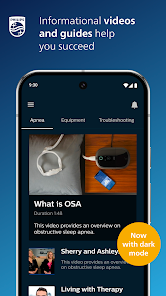
Another notable feature is the personalized coaching and feedback provided by the app. Users receive tailored tips and suggestions based on their therapy data, which can help improve their experience and outcomes. Additionally, DreamMapper includes educational resources about sleep apnea and its treatment, empowering users with knowledge to better understand their condition. The app also allows for goal setting, enabling users to establish and track personal milestones related to their therapy journey.
Furthermore, DreamMapper offers a user-friendly interface that is accessible to individuals of all ages. The app is compatible with various devices, making it convenient for users to access their information anytime, anywhere. Overall, DreamMapper serves as a valuable tool for enhancing the effectiveness of sleep therapy and improving the quality of life for those affected by sleep apnea.
Using DreamMapper is a straightforward process that begins with downloading the app from the App Store or Google Play. Once installed, users need to create an account or log in if they already have one. After setting up their profile, users can connect the app to their CPAP device, which allows for automatic data syncing. This connection is crucial as it enables the app to gather real-time information about therapy usage and performance.
After the initial setup, users can explore the app's dashboard, which displays key metrics such as hours of usage, mask fit, and leak rates. To maximize the benefits of DreamMapper, users should regularly check their progress and utilize the personalized feedback provided. The app also encourages users to set achievable goals, which can motivate them to stay consistent with their therapy. Additionally, users can access educational materials within the app to learn more about sleep apnea and effective management strategies.
For ongoing support, users can engage with the app's community features, where they can share experiences and tips with others facing similar challenges. Overall, DreamMapper is designed to be user-friendly, making it easy for individuals to take charge of their sleep therapy and improve their overall health.
DreamMapper offers several advantages that make it a valuable tool for individuals undergoing sleep therapy. One of the primary benefits is its ability to provide real-time tracking of therapy data, which helps users stay accountable and motivated. The personalized feedback and coaching features are also significant advantages, as they offer tailored advice that can lead to improved therapy adherence and outcomes. Additionally, the educational resources available within the app empower users with knowledge about their condition, fostering a better understanding of sleep apnea and its management.
However, there are some drawbacks to consider. One potential con is that the app requires a compatible CPAP device for full functionality, which may limit accessibility for some users. Additionally, while the app is user-friendly, some individuals may still find the initial setup process challenging, particularly if they are not tech-savvy. Furthermore, the effectiveness of the app largely depends on the user's commitment to regularly engage with it and utilize its features. Overall, while DreamMapper has its limitations, its benefits can significantly enhance the sleep therapy experience for many users.
In conclusion, DreamMapper is a powerful tool that can aid individuals in managing their sleep apnea treatment effectively. By weighing the pros and cons, users can determine if this app aligns with their needs and preferences.
Spotify Wrapped is an annual feature that summarizes your listening habits, including your most-played songs and artists of the year.
To create a playlist, click "Your Library," then "Playlists," and select "Create Playlist." Add songs by searching or browsing.
Yes, with a Spotify Premium subscription, you can download songs and playlists for offline listening.
Spotify offers a free tier with ads, as well as a Premium subscription that removes ads and adds features.
Click the three dots next to the song, select "Share," and choose your preferred sharing method, like social media or a link.
















 Google Play
  App Store