Dolphin Emulator is a powerful, open-source emulator for Nintendo GameCube and Wii games, allowing users to play their favorite titles on various platforms, including Windows, macOS, and Linux. With enhanced graphics, customizable controls, and support for high-definition resolutions, Dolphin provides an immersive gaming experience. Its active community continuously contributes to improvements and features, making it a popular choice for gamers seeking to relive classic Nintendo experiences on modern devices.
Features & Highlights
- Cross-Platform Compatibility: Dolphin Emulator allows users to play Nintendo GameCube and Wii games on various platforms including Windows, macOS, and Linux. Imagine being able to relive your childhood memories of “Super Mario Sunshine” on your high-end gaming PC instead of the original console. The seamless transition between devices makes this feature exceptionally appealing.
- High Definition Graphics: One of the standout features of Dolphin Emulator is its ability to upscale games to 1080p or even 4K resolution. For instance, when I played “The Legend of Zelda: Twilight Princess,” the graphics were not just nostalgic; they were stunningly vibrant and detailed, making the landscapes and characters feel fresh and immersive.
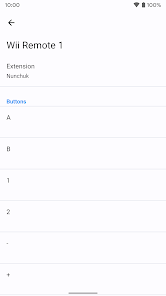
- Customizable Controls: Dolphin Emulator offers extensive control customization options. Whether you're using a keyboard and mouse or a game controller, you can tailor the controls to suit your preferences. I remember setting up my Xbox controller to play “Super Smash Bros. Brawl,” and the process was straightforward, allowing me to tweak button mappings until they felt just right.
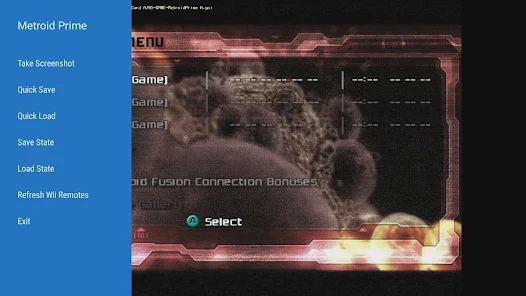
- Save States: This feature enables you to save your game at any point, making it easier to pick up where you left off. I often use this while playing challenging levels in “Metroid Prime,” allowing me to experiment without the fear of losing progress after a tough boss fight. It’s a game-changer for those who have busy lives!
- Active Community and Development: Dolphin Emulator has a vibrant community that contributes to its ongoing development. I often find myself checking the forums for tips and tricks or to download the latest builds. The active development means that bugs are often fixed quickly, and new features are regularly added.
Real Experience Using Dolphin Emulator
Application Scenarios
In my daily life, I often find myself reminiscing about the games I grew up with. The Dolphin Emulator has become my go-to solution for enjoying these classics without the hassle of finding and maintaining old consoles. Whether I’m relaxing on the couch after a long day or taking a short break during work hours, I can effortlessly load up a game and dive back into the adventures I once cherished. Last weekend, for instance, I hosted a game night with friends. We connected my laptop to the TV and played “Mario Kart: Double Dash!!” using the Dolphin Emulator. The high-definition graphics and customizable controls made the experience not only nostalgic but also incredibly fun for everyone involved.
User Experience
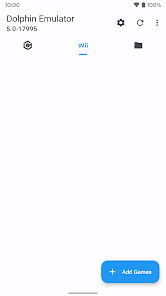
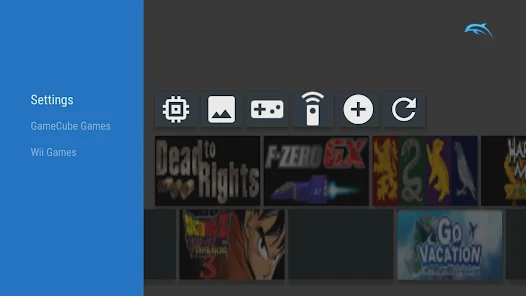
The user interface of Dolphin Emulator is user-friendly and intuitive. Upon launching the app, I was greeted with a clean layout that made it easy to navigate my game library. Adding games is a breeze; I simply pointed the emulator to the folder containing my ROMs, and they automatically appeared. The feature workflow is smooth, from adjusting graphical settings to creating save states. Performance-wise, I’ve experienced minimal lag, even on demanding games like “Super Smash Bros. Brawl.” The emulator runs remarkably well on my mid-range PC, and I often forget I’m not playing on the original hardware. Overall, my feelings towards Dolphin Emulator are overwhelmingly positive; it provides a nostalgic yet modern gaming experience that is hard to beat.
Pricing
One of the best aspects of Dolphin Emulator is that it is completely free to use. There are no hidden costs or premium features locked behind a paywall, which is refreshing in a world where many emulators and software come with hefty price tags. The developers rely on donations, which makes it easy for anyone to access the full functionality of the app without spending a dime.
Updates & Support
Dolphin Emulator frequently receives updates that improve performance and fix bugs, which is one of the reasons I love using it. The development team is quite active, and I’ve seen patches roll out within days of reporting issues on their forums. I appreciate the robust community support; whether I need technical assistance or tips on optimizing my settings, there’s always someone willing to help. Plus, the official website is well-organized and provides a wealth of resources, including FAQs and troubleshooting guides.
Security & Privacy Review
As an American user, I prioritize security and privacy when using any software, and Dolphin Emulator does not disappoint. The application is available for download from its official website, ensuring that I’m not inadvertently installing malware or compromised versions from third-party sources. There’s no requirement for registration or personal data, which is a significant plus for privacy-conscious users like myself. The app does not contain intrusive ads or engage in tracking behavior, allowing me to enjoy my gaming sessions without distractions or concerns about data privacy. Overall, Dolphin Emulator stands out as a secure choice for anyone looking to relive the magic of GameCube and Wii games without compromising their privacy.
-
 Experience high-quality graphics
 - Play your favorite games anywhere
- Save and load game states easily
- Customize controls to your liking
- Supports various game formats
-
 Performance issues on some devices
 - Compatibility problems with games
- Setup can be complex for users
- May require powerful hardware



 Verified App


 Google Play
  App Store