
 Home
Home  Apps
Apps  Games
Games  About Us
  Cookies & Privacy Policy
  Terms of Service
ZUS - Save Car Expenses
Version: 6.15.3
Developer: No NDA Inc
 Verified App
 Advertisement
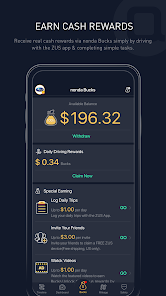
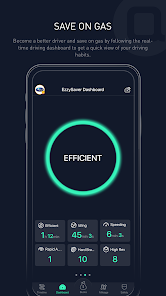
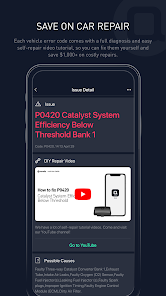
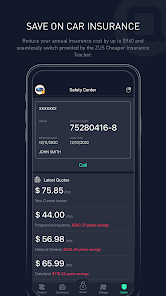
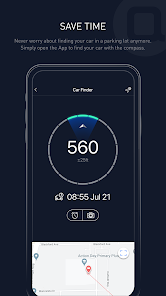
Introducing ZUS - Save Car Expenses, the ultimate app designed to help you manage and reduce your vehicle costs effortlessly. Track fuel consumption, monitor maintenance schedules, and receive personalized tips to optimize your spending. With ZUS, you can take control of your car expenses, ensuring you get the most out of every mile. Say goodbye to unexpected costs and hello to smarter driving with ZUS!
Advertisement
Features of "ZUS - Save Car Expenses"
"ZUS - Save Car Expenses" is a comprehensive mobile application designed to help users manage and reduce their vehicle-related expenses effectively. One of its standout features is the ability to track fuel consumption, allowing users to monitor their mileage and fuel efficiency over time. This feature helps in identifying patterns and making informed decisions about driving habits.
Another key feature is the expense tracking functionality, which enables users to log various costs associated with their vehicles, such as maintenance, repairs, and insurance. This holistic view of expenses helps users budget better and identify areas where they can save money. Additionally, the app provides reminders for upcoming maintenance tasks, ensuring that users stay on top of their vehicle's health and avoid costly repairs down the line.
Furthermore, "ZUS" offers a user-friendly interface that simplifies navigation and data entry, making it accessible for users of all ages. The app also includes a community feature where users can share tips and advice, fostering a sense of camaraderie among car owners. Overall, "ZUS - Save Car Expenses" is a valuable tool for anyone looking to manage their car expenses more effectively.
How to Use "ZUS - Save Car Expenses"
Using "ZUS - Save Car Expenses" is straightforward and user-friendly, making it accessible for everyone. To get started, users need to download the app from their respective app store and create an account. Once registered, users can input their vehicle details, including make, model, and year, which helps tailor the app's features to their specific needs.
After setting up their profile, users can begin logging their fuel purchases and expenses. The app allows for easy entry of fuel costs, mileage, and other expenses, which can be categorized for better tracking. Users can also set reminders for maintenance tasks, ensuring they never miss an oil change or tire rotation. The app's dashboard provides a visual representation of expenses, making it easy to analyze spending patterns over time.
Additionally, users can engage with the community feature to exchange tips and advice with other car owners. This social aspect enhances the overall experience, providing valuable insights into cost-saving strategies. By regularly updating their information and utilizing the app's features, users can effectively manage their car expenses and make informed financial decisions.
Pros & Cons of the App
Like any application, "ZUS - Save Car Expenses" comes with its own set of advantages and disadvantages. One of the primary pros is its comprehensive tracking capabilities, which allow users to monitor fuel consumption, maintenance costs, and overall vehicle expenses in one place. This feature can lead to significant savings over time, as users become more aware of their spending habits.
Another advantage is the user-friendly interface, which makes it easy for individuals of all ages to navigate the app and input data. The reminder feature for maintenance tasks is also a significant benefit, helping users keep their vehicles in optimal condition and avoid unexpected repair costs. Additionally, the community aspect fosters a sense of connection among users, providing a platform for sharing tips and experiences.
On the downside, some users may find the app's features limited if they are looking for more advanced analytics or integration with other financial tools. Additionally, while the app is designed to be user-friendly, some users may still experience a learning curve when first using it. Lastly, the effectiveness of the app largely depends on the user's commitment to regularly inputting data, which can be a drawback for those who prefer a more automated solution.
 Google Play
  App Store
 Top Apps





Similar Apps

Car Launcher Pro
Auto & Vehicles

4.4

inCarDoc Pro | OBD2
Auto & Vehicles
4.3

PayByPhone
Auto & Vehicles
4.9

ParkMobile: Park. Pay. Go.
Auto & Vehicles
4.7

Shell: Fuel, Charge & More
Auto & Vehicles
3.5

Toyota
Auto & Vehicles
4.5

CarMax: Used Cars for Sale
Auto & Vehicles
4.5
AutoZone Auto Parts & Repair
Auto & Vehicles
4.7

Android Auto
Auto & Vehicles
4.1

FIXD OBD2 Scanner
Auto & Vehicles
4.3

Allstate Motor Club
Auto & Vehicles
3.4

CarGurus: Used & New Cars
Auto & Vehicles
4.7
Advertisement
Laden…