Category: Augmented Reality
Developer: Align Technology Inc.
 Verified App


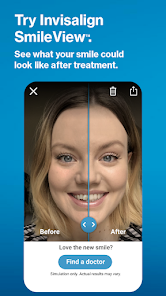
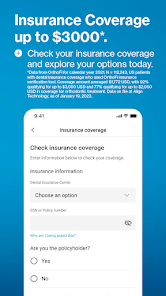
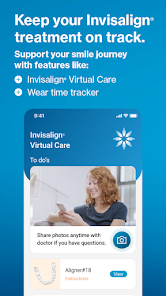
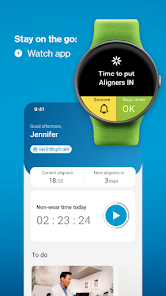
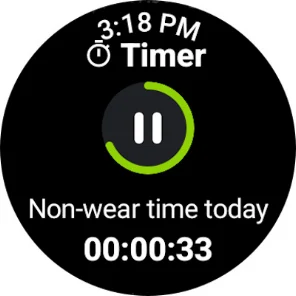
The "My Invisalign - Official App" offers a variety of features designed to enhance the user experience for individuals undergoing Invisalign treatment. One of the primary features is the ability to track your treatment progress. Users can view their aligner changes, monitor the duration of wear, and receive reminders for when to switch to the next set of aligners. This helps ensure that users stay on schedule and achieve optimal results.
Another notable feature is the personalized treatment plan, which provides insights into the expected timeline and outcomes of the treatment. The app also includes educational resources, such as videos and articles, to help users understand the Invisalign process better. Additionally, users can connect with their orthodontist through the app, allowing for easy communication and support. The app also offers a virtual treatment simulator, enabling users to visualize their potential results before completing their treatment.
Overall, the "My Invisalign - Official App" serves as a comprehensive tool for managing Invisalign treatment, making it easier for users to stay informed and engaged throughout their journey.
Using the "My Invisalign - Official App" is straightforward and user-friendly. First, download the app from the App Store or Google Play and create an account using your email address. Once registered, you can input your treatment details, including your orthodontist's information and your specific treatment plan. This initial setup is crucial for personalizing your experience and ensuring that you receive relevant updates.
After setting up your account, you can start tracking your aligners. The app will prompt you to log when you switch to a new set of aligners, helping you stay on track with your treatment schedule. You can also set reminders for daily wear and appointments with your orthodontist. Additionally, explore the educational resources available within the app to gain a better understanding of your treatment process. If you have any questions or concerns, use the app's messaging feature to communicate directly with your orthodontist for timely support.
By regularly engaging with the app, you can maximize the effectiveness of your Invisalign treatment and ensure a smoother journey toward achieving your desired smile.
The "My Invisalign - Official App" comes with several advantages that enhance the user experience. One of the main pros is its convenience; users can manage their treatment from their smartphones, making it easy to track progress and receive reminders. The app's educational resources are also beneficial, providing users with valuable information about their treatment and oral care. Additionally, the ability to communicate directly with orthodontists through the app fosters a supportive environment, allowing for quick resolution of any concerns.
However, there are some drawbacks to consider. Some users may experience technical issues, such as app crashes or slow loading times, which can hinder the overall experience. Additionally, while the app is designed to be user-friendly, some individuals may find it challenging to navigate, especially if they are not tech-savvy. Lastly, the app's effectiveness is contingent on users consistently engaging with it; neglecting to log aligner changes or appointments can lead to delays in treatment progress.
In summary, while the "My Invisalign - Official App" offers numerous benefits for managing Invisalign treatment, potential users should weigh these pros and cons to determine if it aligns with their needs and preferences.

 Track your Invisalign progress with real-time updates for motivation. Access personalized treatment tips tailored to your needs. Easily schedule appointments and receive reminders directly in the app. Connect with your orthodontist for quick questions and support anytime. Enjoy a user-friendly interface that simplifies your orthodontic journey.
 Limited features compared to other orthodontic apps may hinder user experience. Occasional syncing issues can disrupt treatment tracking and progress. User interface may feel outdated, affecting overall navigation and usability.
  Google Play
  App Store

The app no longer has the option to turn off auto detection for weekly progress photos I am required to send to my doctor (which never worked to begin with, it never detects my bite correctly), so now I can't take anything. Very clunky app and now useless for the one thing I'm obligated to use it for. Please put back the manual photo option or let users upload our own photos.
The detection systems might be the worst software coded in history. It normally takes me at least 10-15 minutes to take a total of 9 pictures - it keeps saying "Back teeth not detected" when they are very visible. During that time, I need to stretch my entire face to the absolute limit using a cheek retractor. I feel more pain taking pictures than when I broke 3 fingers. And I have to do this weekly. The interface is alright but the detection systems are horrible so it really doesn't matter.
Edit: removing a star because the app is even worse. The timer never worked properly and now I submitted photos last week and had feedback in progress for days. I sent messages to my doctor, to support, nothing. Radio silence for a week. My photos for week 25 and 26 are both listed as week 25 and I got no feedback for week 30. So I guess it just broke. Almost 4k for it to not work and no one to respond to you. I regret ever getting Invisalign this way.
Without exaggeration this is the worst piece of software I've used in my life, by far. The My Care picture taking is completely broken. The AI detection keeps failing over and over and over again, telling you it "couldn't process last picture" with no other info. You have to allocate 30 min of your time to take 9 pictures. This is insane
As others have written - photo processing is broken on Android. It worked several months ago, but then suddenly won't process photos that include back teeth no matter the angle - ("Couldn't process photo"). Others have reported the same. Does it on multiple phones so it's not us. Fix your software. Edit: Developer's response is to submit contact form but they don't respond.
Review Source: Google Play store public user reviews.
Yes, users can submit suggestions or feedback through the app's contact or support section, ensuring their voices are heard.
Yes, the app may collect personal data to enhance user experience and provide tailored services, but it complies with privacy regulations.
Yes, My Invisalign - Official App allows some features to be accessed offline, although certain functionalities may require an internet connection.
You can cancel your subscription through your app store account settings or by following the cancellation instructions provided in the app.
The subscription cost for My Invisalign - Official App varies based on the features selected, but detailed pricing can be found within the app.
Unfortunately, customer numbers cannot be changed once your account is activated. Please contact customer service for any concerns.
You can reach customer service through the app's help section or by calling the number listed on our website.
To activate your account, follow the activation link in your email or enter your details directly in the app under “Activate Account.”
You can find customer service contact details in the app's help section under "Contact Us."
If you activated your account and can't log in, double-check your password or contact customer service for support.