Category: Augmented Reality
Developer: Facer Studios
 Verified App


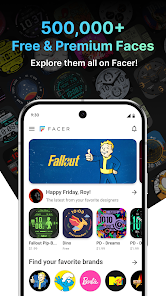
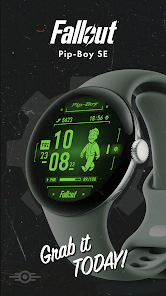
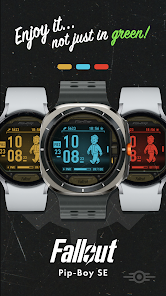
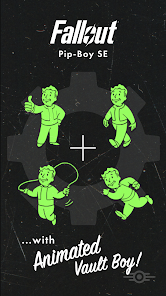
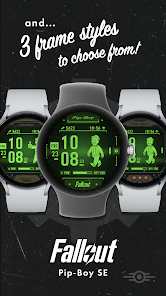
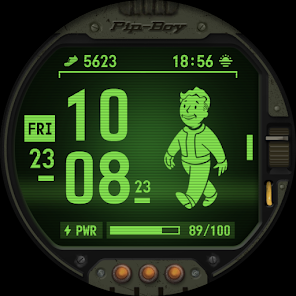
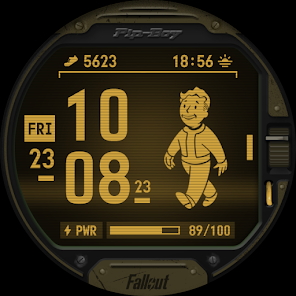
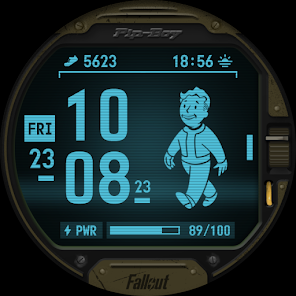
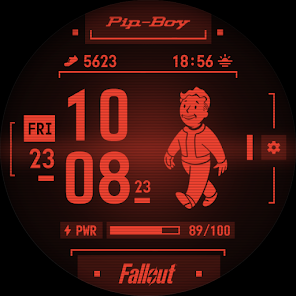
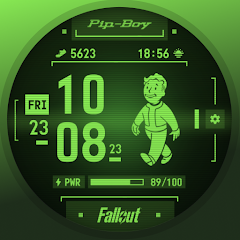
The "Fallout Pip-Boy Watch Face" is a unique and immersive watch face designed for fans of the Fallout franchise. One of its standout features is the iconic Pip-Boy interface, which replicates the look and feel of the in-game device. Users can enjoy a customizable display that showcases essential information such as time, date, and battery life, all presented in a retro-futuristic style that pays homage to the series.
Additionally, the watch face includes interactive elements, allowing users to tap on various icons to access different functionalities. This interactivity enhances the user experience, making it not just a timepiece but also a mini-dashboard for notifications and health tracking. The watch face is also designed to be energy-efficient, ensuring that it does not drain the battery excessively while providing a visually appealing experience. With various color themes and customization options, users can personalize their Pip-Boy watch face to match their style or mood.
Using the "Fallout Pip-Boy Watch Face" is straightforward and user-friendly. First, ensure that you have the watch face installed on your compatible smartwatch. Once installed, navigate to your watch's settings or watch face selection menu. From there, locate the Pip-Boy watch face and select it to set it as your active display.
After activation, you can customize the watch face to suit your preferences. Tap on the various icons to explore the interactive features, such as checking notifications or accessing health metrics. You can also adjust settings like color themes and display options through the watch's companion app on your smartphone. This app allows for deeper customization, enabling you to tailor the watch face to your liking. Overall, the user experience is designed to be intuitive, making it easy for both new and seasoned users to enjoy the Pip-Boy watch face.
The "Fallout Pip-Boy Watch Face" comes with several advantages that appeal to fans of the franchise. One of the primary pros is its nostalgic design, which effectively captures the essence of the Pip-Boy from the games. This makes it a delightful addition for gamers who want to showcase their love for Fallout. Additionally, the interactive features enhance usability, allowing users to access important information quickly and efficiently. The customization options also provide a personal touch, enabling users to tailor the watch face to their preferences.
However, there are some drawbacks to consider. One potential con is that the watch face may not be compatible with all smartwatch models, limiting its accessibility. Furthermore, while the interactive features are engaging, they may not be as comprehensive as those found in more advanced smartwatch applications. Some users might find the energy consumption higher than expected, especially if they frequently use the interactive elements. Overall, while the "Fallout Pip-Boy Watch Face" offers a unique experience, potential users should weigh these pros and cons before making a decision.

 Stylish design inspired by the iconic Fallout universe Customizable features to match your personal style Easy access to notifications and health metrics Durable build ensures long-lasting use in any environment Engaging animations enhance your daily experience
 Limited customization options may not satisfy all users' preferences. Battery life can drain quickly with constant use. Interface may feel cluttered and overwhelming for some users.
  Google Play
  App Store

ALMOST perfect. I love it for the most part. There should be an option to stop the pip boy animation to conserve power. Other than that, there should be more complication options, there's certainly room for them on the watch face and you can't change the ones that exist aside from two small ones at the top. You should be able to change the battery power bar to something else. The fallout logo on the bottom takes up enough space for two complications itself, Or on the right, instead of settings.
Awesome! I wish you could customize it exactly how you wanted it other then the background color and 2 additional add ons. May be a little much for asking but it would be cool if there could be a little achievement sort of like the game when let's say you meet your walking goal or your extremely tired and vault boy shows an animation of said action(s). Other then that, I get a lot of compliments surprisingly!
Great watch face just wish there were more complications, colors and backgrounds. Maybe you can add an option that as your battery depletes his health gets worse. Definitely my favorite of the available pipboy faces for the galaxy watch ultimate. You get 4 colors (green yellow red and blue). You get 3 backgrounds, (2 pipboy styled and one alternate) And 2 complications that appear on the top.
Needlessly complicated installation experience. I think I wound up paying for it twice through both the Android and Watch store. Seeing other reviews saying refund inquiries are pointless, I guess I'll have to eat the cost. It's a fun design but more complicated than it needs to be, and it'd be better if it didn't say "Fallout" at the bottom so it would feel more immersive. It's also been a huge drain of battery life on my Galaxy Watch 4, so I'm going to have to uninstall in the end.
Compared to the original Facer version, which though fun due to the multiple screens, this one is superior for me -- simply because the face complication, which I have set for weather (where the original was on the last screen). I also like the frame option for Fo3 and the ability to switch between the color choices in Fo3/NV/4. For those having Battery Drain issues, try turning off your Location option. Since it isn't used on this face. Most Samsung watches have it in the drop down menu toggle.
Review Source: Google Play store public user reviews.
Yes, users can submit suggestions or feedback through the app’s support section or the developer's contact information found on the app's page in the store.
The app is designed to prioritize user privacy and does not collect personal data without consent. However, it may access some device information to enhance functionality.
Yes, Fallout Pip-Boy Watch Face can function offline, allowing users to access the watch face without requiring an internet connection.
To cancel your subscription, you can go to the app settings in the Google Play Store and follow the prompts to manage your subscriptions.
The subscription cost for Fallout Pip-Boy Watch Face may vary based on the selected plan, typically ranging from a few dollars per month to an annual subscription discount.
Yes, you can access customer service without logging in by visiting our support site for assistance.
Customer numbers are unique and cannot be changed. If you have issues, please contact customer service for help.
After purchase, log in to your account and follow the instructions to activate your watch face under the “My Products” section.
You can reach customer service through the support section of our website or via the app's help menu. We’re here to assist you!
To log in, open the app and enter your registered email and password. If you encounter issues, try resetting your password.
Fixed the issue with Pip-Boy character disappearing after animation on Pixel Watch 3