
Category: Shopping
Developer: H-E-B
 Verified App


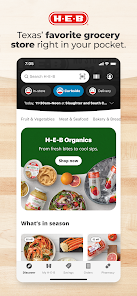
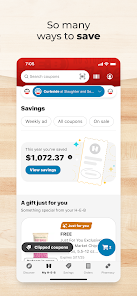
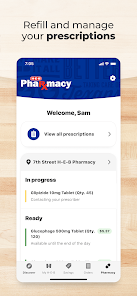
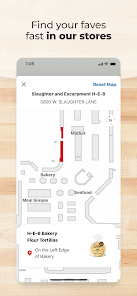
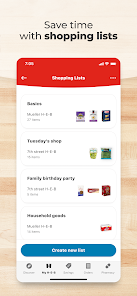
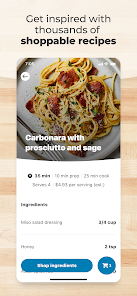
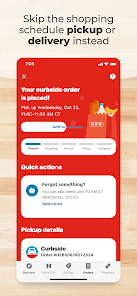
"My H-E-B" is a comprehensive app designed to enhance the shopping experience for H-E-B customers. One of its standout features is the personalized shopping list, which allows users to create and manage their grocery lists efficiently. This feature can be tailored to include frequently purchased items, making it easier to shop for essentials. Additionally, the app provides access to weekly ads and promotions, ensuring that users are always informed about the latest deals and discounts available at their local store.
Another notable feature is the ability to order groceries online for curbside pickup or delivery, which adds convenience for busy shoppers. Users can browse the entire store's inventory, select items, and choose their preferred pickup or delivery time. The app also includes a store locator, helping users find the nearest H-E-B location. Furthermore, customers can manage their H-E-B account, view their purchase history, and even access digital coupons, making it a one-stop solution for all shopping needs.
Using "My H-E-B" is straightforward and user-friendly. First, download the app from the App Store or Google Play and create an account using your email address. Once registered, you can start exploring the app's features. Begin by setting up your personalized shopping list, where you can add items you frequently buy or plan to purchase for your next grocery run.
To take advantage of the app's online shopping capabilities, navigate to the grocery section, browse through the categories, and select the items you wish to purchase. After adding items to your cart, you can choose between curbside pickup or home delivery, depending on your preference. Don’t forget to check the weekly ads and available coupons to maximize your savings. Finally, review your order, select a pickup or delivery time, and complete your purchase. The app also allows you to track your order status, ensuring a seamless shopping experience.
The "My H-E-B" app offers several advantages that enhance the shopping experience. One of the primary benefits is the convenience of online ordering, which saves time for busy individuals and families. The personalized shopping list feature helps streamline grocery shopping, while access to weekly ads and digital coupons allows users to save money. Additionally, the app's user-friendly interface makes navigation easy, even for those who may not be tech-savvy.
However, there are some drawbacks to consider. Some users have reported occasional glitches or slow loading times, which can be frustrating during busy shopping periods. Additionally, while curbside pickup and delivery options are convenient, they may not be available in all areas, limiting access for some customers. Lastly, the app may require a learning curve for new users unfamiliar with grocery shopping apps. Overall, while "My H-E-B" has its pros and cons, it remains a valuable tool for enhancing the grocery shopping experience.

 Convenient shopping with easy online ordering Wide selection of fresh, quality groceries Exclusive discounts and rewards for members Personalized recommendations for tailored shopping Fast delivery and curbside pickup options available
 Limited product selection compared to larger supermarkets Higher prices on some items than competitors Inconsistent stock availability can frustrate shoppers App navigation can be confusing for users

App crashes frequently and will empty my cart. it randomly takes things out of my cart if the physical store is out of stock-however it doesn't update me or let me know. so I have to remember how many items are in cart. I started to make a physical list because I've had to redo my entire order. and yes, the app is up to date. love the recipes and features the app gives, but I'd trade it just so its functional.
Must manually log in to check prescriptions, as the fingerprint no longer works. No place to change this either. Have to "allow access to my account name, email, and phone number" each time I log in. Will not save in the app for some reason. Recommend making the app work like 99% of all other apps. Quick login with the method I choose (manual, fingerprint, pin, etc). And stop asking me to approve access I've approved countless times.
Edited again (11/8/25): I'm now having to login several times a day, even when uninstalling and reinstalling. I understand safety, but if you added the biometrics to log back in, it would be a million times better. I HATE having to go to the website, type my email, go to the next page, then put my password everytime. Please fix.
The "follow your delivery driver" does not follow the instructions I've provided. When you send a non-english speaking or one that can't read english who follows the GPS map, they WILL get lost in the apartment complex. I've said this before and nothing changes. Second, it would be nice to be able to delete items from the "Buy Again" option and "Past Orders". Several items are not something I'd buy again for several reasons. HEB provides this to save time, but it doesn't.
2 factor authentication for a store app? Who is the moron that decided it was a good idea? So, I am standing in front of an item which has a digital coupon, and I cannot get the discount because I cannot get into my app. First - stop with the digital coupons. Second, I don't need 2 factor authentication for a grocery store app. I am not going to be upset if someone gets into it and sees my grocery list.
Review Source: Google Play store public user reviews.
Yes, My H-E-B collects certain personal data to provide personalized services, improve user experience, and comply with legal requirements. You can review their privacy policy for more details.
My H-E-B is free to download and use, with no subscription required for basic features. However, some premium services may involve additional costs.
Yes, My H-E-B requires an active internet connection to access features such as online shopping, promotions, and account management.
You can contact My H-E-B support through the app's help section or visit their official website for additional support options, including email and customer service numbers.
You can manage or cancel your My H-E-B subscription directly through the app's settings or your account profile, following the provided instructions for subscription management.
Unfortunately, customer numbers cannot be changed once assigned. For any issues, please contact customer service for help.
Yes, you can use your customer number for online orders to earn rewards and access special offers.
You can update your customer information by logging into your account and navigating to the profile settings section.
To activate your account, click on the activation link sent to your email after registration and follow the prompts.
You can reach My H-E-B customer service by calling the support line listed on our website or using the chat feature in the app.
We fixed a few bugs and made some improvements to better serve Texans.















 Google Play
  App Store