
 Home
Home  Apps
Apps  Games
Games  About Us
  Cookies & Privacy Policy
  Terms of Service
MediaMonkey Pro
Version: 2.0.0026
Developer: Ventis Media, Inc.
 Verified App
 Advertisement
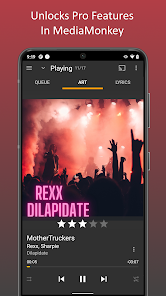
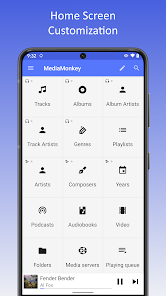
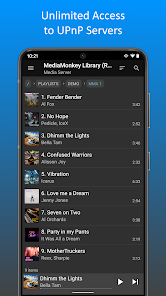
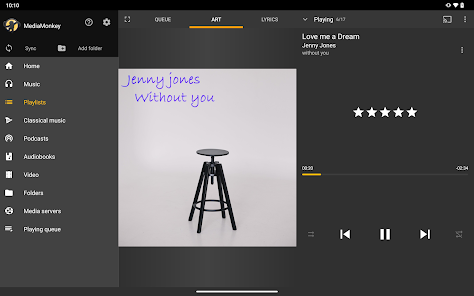
MediaMonkey Pro is a powerful media management app designed for music enthusiasts and audiophiles. It allows users to organize, manage, and play their music and video collections seamlessly. With features like advanced tagging, playlist creation, and support for various audio formats, MediaMonkey Pro enhances your media experience. Its intuitive interface and robust syncing capabilities make it easy to access your library across devices, ensuring you enjoy your favorite tracks anytime, anywhere.
Advertisement
Features of MediaMonkey Pro
MediaMonkey Pro is a comprehensive media management software designed for music enthusiasts and audiophiles. One of its standout features is its ability to organize and manage large music libraries, allowing users to categorize their collections by artist, album, genre, and more. The software supports a wide range of audio formats, including MP3, FLAC, and OGG, ensuring compatibility with various media types.
Another notable feature is the advanced tagging system, which enables users to edit and update metadata for their audio files easily. This is particularly useful for maintaining a well-organized library. MediaMonkey Pro also offers powerful playlist management tools, allowing users to create, edit, and share playlists effortlessly. Additionally, the software includes a built-in audio converter, enabling users to convert files between different formats without needing external tools.
For those who enjoy syncing their music with portable devices, MediaMonkey Pro supports synchronization with Android and iOS devices, making it easy to take your music on the go. The software also features a robust search function, allowing users to quickly find specific tracks or albums. With its customizable interface and extensive plugin support, MediaMonkey Pro is a versatile solution for anyone looking to enhance their media management experience.
How to Use MediaMonkey Pro
Using MediaMonkey Pro is straightforward, even for those new to media management software. After downloading and installing the application, users can begin by importing their music library. This can be done by selecting the "Add/Rescan Files to the Library" option, which allows users to browse their computer for audio files. Once imported, MediaMonkey will automatically organize the files based on metadata, making it easy to navigate through the collection.
To edit tags or metadata, users can right-click on a track and select "Edit Track" to access the tagging interface. Here, users can modify information such as artist name, album title, and genre. Creating playlists is also simple; users can drag and drop tracks into a new playlist or use the "AutoPlaylist" feature to generate playlists based on specific criteria.
For syncing music with portable devices, users can connect their device to the computer and select it from the MediaMonkey interface. The software will guide users through the synchronization process, ensuring that selected tracks are transferred seamlessly. Additionally, users can explore the extensive settings menu to customize their experience, including adjusting playback options and interface preferences. Overall, MediaMonkey Pro offers a user-friendly experience for managing and enjoying music collections.
Pros & Cons of MediaMonkey Pro
MediaMonkey Pro comes with several advantages that make it a popular choice among music lovers. One of the primary pros is its ability to handle large music libraries efficiently, making it ideal for users with extensive collections. The software's robust tagging and organization features allow for easy management of metadata, ensuring that users can keep their libraries well-structured. Additionally, the built-in audio converter and support for various file formats enhance its versatility, catering to different user needs.
However, MediaMonkey Pro is not without its drawbacks. Some users may find the interface a bit overwhelming at first, especially if they are accustomed to simpler media players. Additionally, while the software offers a wealth of features, some of them may require a learning curve to master fully. Furthermore, the Pro version comes with a price tag, which may deter some users who are looking for free alternatives. Overall, while MediaMonkey Pro has its challenges, its extensive features and capabilities make it a valuable tool for serious music enthusiasts.
Check All Versions  Google Play
  App Store
Google Play App Store Top Apps





Similar Apps

SiriusXM: Music, Sports & News
Music & Audio

4.6

Pandora - Music & Podcasts
Music & Audio
3.9

BandLab
Music & Audio
4.6

Audiomack: Music Downloader
Music & Audio
4.8

Amazing Slow Downer
Music & Audio
3.7

Amazon Music: Songs & Podcasts
Music & Audio
3.4

Apple Music
Music & Audio
4.6

FL STUDIO MOBILE
Music & Audio
4.0

Koala Sampler
Music & Audio
4.8

MobileSheets
Music & Audio
4.4

Music Downloader MP3 Download
Music & Audio
4.2

Poweramp Full Version Unlocker
Music & Audio
4.2
Advertisement
Laden…