
 Home
Home  Apps
Apps  Games
Games  About Us
  Cookies & Privacy Policy
  Terms of Service
Audiomack: Music Downloader
Version: 7.6.0
Developer: Audiomack Music Apps
 Verified App
 Advertisement
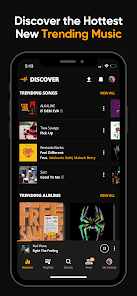


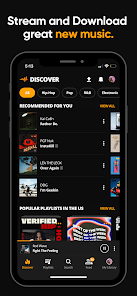


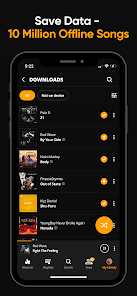
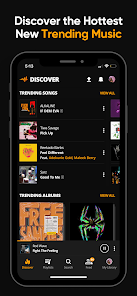


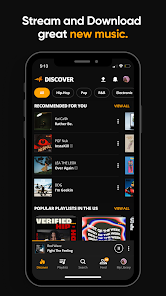
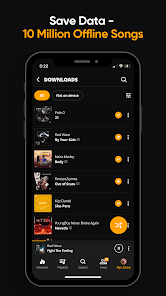
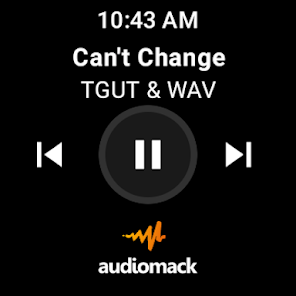
Audiomack: Music Downloader is your ultimate music companion, offering a vast library of tracks across various genres. With a user-friendly interface, you can easily discover, stream, and download your favorite songs for offline listening. Enjoy curated playlists, personalized recommendations, and the latest hits, all while supporting your favorite artists. Whether you're at home or on the go, Audiomack ensures you have access to the music you love, anytime, anywhere.
Advertisement
Features of "Audiomack: Music Downloader"
Audiomack: Music Downloader is a versatile platform designed for music lovers who want to discover, download, and enjoy their favorite tracks. One of its standout features is the ability to stream and download music for offline listening, allowing users to enjoy their playlists without needing an internet connection. The app supports a wide range of genres, from hip-hop and R&B to electronic and reggae, catering to diverse musical tastes.
Another notable feature is the user-friendly interface, which makes navigation seamless and enjoyable. Users can create personalized playlists, follow their favorite artists, and receive recommendations based on their listening habits. Additionally, Audiomack offers a social aspect, enabling users to share their favorite tracks and playlists with friends. The app also includes a trending section, showcasing popular songs and emerging artists, ensuring that users stay updated with the latest music trends.
Furthermore, Audiomack allows users to upload their own music, providing a platform for independent artists to reach a wider audience. The app is free to use, with optional premium features available for those seeking an ad-free experience. Overall, Audiomack: Music Downloader combines functionality and accessibility, making it a go-to choice for music enthusiasts.
How to Use "Audiomack: Music Downloader"
Using Audiomack: Music Downloader is straightforward and user-friendly, making it accessible for everyone. To get started, download the app from the Google Play Store or Apple App Store and install it on your device. Once installed, open the app and create an account or log in using your existing credentials. This will allow you to save your favorite tracks and playlists.
After logging in, you can explore the extensive music library by browsing through various genres, charts, and trending sections. To find specific songs or artists, use the search function at the top of the screen. When you discover a track you want to download, simply click on the download button next to the song. The app will save the track for offline listening, allowing you to enjoy your music anytime, anywhere.
You can also create custom playlists by selecting your favorite songs and organizing them according to your preferences. Additionally, Audiomack allows you to follow artists and receive notifications about new releases. For those who want an ad-free experience, consider upgrading to the premium version. Overall, Audiomack provides a simple yet effective way to enjoy and manage your music collection.
Pros & Cons of the App
Audiomack: Music Downloader comes with several advantages that make it a popular choice among music enthusiasts. One of the primary pros is its extensive library, which includes a wide variety of genres and artists, catering to diverse musical preferences. The ability to download music for offline listening is another significant benefit, allowing users to enjoy their favorite tracks without relying on an internet connection. The app's user-friendly interface enhances the overall experience, making it easy to navigate and discover new music.
However, there are some drawbacks to consider. One of the main cons is the presence of ads in the free version, which can interrupt the listening experience. While the premium version offers an ad-free experience, it comes at a cost, which may not be appealing to all users. Additionally, some users have reported occasional issues with song availability, as not all tracks may be accessible for download. Lastly, while the app supports independent artists, the quality of uploaded music can vary, leading to inconsistencies in the listening experience.
In summary, Audiomack: Music Downloader offers a range of features that make it a valuable tool for music lovers, but potential users should weigh the pros and cons before diving in.
 Google Play
  App Store
 Top Apps





Similar Apps

SiriusXM: Music, Sports & News
Music & Audio

4.6

Pandora - Music & Podcasts
Music & Audio
3.9

BandLab
Music & Audio
4.6

Amazing Slow Downer
Music & Audio
3.7

Amazon Music: Songs & Podcasts
Music & Audio
3.4

Apple Music
Music & Audio
4.6

FL STUDIO MOBILE
Music & Audio
4.0

Koala Sampler
Music & Audio
4.8

MediaMonkey Pro
Music & Audio
4.4

MobileSheets
Music & Audio
4.4

Music Downloader MP3 Download
Music & Audio
4.2

Poweramp Full Version Unlocker
Music & Audio
4.2
Advertisement
Laden…