
 Home
Home  Apps
Apps  Games
Games  About Us
  Cookies & Privacy Policy
  Terms of Service
John GBC Lite
Version: 3.93
Developer: John emulators
 Verified App
 Advertisement
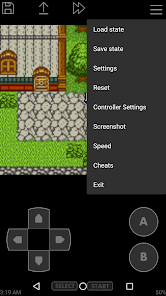
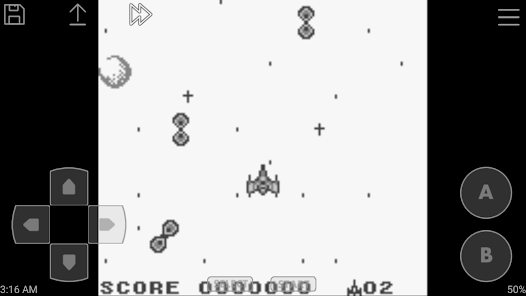
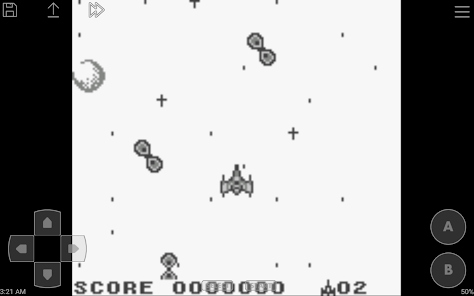
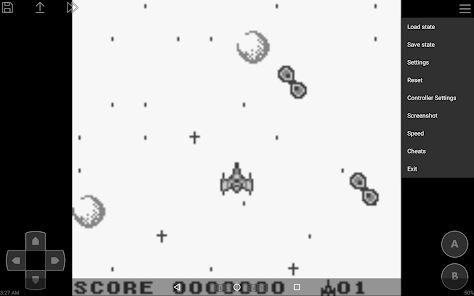
Introducing "John GBC Lite," your ultimate Game Boy Color emulator! Experience classic gaming on the go with enhanced features, including customizable controls, save states, and a user-friendly interface. Play your favorite retro titles with improved graphics and performance, all while enjoying a seamless gaming experience. Whether you're revisiting childhood classics or discovering new gems, John GBC Lite brings nostalgia and excitement to your fingertips. Download now and relive the magic of Game Boy Color gaming!
Advertisement
Features of "John GBC Lite"
"John GBC Lite" is a popular Game Boy Color emulator that allows users to enjoy classic games on their mobile devices. One of its standout features is its user-friendly interface, which makes navigation simple for both seasoned gamers and newcomers alike. The app supports a wide range of Game Boy Color ROMs, ensuring that players can access a vast library of titles from the beloved handheld console.
Another notable feature is the ability to save and load game states, allowing players to pick up right where they left off. This is particularly useful for challenging games that require multiple attempts to complete. Additionally, "John GBC Lite" offers customizable controls, enabling users to adjust the on-screen buttons to their liking for a more comfortable gaming experience. The app also supports cheat codes, enhancing gameplay by allowing users to unlock hidden features or gain advantages in their favorite games.
Furthermore, the emulator provides options for screen scaling and filtering, which can improve the visual quality of the games. Users can also enjoy sound effects and music from the original games, adding to the nostalgic experience. Overall, "John GBC Lite" combines functionality and ease of use, making it a top choice for Game Boy Color enthusiasts.
How to Use "John GBC Lite"
Using "John GBC Lite" is a straightforward process that allows gamers to dive into their favorite Game Boy Color titles quickly. First, users need to download and install the app from a trusted source, ensuring they have the latest version for optimal performance. Once installed, the next step is to load Game Boy Color ROMs onto the device. This can be done by transferring ROM files from a computer or downloading them directly onto the mobile device.
After loading the ROMs, users can open the app and select the desired game from the list. The emulator will automatically configure the settings for the selected game, but users can also customize controls and display options according to their preferences. To start playing, simply tap on the game icon, and the emulator will launch the game. Players can utilize the save and load state features to manage their progress effectively, making it easy to resume gameplay at any time.
Additionally, users can explore the settings menu to adjust audio, visual filters, and control layouts for a more personalized experience. With these simple steps, "John GBC Lite" provides an enjoyable way to relive classic gaming moments on the go.
Pros & Cons of the App
"John GBC Lite" comes with several advantages that make it a favored choice among gamers. One of the primary pros is its extensive compatibility with a wide range of Game Boy Color ROMs, allowing users to access a large library of classic games. The app's intuitive interface enhances user experience, making it easy for anyone to navigate through the features. Additionally, the ability to save and load game states is a significant benefit, as it allows players to manage their gaming sessions conveniently.
However, there are some drawbacks to consider. One of the main cons is that the app may not support all ROMs perfectly, leading to occasional glitches or performance issues with certain games. Furthermore, while the free version offers many features, some advanced functionalities may require a paid upgrade, which could deter users looking for a completely free experience. Lastly, the legality of downloading ROMs can be a concern, as users must ensure they are obtaining games through legitimate means.
In summary, "John GBC Lite" is a powerful emulator with numerous features that enhance the gaming experience, but potential users should weigh the pros and cons before diving in.
Check All Versions  Google Play
  App Store
Google Play App Store Top Apps




Similar Apps

Fairy Rush: Genetic Fusion
Arcade

4.3

Galaxy Attack: Shooting Game
Arcade
4.7

Hoard Master
Arcade
4.0

John GBA
Arcade
3.1

Kungfu Ragdoll
Arcade
4.6
M64Plus FZ Pro Emulator
Arcade
4.9

MD.emu (Genesis Emulator)
Arcade
4

Merge Super - Monster Fight
Arcade
4.6

My Boy! - GBA Emulator
Arcade
3.9

My OldBoy! - GBC Emulator
Arcade
3.9

Pizza Boy A Pro
Arcade
4.8

Pizza Boy C Pro
Arcade
4.5
Advertisement
Laden…