
 Home
Home  Apps
Apps  Games
Games  About Us
  Cookies & Privacy Policy
  Terms of Service
BlueDriver OBD2 Scan Tool
Version: 8.1
Developer: Lemur Vehicle Monitors
 Verified App
 Advertisement

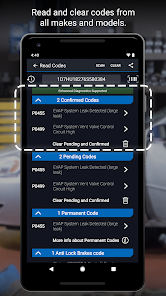
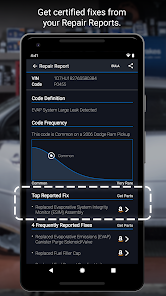
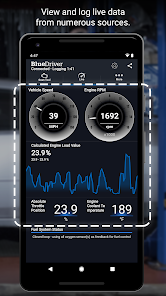
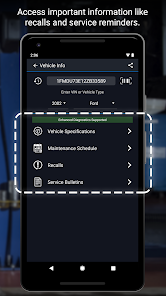
The BlueDriver OBD2 Scan Tool app is a powerful diagnostic tool designed for car enthusiasts and everyday drivers alike. It connects seamlessly with your vehicle's OBD2 system, providing real-time data, diagnostic trouble codes, and repair solutions. With an intuitive interface and comprehensive features, BlueDriver empowers users to understand their vehicle's health, troubleshoot issues, and save on costly repairs. Whether you're a DIY mechanic or just want peace of mind, BlueDriver is your go-to automotive companion.
Advertisement
Features of BlueDriver OBD2 Scan Tool
The BlueDriver OBD2 Scan Tool is a comprehensive diagnostic tool designed for both professional mechanics and DIY enthusiasts. One of its standout features is its ability to read and clear diagnostic trouble codes (DTCs) from various vehicle systems, including the engine, transmission, and ABS. This tool supports both generic and manufacturer-specific codes, providing users with detailed insights into their vehicle's health.
Another notable feature is the live data stream, which allows users to monitor real-time data from their vehicle's sensors. This includes information such as engine RPM, coolant temperature, and fuel trim levels, enabling users to make informed decisions about their vehicle's performance. Additionally, the BlueDriver app offers repair reports that provide suggested fixes and relevant technical service bulletins, making it easier for users to address issues.
Moreover, the BlueDriver OBD2 Scan Tool is Bluetooth-enabled, allowing for wireless connectivity with smartphones and tablets. This feature enhances user convenience, as it eliminates the need for cumbersome cables. The app is compatible with both iOS and Android devices, ensuring broad accessibility for users. Overall, the BlueDriver OBD2 Scan Tool combines advanced diagnostic capabilities with user-friendly features, making it a valuable tool for anyone looking to maintain their vehicle.
How to Use BlueDriver OBD2 Scan Tool
Using the BlueDriver OBD2 Scan Tool is a straightforward process that can be completed in just a few steps. First, ensure that your vehicle is compatible with OBD2 protocols, which most vehicles manufactured after 1996 support. Begin by plugging the BlueDriver OBD2 adapter into the vehicle's OBD2 port, typically located under the dashboard near the steering column.
Next, download the BlueDriver app from the App Store or Google Play Store on your smartphone or tablet. Once the app is installed, enable Bluetooth on your device and pair it with the BlueDriver adapter. After a successful connection, you can launch the app to access various diagnostic features. The app will automatically detect your vehicle and provide options to read trouble codes, view live data, and generate repair reports.
To read trouble codes, simply select the appropriate option in the app, and it will display any existing codes along with their definitions. You can then clear the codes if desired. For live data monitoring, navigate to the live data section, where you can select specific parameters to observe in real-time. The BlueDriver app also allows you to save and share diagnostic reports, making it easy to consult with a mechanic or keep a record of your vehicle's performance.
Pros & Cons of BlueDriver App
The BlueDriver app offers several advantages that make it a popular choice among vehicle owners. One of the primary benefits is its user-friendly interface, which simplifies the diagnostic process for users of all skill levels. The app provides detailed explanations of trouble codes, making it easier for users to understand their vehicle's issues. Additionally, the inclusion of repair reports and suggested fixes adds significant value, as it guides users on how to address problems effectively.
Another advantage is the app's compatibility with a wide range of vehicles, allowing users to diagnose issues across different makes and models. The live data feature is also a significant plus, as it enables real-time monitoring of vehicle performance, which can be crucial for troubleshooting. Furthermore, the wireless Bluetooth connection enhances convenience, eliminating the need for physical cables.
However, there are some drawbacks to consider. One potential downside is that while the app provides extensive information, it may not cover every possible issue, particularly for more complex problems. Additionally, some users may find the initial setup process slightly challenging, especially if they are not tech-savvy. Lastly, while the app is free to download, the BlueDriver adapter itself is a one-time purchase, which may be a consideration for budget-conscious users. Overall, the BlueDriver app is a powerful tool with both strengths and limitations that users should weigh before making a decision.
 Google Play
  App Store
 Top Apps





Similar Apps
Car Launcher Pro
Auto & Vehicles

4.4
inCarDoc Pro | OBD2
Auto & Vehicles
4.3

PayByPhone
Auto & Vehicles
4.9

ParkMobile: Park. Pay. Go.
Auto & Vehicles
4.7

Shell: Fuel, Charge & More
Auto & Vehicles
3.5

Toyota
Auto & Vehicles
4.5

CarMax: Used Cars for Sale
Auto & Vehicles
4.5

AutoZone Auto Parts & Repair
Auto & Vehicles
4.7
Android Auto
Auto & Vehicles
4.1

FIXD OBD2 Scanner
Auto & Vehicles
4.3

Allstate Motor Club
Auto & Vehicles
3.4

CarGurus: Used & New Cars
Auto & Vehicles
4.7
Advertisement
Laden…