Category: Shopping
Developer: Asda Stores Ltd
 Verified App


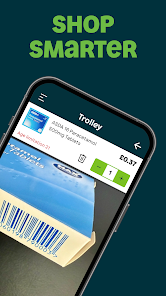
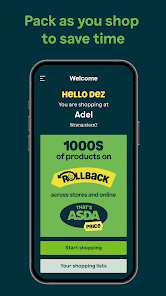
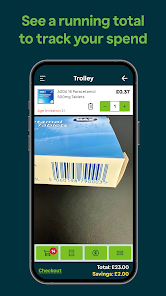
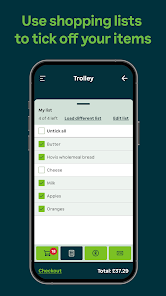
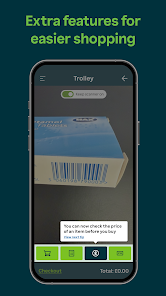
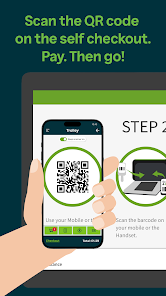
"ASDA Scan & Go" is a convenient shopping solution designed to enhance the customer experience at ASDA stores. One of its primary features is the ability to scan items as you shop, allowing for a seamless checkout process. Customers can use their smartphones or in-store devices to scan barcodes, which helps keep track of spending in real-time. This feature not only saves time but also provides a clear overview of the total cost before reaching the checkout.
Another notable feature is the ability to bag items as you go, which can help streamline the packing process at the end of your shopping trip. The app also offers a user-friendly interface, making it easy for shoppers to navigate through their lists and find products quickly. Additionally, "ASDA Scan & Go" supports various payment methods, including credit and debit cards, ensuring a flexible and secure transaction experience. Furthermore, the app often provides access to exclusive discounts and promotions, enhancing the overall value for customers.
Using "ASDA Scan & Go" is a straightforward process that enhances your shopping experience at ASDA. First, download the ASDA app from your device's app store and create an account if you don't already have one. Once you have the app, you can either choose to use your smartphone or pick up a handheld scanner available in-store. Begin your shopping by scanning the barcodes of the items you wish to purchase as you place them in your cart.
As you scan each item, the app will automatically update your total, allowing you to keep track of your spending. If you have any discounts or promotions, they will be applied at this stage. Once you have finished shopping, proceed to the designated "Scan & Go" checkout area. Here, you can pay directly through the app or at a self-checkout kiosk. After payment, simply show your receipt to the staff, and you’re ready to go. This process not only saves time but also minimizes contact, making it a convenient option for shoppers.
The "ASDA Scan & Go" app offers several advantages that enhance the shopping experience. One of the main pros is the convenience it provides; customers can scan items at their own pace, which can lead to a more relaxed shopping experience. Additionally, the real-time tracking of expenses helps shoppers stay within their budget. The app also reduces waiting times at checkout, making it an efficient option for busy individuals. Furthermore, the ability to bag items as you shop can simplify the packing process.

 Enjoy faster checkout processes with minimal wait times. Easily scan items as you shop for convenience. Track your spending in real-time for better budgeting. Reduce contact with surfaces for a safer shopping experience. Access exclusive deals and offers directly through the app.
 Limited availability at select stores can restrict user access. Potential technical issues may disrupt the shopping experience. Lack of personal interaction may reduce customer engagement and assistance.

I have no idea what has happened to this app. Since the new update I cannot scan most things. Trying to scan Small barcoads are an impossibility. Even decent sized ones it tells you to move your camera closer but then it's blurry and the barcoads cannot be scanned. What's the point in getting rid of most of the manned tills if you can't use the scan and go tills at all? For the love of God, asda tech dept, get this sorted 🤦
I didn't think they could make the app any worse than it was, but they've excelled themselves. The new update, Feb '26, is painful. If want to see how it should be done, just look to the Sainsbury's app, scan button, opens, scans, closes, no fiddling to get the barcode in focus and the right size. The Sainsbury's one also integrates their reward system.
I used to love this app. since the upgrade, I hate it. no idea why the menu options have changed - what was the point? I can see the price on the shelf, I just want to scan the item and go. it takes longer now. today every time I scanned an item, it re-added the previous item before it would let me scan. added more time to my shop whilst I deleted.
Would be better if integrated with website account; make a list online, have it visible when shopping and items tick off as you scan them. Would be better if I didn't have to separately scan my Asda Rewards at the till. You have my details, it should be registered as soon as I scan the Scan and Go app at the till to transfer my items.
Worst super market app! Ever since the update this app is terrible and does not scan properly. it takes multiple attempts to scan an item because it says move closer but doesn't focus the camera lens. used to work reasonably well. Quite clearly was not tested before rolling out which shows terrible QA in place. It wouldn't be so bad if this didn't trigger a check when you go to pay and then an authorisation even when you dont have age restricted products. Not to mention it looks so childish now.
Review Source: Google Play store public user reviews.
Yes, users can submit suggestions or feedback through the app or by contacting ASDA customer service to help improve the app's features and functionality.
Yes, ASDA Scan & Go collects personal data to enhance user experience, process transactions, and improve services, but it complies with data protection regulations.
The app requires an internet connection for most features, but some basic functionalities may be accessible offline, such as viewing your shopping list.
Since there is no subscription fee associated with ASDA Scan & Go, there is no need for a cancellation process. Users can simply uninstall the app if they choose not to use it anymore.
Currently, there is no subscription fee for using ASDA Scan & Go; it is free for all users.
Unfortunately, customer numbers cannot be updated directly in the app; please contact customer service for modifications.
Yes, customer service can assist you with any issues regarding account activation; just provide your details when you contact them.
You can reach customer service by calling the number on your receipt or visiting the ASDA website for support options.
You can find your customer number in the account settings section of the ASDA app under 'Profile Information'.
Open the app, tap on 'Log in', and enter your registered email and password to access your account.
This update includes bug fixes and general improvements.
















 Google Play
  App Store