
 Home
Home  Apps
Apps  Games
Games  About Us
  Cookies & Privacy Policy
  Terms of Service
Amazon Kindle
Version: 8.130.0.100(2.0.52709.0)
Developer: Amazon Mobile LLC
 Verified App
 Advertisement
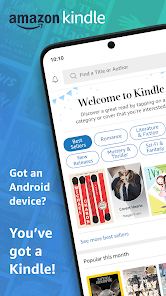
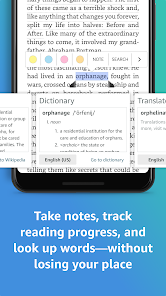
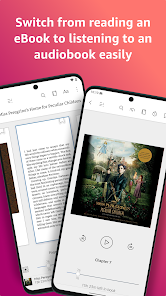
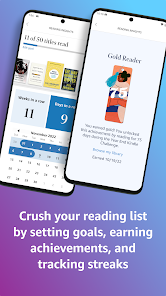
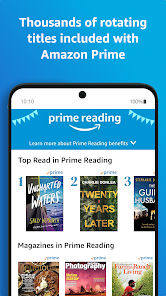
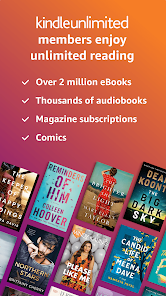
The Amazon Kindle app brings the joy of reading to your fingertips, allowing you to access millions of books, magazines, and newspapers anytime, anywhere. With features like adjustable font sizes, customizable backgrounds, and built-in dictionaries, it enhances your reading experience. Sync your library across devices, highlight passages, and take notes effortlessly. Whether you're a casual reader or a book enthusiast, the Kindle app transforms your device into a personal library, making reading more accessible and enjoyable than ever.
Advertisement
Features of Amazon Kindle
The Amazon Kindle is a popular e-reader that offers a range of features designed to enhance the reading experience. One of its standout features is the E Ink display, which mimics the appearance of paper and reduces glare, making it easy to read in various lighting conditions. The Kindle is lightweight and portable, allowing users to carry thousands of books in a single device, making it ideal for travel and commuting.
Another notable feature is the adjustable front light, which enables users to read comfortably in both bright and dim environments. The Kindle also supports various formats, including Kindle books, PDFs, and more, providing flexibility in reading materials. Additionally, it offers built-in dictionaries, Wikipedia access, and the ability to highlight text and take notes, enhancing the learning experience.
With features like Whispersync, users can sync their reading progress across devices, ensuring they can pick up where they left off. The Kindle Store provides access to millions of titles, including bestsellers and exclusive content. Furthermore, the device has a long battery life, often lasting weeks on a single charge, making it a reliable companion for avid readers.
How to Use Amazon Kindle
Using an Amazon Kindle is straightforward and user-friendly, making it accessible for readers of all ages. To get started, first, charge your Kindle using the provided USB cable. Once charged, power on the device and connect it to Wi-Fi. You can then sign in to your Amazon account or create a new one if you don’t have one already.
After setting up your account, you can browse the Kindle Store directly from your device. Search for books by title, author, or genre, and purchase or download free titles. Once you’ve acquired books, they will appear in your library, ready for reading. Simply tap on a book cover to open it, and use the touchscreen to navigate through the pages.
To enhance your reading experience, you can adjust the font size, background color, and brightness settings according to your preference. Utilize features like highlighting, note-taking, and the built-in dictionary to engage more deeply with the text. When finished, simply return to your library or power off the device to save battery life. Regularly syncing your Kindle ensures you have the latest updates and access to your purchased content.
Pros & Cons of the App
The Amazon Kindle app offers several advantages that make it a popular choice among readers. One of the primary benefits is its accessibility; the app is available on multiple platforms, including iOS, Android, and desktop, allowing users to read on their preferred devices. The app syncs seamlessly with Kindle e-readers, enabling users to pick up where they left off, regardless of the device used.
Additionally, the Kindle app provides access to a vast library of e-books, magazines, and audiobooks, often at competitive prices. Users can customize their reading experience with adjustable font sizes, background colors, and brightness settings. The app also includes features like highlighting, note-taking, and dictionary access, enhancing the overall reading experience.
However, there are some drawbacks to consider. The app may consume more battery life on mobile devices compared to dedicated e-readers, especially when using features like the backlight. Furthermore, reading on a tablet or smartphone can be less comfortable for extended periods due to screen glare and eye strain. Lastly, while the app is free, some content may require purchase, which could be a downside for budget-conscious readers.
 Google Play
  App Store
 Top Apps





Similar Apps

Wikipedia
Books & Reference

4.4

YouVersion Bible App + Audio
Books & Reference
4.9

Ancestry: Family History & DNA
Books & Reference
4.6
Bible Home - Daily Bible Study
Books & Reference
4.8
Bible Offline-KJV Holy Bible
Books & Reference
4.8

JoyRead
Books & Reference
4.1
King James Bible - Verse+Audio
Books & Reference
4.8

Libby, the Library App
Books & Reference
4.8
Moon+ Reader Pro
Books & Reference
4.2

Radish Fiction
Books & Reference
4.4

Wattpad - Read & Write Stories
Books & Reference
3.9

WebNovel
Books & Reference
4.1
Advertisement
Laden…