
 Home
Home  Apps
Apps  Games
Games  About Us
  Cookies & Privacy Policy
  Terms of Service
The Roku App (Official)
Version: 11.0.1.3896471
Developer: Roku, Inc. & its affiliates
 Verified App
 Advertisement
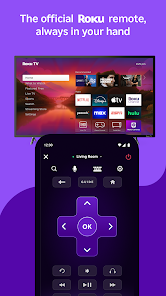
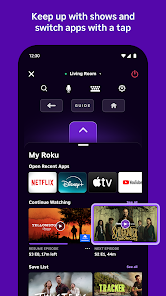
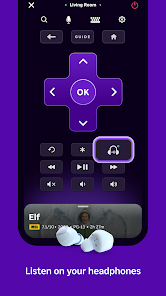
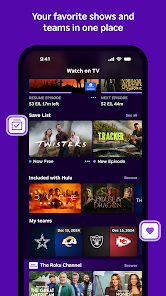
The Roku App (Official) enhances your streaming experience by allowing you to control your Roku device directly from your smartphone. With features like voice search, private listening, and access to thousands of channels, you can easily browse and manage your favorite content. The app also enables you to cast photos and videos to your TV, making it a versatile companion for all your entertainment needs. Enjoy seamless streaming and control at your fingertips!
Advertisement
Features of "The Roku App (Official)"
The Roku App (Official) offers a variety of features designed to enhance your streaming experience. One of its primary functions is the ability to control your Roku device directly from your smartphone or tablet. This includes using your device as a remote control, which is particularly useful if you misplace the physical remote. The app also provides a convenient way to browse and search for content across various streaming channels, making it easier to find your favorite shows and movies.
Another notable feature is the ability to cast content from your mobile device to your Roku TV. This allows you to share photos, videos, and music seamlessly. Additionally, the app includes a voice search function, enabling users to find content quickly by simply speaking into their device. The app also supports private listening, allowing you to connect headphones to your mobile device for a more personal viewing experience without disturbing others in the room. Overall, the Roku App enhances the functionality of your Roku device and makes streaming more accessible and enjoyable.
How to Use "The Roku App (Official)"
Using "The Roku App (Official)" is straightforward and user-friendly. First, download the app from the App Store or Google Play Store and install it on your smartphone or tablet. Once installed, ensure that your mobile device and Roku device are connected to the same Wi-Fi network. Open the app, and it will automatically detect your Roku device. Select your device to establish a connection.
After connecting, you can use the app as a remote control, navigating through menus and selecting content with ease. To search for shows or movies, utilize the search bar or voice search feature. If you want to cast content from your mobile device, simply select the casting option and choose the media you wish to share. For private listening, connect your headphones to your mobile device and enable the private listening feature in the app settings. With these simple steps, you can maximize your Roku streaming experience.
Pros & Cons of the App
The Roku App (Official) comes with several advantages that enhance its usability. One of the main pros is its convenience; having a remote control on your smartphone means you can easily navigate your Roku device without needing the physical remote. The app's ability to search for content across multiple platforms simplifies the process of finding what to watch. Additionally, features like private listening and casting make it versatile for different viewing preferences.
However, there are some drawbacks to consider. Some users report occasional connectivity issues, which can be frustrating when trying to control the Roku device. The app may also drain your mobile device's battery more quickly, especially when using features like private listening. Furthermore, while the app is generally user-friendly, some users may find the interface less intuitive compared to traditional remotes. Balancing these pros and cons can help users determine if the Roku App is the right choice for their streaming needs.
 Google Play
  App Store
 Top Apps





Similar Apps

PlutoTV: Live TV & Free Movies
Entertainment

3.7
Peacock TV: Stream TV & Movies
Entertainment
4.7

Prime Video
Entertainment
4.0

Hulu: Stream TV shows & movies
Entertainment
4.5

Bitmoji
Entertainment
4.5

AMC+
Entertainment
2.5

Akinator
Entertainment
4.6

Amazon Freevee: Free Movies/TV
Entertainment
4

CBS
Entertainment
3.8
Call Mirabel Encanto Fake Chat
Entertainment
4.5

Crunchyroll: Anime Streaming
Entertainment
4.7

D&D Beyond
Entertainment
4.6
Advertisement
Laden…