Version: 6.5.11
Developer: joaomgcd
 Verified App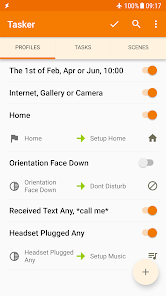
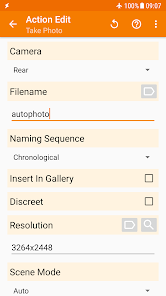
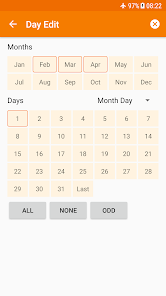
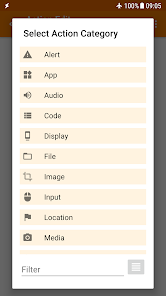
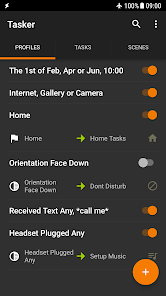
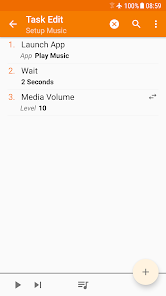
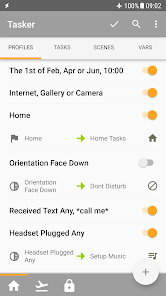
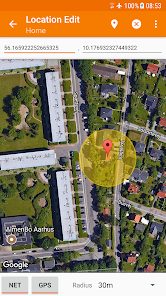
Tasker is a powerful automation app for Android that allows users to create custom tasks and automate various functions on their devices. One of its standout features is the ability to trigger actions based on specific contexts, such as location, time, or event. This means you can set your phone to perform certain actions when you arrive at work or when the clock strikes a specific hour.
Another notable feature is the extensive range of actions that can be automated. Tasker can control settings like Wi-Fi, Bluetooth, and screen brightness, as well as launch apps, send messages, and even interact with third-party applications. The app also supports plugins, which expand its capabilities even further, allowing for integration with other services and apps.
Tasker’s user interface, while initially daunting, offers a robust environment for creating complex automation scripts. Users can create profiles that define the conditions under which tasks are executed, making it highly customizable. Additionally, Tasker supports variables and loops, enabling users to create intricate workflows that can adapt to various scenarios.
Using Tasker begins with downloading and installing the app from the Google Play Store. Once installed, you can start by creating a new profile, which serves as the trigger for your automation. To do this, tap on the "+" icon and select a context, such as "Time," "Location," or "Event." For example, if you want your phone to switch to silent mode during a specific time, you would set the time context accordingly.
After defining the context, you will need to create a task that corresponds to that trigger. This involves selecting the actions you want to automate, such as changing settings or launching an app. You can add multiple actions to a single task, allowing for complex automation sequences. Once your profile and task are set up, Tasker will automatically execute the defined actions whenever the specified conditions are met.
To further enhance your automation, explore the use of variables and plugins. Variables can store information that can be used later in your tasks, while plugins can add additional functionality. As you become more familiar with Tasker, you can experiment with more advanced features, creating a personalized automation experience tailored to your needs.
Tasker is widely regarded as one of the most powerful automation tools available for Android, and it comes with several advantages. One of the primary pros is its flexibility; users can create highly customized automation scripts that cater to their specific needs. The app supports a wide range of triggers and actions, making it suitable for various use cases, from simple tasks like silencing your phone at night to complex workflows involving multiple apps and settings.
However, Tasker is not without its drawbacks. The learning curve can be steep for new users, as the interface and functionality may seem overwhelming at first. Additionally, while the app is incredibly powerful, it may require a significant investment of time to set up and fine-tune automations effectively. Some users may find that the complexity outweighs the benefits, especially if they only need basic automation features.
Moreover, Tasker’s reliance on Android’s permissions can sometimes lead to issues with functionality, particularly with newer Android versions that impose stricter privacy controls. Despite these cons, many users find that the benefits of Tasker far outweigh the challenges, making it a valuable tool for those looking to enhance their Android experience through automation.

 Tasker automates repetitive tasks effortlessly, saving you time and effort. It allows for deep customization, tailoring functions to your specific needs. Tasker supports a wide range of apps, enhancing your device's functionality. You can control device settings based on context, improving efficiency and convenience. It enables complex workflows, streamlining processes and boosting productivity.
 Steep learning curve for beginners can be intimidating and time-consuming. Limited support and documentation may hinder troubleshooting and advanced usage. Complex tasks can lead to performance issues on older devices or apps.
  Google Play
  App Store
 Yes, users can submit suggestions or feedback through the official Tasker forums or support channels, where developers actively engage with the community.
Tasker does not collect personal data from users. However, certain features may require permissions that access device data, which users can manage in the app settings.
Yes, Tasker can operate offline, allowing users to run automated tasks without an active internet connection.
Since Tasker is a one-time purchase app, there is no subscription to cancel; users retain access to the app after purchase without ongoing fees.
Tasker is available for a one-time purchase, rather than a subscription model, and the price may vary based on the app store and region.
Yes, you can recover your account by using the "Forgot Password" option on the login page.
You can reach customer service through the support section on our website or by calling the customer service number listed in your account details.
To activate your account, check your email for an activation link and follow the instructions provided.
To log in, visit the Tasker website or app, enter your email and password, then click the login button.
If you’re having trouble activating your account, check your email for the activation link or contact customer service for assistance.