Category: Tools
Developer: Xenom Apps
 Verified App


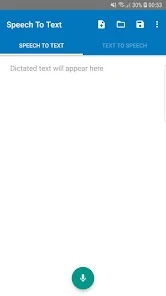
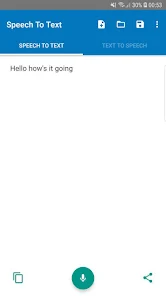
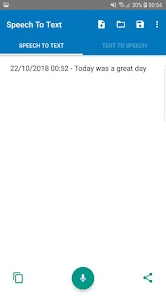
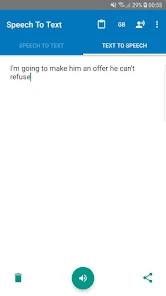
Speech to Text technology, also known as automatic speech recognition (ASR), offers a range of features that enhance user experience and accessibility. One of the primary features is real-time transcription, which allows users to convert spoken words into written text instantly. This is particularly useful in various settings, such as meetings, lectures, and interviews, where capturing spoken content accurately is essential.
Another significant feature is language support, as many speech-to-text applications can recognize multiple languages and dialects, making them versatile for global users. Additionally, these applications often include punctuation and formatting capabilities, which help in producing coherent and readable text. Voice command functionality is also a notable feature, enabling users to control devices or applications hands-free, enhancing convenience and efficiency.
Moreover, many speech-to-text systems incorporate machine learning algorithms that improve accuracy over time by adapting to individual speech patterns and accents. Integration with other software and platforms, such as word processors and email clients, further extends the utility of speech-to-text technology, making it a valuable tool for both personal and professional use.
Using Speech to Text technology is a straightforward process that can significantly enhance productivity. First, ensure that you have a compatible device, such as a smartphone, tablet, or computer, equipped with a microphone. Most modern devices come with built-in microphones, but external microphones can improve accuracy and clarity.
To begin, open a speech-to-text application or enable the feature in your device's settings. For instance, on smartphones, you can often find this feature in the keyboard settings or as a standalone app. Once activated, simply tap the microphone icon and start speaking clearly and at a moderate pace. The application will transcribe your speech into text in real-time.
After dictating your content, review the transcribed text for any errors or inaccuracies, as no system is perfect. You can then edit the text as needed before saving or sharing it. Many applications also allow you to add punctuation and formatting through voice commands, making the process even more efficient. With practice, users can become adept at utilizing speech-to-text technology for various tasks, from note-taking to drafting emails.
Speech to Text applications come with several advantages that make them appealing to users. One of the primary benefits is increased efficiency; users can dictate text much faster than they can type, which is particularly useful for those who need to produce large volumes of written content quickly. Additionally, these apps enhance accessibility for individuals with disabilities or those who struggle with traditional typing methods, allowing them to communicate more effectively.
However, there are also some drawbacks to consider. One significant con is the potential for inaccuracies in transcription, especially in noisy environments or with strong accents, which can lead to misunderstandings or errors in the final text. Furthermore, reliance on speech-to-text technology may reduce traditional writing skills over time, as users become accustomed to dictating rather than writing. Privacy concerns also arise, as some applications may store voice data for improvement purposes, leading to potential data security issues.
In summary, while Speech to Text apps offer numerous benefits, including efficiency and accessibility, users should be aware of their limitations and potential privacy concerns. Balancing the use of these technologies with traditional writing methods can help mitigate some of the drawbacks while maximizing the advantages.
```
 Enhances productivity by quickly converting spoken words into written text. Improves accessibility for individuals with hearing impairments or disabilities. Facilitates note-taking during meetings and lectures, capturing key points effortlessly. Supports multitasking, allowing users to dictate while performing other tasks. Enables efficient documentation, reducing time spent on manual typing and editing.
 Accuracy can be compromised with background noise and accents. Limited support for specialized vocabulary and jargon. Requires a stable internet connection for optimal performance.
  Google Play
  App Store

tries and is great for free with no bad ad expeirence or anything. but it just is not good at hearing well. even saying the words slowly and reiterated time after time it cannot get them right. maybe 50 to 75% accuracy with no option at all to input punctuation makes it more of a waste of time. i could have just typed faster than it took to hear, incorrectly translate, then edit and then go thru trying to imagine the correct punctuation. really tedious. other apps do it better.
I downloaded this app yesterday, 12/29/19. So far, it has only made tiny mistakes while I've been writing out messages. Occasionally, it will put in a different word that sounds like the word that I said. The app I had before, from Google, was absolutely horrible. It would put in a string of words that I hadn't even said and was constantly putting in different words than I had said. I had to proofread every single message before sending it.
I am not a bought and I'm not a shill. I just downloaded this and tested it it's pretty incredible you don't have to touch anything it automatically record to transfer tribes in real-time and the amazing thing is so far no typos no mistakes. So far I highly recommend this app and I don't know why the rating is low. Should be much higher.
App is garbage. Would not create text from voice no matter what we did or how we fiddled with the settings and app permissions. After weeks, uninstalled and reinstalled, but this time it will not record anything....the record function simply won't start, or shuts down within a second. No settings seem to make it work any better. Total junk.
Good application and I have a feature request. It would be really nice if there was a closed caption mode so I could put the phone down and have the last sentence I spoke displayed in really large characters and then erased after a certain amount of time has passed. Then we could use our phones as subtitlers for talking to people who cannot hear well. That would be totally awesome! But still a very good application all around!
Review Source: Google Play store public user reviews.
Yes, users can submit suggestions or feedback directly through the app or via the official website, helping to improve future updates and features.
Speech To Text may collect personal data to improve user experience, but the app is designed to prioritize user privacy and security. Always check the privacy policy for specific details.
Yes, Speech To Text offers offline functionality, allowing users to transcribe speech without needing an internet connection, depending on the device settings.
To cancel your Speech To Text subscription, go to your account settings within the app or through your app store account settings, and follow the cancellation process.
Subscription costs for Speech To Text vary based on the plan selected, with options for monthly or annual payments. Check the app for the most current pricing information.
No, you need a customer number to activate your account. If you need help, please contact customer service.
Always log out after use, use a strong password, and enable two-factor authentication if available. Contact customer service if you need more help.
To log in, visit the website and enter your customer number and password. Click "Log In" to access your account.
You can reach customer service via email or phone. Check the website for the contact details.
After logging in, go to your account settings. You can update your information there.
* Instant dictations!* Offline Support * Customise font size* Auto save changes to open note when exiting app* Show warning when about to discard unsaved changes* Support more TTS languages* Revamp Settings UI* Improve theming for newer versions of Android* Fix repeated dictations bug* Fix settings activity back button bug* Lots of small bugfixes (including sharing TTS audio bug)