Category: Lifestyle
Developer: Leviton Manufacturing Co., Inc.
 Verified App


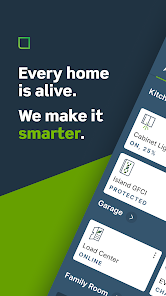
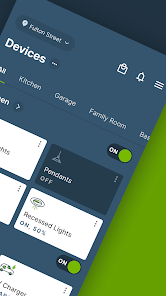
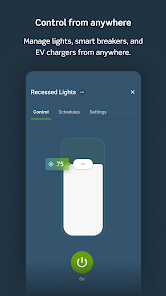
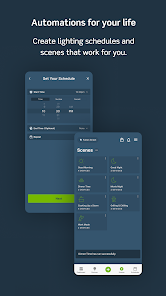
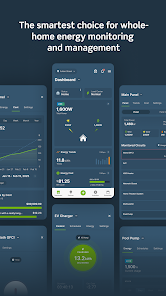
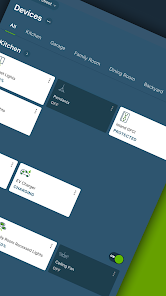
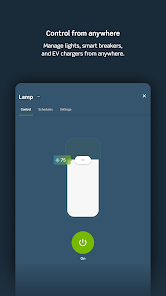
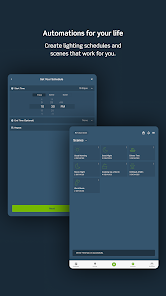
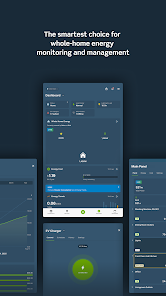
"My Leviton" is a user-friendly app designed to enhance the functionality of Leviton smart devices. One of its standout features is the ability to control lighting and electrical devices remotely, allowing users to turn lights on or off from anywhere using their smartphones. The app also supports scheduling, enabling users to set specific times for devices to operate, which can help save energy and improve convenience.
Another notable feature is the integration with voice assistants like Amazon Alexa and Google Assistant, allowing for hands-free control of devices. Users can create custom scenes that adjust multiple devices simultaneously, providing a tailored experience for different activities or moods. Additionally, the app offers real-time energy monitoring, giving users insights into their energy consumption and helping them make informed decisions about their usage. Overall, "My Leviton" combines convenience, control, and energy efficiency in a single platform.
Using "My Leviton" is straightforward and intuitive. First, download the app from the App Store or Google Play and create an account. Once registered, you can add your Leviton devices by following the in-app instructions, which typically involve connecting the devices to your Wi-Fi network. After successfully adding your devices, you can start controlling them directly from the app.
To set up schedules, navigate to the scheduling feature within the app, select the device you want to schedule, and choose the desired times for it to turn on or off. For voice control, link your account to your preferred voice assistant by following the prompts in the app. You can also create custom scenes by selecting multiple devices and setting their desired states. With these simple steps, you can fully utilize the capabilities of "My Leviton" to enhance your smart home experience.
The "My Leviton" app offers several advantages that make it a valuable tool for smart home management. One of the primary pros is its user-friendly interface, which makes it easy for users of all tech levels to navigate and control their devices. The app's compatibility with various voice assistants adds a layer of convenience, allowing for hands-free operation. Additionally, the energy monitoring feature helps users track their consumption, promoting energy efficiency and cost savings.
However, there are some drawbacks to consider. Some users have reported occasional connectivity issues, which can hinder the app's performance. Additionally, while the app supports a range of devices, it may not be compatible with all smart home products, limiting its versatility. Lastly, the reliance on Wi-Fi means that users may experience disruptions if their internet connection is unstable. Weighing these pros and cons can help potential users decide if "My Leviton" is the right choice for their smart home needs.

 Control your home lighting from anywhere with ease. Enjoy customizable schedules for optimal energy savings. Seamlessly integrate with smart home devices for enhanced convenience. Receive real-time notifications for added security and peace of mind. Effortlessly manage multiple locations from a single app interface.
 Limited compatibility with non-Leviton smart devices can restrict functionality. The app interface may be confusing for some users, leading to frustration. Occasional connectivity issues can disrupt automation and control experiences.
Simple and effective. I now have 3 outlets with lamps hooked up to wireless switches, looking forward to adding more. I can just use the wall mounted switches, or use the app to remotely turn on or off any lights. Installation and programming were super simple. Setting sunrise/sunset or time based schedules is straightforward, and the apps features are plenty for your average person.

If I could give this app 0 stars, I would. It has locked me out, even with the correct pw. When I attempt to reset it, it doesn't send an email link, nor does their website allow you to contact support. You can type in a message to them, but it doesn't send. Think I'll be throwing their smart plugs in the trash. Why on earth would you need a password anyways? 😡
It's great to be able to control lights. I wish it was quicker to start up. Would be nice to have widget so could go quickly straight to light that is on. Also should be able to set voice dimmer to dim to min quickly from the switch instead of having to hold the down button for several seconds. Edit:back to 2 stars. This is the slowest booting of all of my IOT apps which makes it not very useful as an on demand light switch. Please add a simple widget or something to quickly switch lights.
So far, no issues, and much better than earlier versions. Well laid out and easy enough to program light schedules. It will integrate Google Assistant, I generally just use the Leviton app. NOTE: we have had many power outages this summer (welcome to California!), and two of my older Leviton switches stopped working. I tried everything and couldn't get them back, until I called customer support, which put me through promptly and solved the issue in less than ten minutes. I'm very happy.
update won't let new devices connect. I've talked with tech support and told them it's their update. he put me on hold for more than 20 minutes only after telling me to reset my breakers and every runaround thing he could imagine. i go to connect to the device and it asks for a sign in. app CLEARLY says to disregard signing in and go back into the app to hit continue. WHICH NEVER SHOWS UP! I grabbed an old phone with the previous version of the app and was able to install the new device. DONE.
Review Source: Google Play store public user reviews.
Yes, users can submit suggestions or feedback directly through the app or by contacting customer support.
Yes, My Leviton may collect personal data to enhance user experience and functionality, but it adheres to privacy regulations.
No, My Leviton requires an internet connection to access and control your devices effectively.
You can cancel your subscription through the account settings in the app or by contacting customer support for assistance.
Subscription costs for My Leviton vary depending on the specific features and services you choose, so it's best to check within the app for current pricing.
Yes, you can change your email by logging into your account settings. If you need help, feel free to contact customer service.
Customer numbers are unique and cannot be changed. If you have concerns, please contact customer service for help.
You can check your account status by logging into your My Leviton account or contacting customer service for detailed information.
You can contact My Leviton customer service through the support section of our website or by calling our dedicated support number.
To activate your account, check your email for an activation link and follow the instructions provided. If you didn't receive it, please reach out to customer service.
Miscellaneous Fixes and UX Improvements The My Leviton app is always getting better and easier! Use the feedback form to provide your thoughts to our app and cloud team.









 Google Play
  App Store