
Category: Tools
Developer: tytydraco
 Verified App


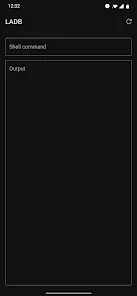
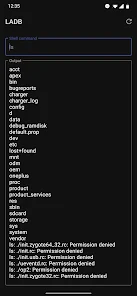
"LADB — Local ADB Shell" is a powerful application designed for Android users who want to access the Android Debug Bridge (ADB) directly from their devices. One of its standout features is the ability to execute ADB commands without needing a computer, making it incredibly convenient for developers and advanced users. The app provides a user-friendly interface that simplifies the process of running commands, allowing users to interact with their device's system settings and files easily.
Another notable feature is the support for root access, which enables users to perform advanced operations that are typically restricted on non-rooted devices. LADB also includes a built-in terminal emulator, allowing users to view command outputs in real-time. Additionally, the app supports various ADB commands, including those for installing and uninstalling applications, managing device settings, and accessing system logs. Overall, LADB is an essential tool for anyone looking to harness the full potential of their Android device through ADB.
Using "LADB — Local ADB Shell" is straightforward and user-friendly, even for those who may not be familiar with ADB commands. First, download and install the app from the Google Play Store. Once installed, open the app, and you will be greeted with a terminal interface. Before executing any commands, ensure that your device has USB debugging enabled in the Developer Options menu.
To run a command, simply type it into the terminal and press enter. The app will execute the command and display the output directly within the interface. You can use various ADB commands to perform tasks such as installing apps, modifying system settings, or accessing device logs. For users with root access, additional commands can be executed to gain deeper control over the device. Overall, LADB makes it easy to utilize ADB functionalities directly from your Android device without the need for a computer.
"LADB — Local ADB Shell" offers several advantages that make it a valuable tool for Android users. One of the primary benefits is its convenience; users can execute ADB commands directly from their devices without needing a computer. This feature is particularly useful for developers and tech enthusiasts who frequently need to test and debug applications. Additionally, the app supports root access, allowing for advanced operations that can enhance device performance and customization.
However, there are some drawbacks to consider. The app may not be suitable for novice users who are unfamiliar with ADB commands, as incorrect usage can lead to unintended consequences. Furthermore, while the app is powerful, it may not support all ADB commands, limiting its functionality in certain scenarios. Lastly, users must ensure that their devices are rooted to access the full range of features, which may not be feasible for everyone. Overall, while LADB is a robust tool, it is essential to weigh its pros and cons based on individual needs and expertise.

 LADB offers a user-friendly interface for easier ADB access. It allows file management directly on your device. Enjoy seamless execution of ADB commands without a computer. LADB supports various devices, enhancing versatility for users. Experience increased productivity with quick command execution and multitasking.
 Limited support for complex commands can hinder advanced users' capabilities. Compatibility issues with certain devices may restrict functionality. Learning curve for beginners can discourage new users from utilizing the tool.
  Google Play
  App Store
Wanted to change casting permissions so I didn't need to constantly approve a screen recorder every time I tabbed out, and frankly I didn't feel like dealing with my PC right now. Very clever tool if you're on Android 11+ (as you need wireless debugging), worked great for me. A word of advice: if you TAB OUT of settings to input the pairing code and port number, it WILL NOT work. Settings NEEDS to be open in the foreground to link (or you get "dead shell" loop). Use split-screen and it'll work.

Doesn't always work. I have this app installed on a few devices. On all devices, it takes a few attempts to get it the app to connect and be able to use the app. On one device, it will connect for a few seconds and disconnect. Making me unable to remove any other app. When I used this app on the devices worked eventually, it worked well to be able to remove bloatware. Would be nice to consistently work.
June 20 update broke the app. No longer connects! Sadly, whereas others had claimed the previous iteration "doesn't work with newer phones," I have been running the newest version of Android, and, while there were rare times the app wouldn't connect, truth is that all that was ever required was a restart of the app or the phone and problem solved. A slight inconvenience, yes but infinitely preferable to the abject failure of this newest update, which doesn't connect at all!
It was a bit hard to use but then again this is not an app for your average Android user. I had to set USB debugging on and always allow wireless debugging on my Wi-Fi connection to get this working in a stable manner. Wanted to disable opening of links in a certain app as my phone OnePlus 9 Pro would not let me. Once I also figured out to enter commands WITHOUT the 'adb shell' part it worked a charm! thank you for this useful app.
Very bad app and hard to control. hard to use, connect or switch between devices or connections. always start with a loop and now visual way to get the hell out of it. The interface is totally useless. termux is a million times easier and more efficient. this app seem to be designed only for wireless debugging, nothing else.
Review Source: Google Play store public user reviews.
LADB is designed with user privacy in mind and does not collect personal data. However, users should review the privacy policy for more details on data handling practices.
Yes, LADB offers a free version with limited features, allowing users to explore the app before deciding to upgrade to the full version.
No, LADB does not require an internet connection to function, as it operates locally on your device. However, an internet connection may be needed for certain features like updates or accessing documentation.
Users can contact support or send feedback through the app's settings menu, where they will usually find options for support requests or links to the developer's website.
Since LADB does not operate on a subscription basis, users can manage their purchase through the app store where it was downloaded, typically by uninstalling the app or checking their purchase history.
Yes, you can log in to your LADB account from multiple devices using your customer number and password.
To activate your account, follow the link in your activation email and complete the required steps. If you need help, reach out to customer service.
Customer numbers cannot be changed. If you need assistance, contact customer service for further options.
To log in, enter your customer number and password on the login page, then click 'Sign In.' Make sure your credentials are correct.
After activating, log in to your account to verify your details. If you encounter issues, reach out to customer service.
- Automatically disable mobile_data_always_on if enabled (thanks to a support email!)- Warn if mobile_data_always_on is enabled