
Version: 6.7.0
Developer: Crazy Maple Studio Dev
 Verified App





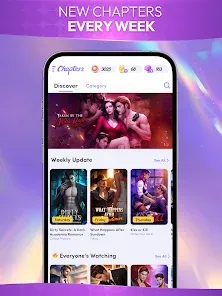



"Chapters: Interactive Stories" is a unique mobile application that allows users to immerse themselves in a variety of interactive narratives. One of its standout features is the extensive library of stories across multiple genres, including romance, fantasy, and drama. Users can choose from a wide range of plots and characters, ensuring that there is something for everyone. The app also offers a personalized experience, allowing players to make choices that influence the storyline and character development, creating a sense of agency in the narrative.
Another notable feature is the ability to customize characters, enabling users to select their appearance and style, which enhances engagement with the story. The app includes regular updates with new chapters and stories, keeping the content fresh and exciting. Additionally, "Chapters" incorporates a social aspect, allowing users to share their favorite stories and choices with friends. The visually appealing graphics and sound effects further enhance the storytelling experience, making it not just a reading app but an interactive adventure.
Using "Chapters: Interactive Stories" is straightforward and user-friendly. After downloading the app from your device's app store, you can create an account or log in as a guest. Once inside, you will be greeted with a diverse selection of stories categorized by genre. You can browse through the titles and read the descriptions to find a story that piques your interest.
After selecting a story, you will be guided through the narrative, where you will encounter various choices that affect the plot's direction. Simply tap on your preferred option to see how it influences the story. As you progress, you can unlock new chapters and explore different endings based on your decisions. The app also allows you to save your progress, so you can return to your story at any time. Additionally, you can customize your character and interact with other users, enhancing the overall experience.
"Chapters: Interactive Stories" offers several advantages that make it appealing to users. One of the primary benefits is the vast array of stories available, catering to diverse tastes and preferences. The interactive nature of the app allows for a personalized experience, as users can make choices that shape the narrative. The graphics and sound design contribute to an immersive storytelling experience, making it enjoyable for readers. Furthermore, the app is regularly updated with new content, ensuring that users always have fresh material to explore.
However, there are some drawbacks to consider. One significant con is the presence of in-app purchases, which can be necessary to unlock certain features or chapters, potentially limiting access for some users. Additionally, while the app provides a variety of stories, the quality can vary, with some narratives feeling less engaging than others. Lastly, the reliance on choices can sometimes lead to frustration if users feel their decisions do not significantly impact the outcome. Balancing these pros and cons is essential for users to determine if the app aligns with their preferences.
 Google Play
  App Store
 Spotify Wrapped is an annual feature that summarizes your listening habits, including your most-played songs and artists of the year.
To create a playlist, click "Your Library," then "Playlists," and select "Create Playlist." Add songs by searching or browsing.
Yes, with a Spotify Premium subscription, you can download songs and playlists for offline listening.
Spotify offers a free tier with ads, as well as a Premium subscription that removes ads and adds features.
Click the three dots next to the song, select "Share," and choose your preferred sharing method, like social media or a link.